
 Need help?
Do you have a question about the BlueTees Ringer and is the answer not in the manual?
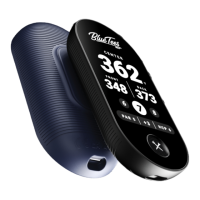
Device features a responsive touch interface for navigation and control.
Provides accurate yardage to front, center, and back of the green.
Automatically detects and selects the golf course being played.
Offers detailed scoring options including fairways and greens in regulation.
Visualizes green shape and pin placement for precise yardage.
Displays distances to up to four key hazards on each hole.
Records the distance of each shot taken during a round.
Features a strong magnetic strip for convenient attachment to golf carts.
Offers extended battery life for multiple rounds of play.
Companion mobile app for course maps, stats, and feature updates.
Securely attaches the Ringer to magnetic surfaces like golf carts.
Lists all items provided in the Ringer package, including cables and cloth.
Step-by-step guide for charging the Ringer using a USB port.
Guide for powering on, connecting to satellites, and initial configuration.
Displays serial number, firmware, battery, and connectivity status.
Options to select between dark and light display themes.
Control the screen brightness level for optimal visibility.
Instructions for pairing the Ringer with the mobile app via Bluetooth.
Choose the preferred language for the device interface.
Select between imperial (yards) and metric (meters) units.
Configure how center distances are displayed relative to front/back.
Assign functions like Auto Lock or Shot Tracking to the action button.
Set the device to enlarge display elements after inactivity.
Choose between simple or advanced scoring methods.
Enable or disable the feature to track shot distances.
Control the visibility of hazard information on screen.
Choose between 12-hour or 24-hour time display formats.
Select the preferred time format for the device display.
Lock/unlock the touchscreen display with a single button press.
Switch between different GPS display screens quickly.
Access the scoring screen to log scores and putts.
Press button to start tracking shot distances.
Manage music playback on connected Player+ speakers.
View current scorecard and round statistics.
Enhances usability by preventing accidental touches.
Step-by-step process for recording shot distances.
Swipe left or right to move between different golf-related views.
Tap the green for precise pin placement yardages.
Shows up to four hazards and their distances.
Tracks distances for up to four shots per hole.
Record score and putts per hole.
Save fairway and green in regulation data.
Easily change holes by selecting the next/previous hole number.
Tap highlighted hole button for a list of front/back 9 holes.
Tap round summary bar to view current scorecard.
Interface for selecting holes from the front nine.
Interface for selecting holes from the back nine.
Tap anywhere on the green for precise pin location yardages.
Displays up to four hazards with dynamic icons and distances.
Track up to 4 shots per hole with button presses.
Record score and putts per hole using +/- buttons.
Track score, putts, drive, and approach positions.
Access your scorecard and current round statistics.
Option to end the current golf round.
Swipe up or down to access utility functions.
Control volume and music playback on Player+ speaker.
View battery life and adjust device settings.
Shows current time and date based on device settings.
Play, pause, skip tracks, and adjust volume for connected speakers.
Activate spoken yardages for front, center, and back of green.
Displays the current battery percentage of the device.
Conserves battery by dimming and sleeping the screen.
Displays the current date and time on the device.
Choose between 12-hour and 24-hour time display formats.
Data enlarges for better viewing after inactivity.
Tap the touchscreen to wake the device from Idle Mode.
Connect and register your Ringer device with the Blue Tees Game app.
Subscribe to premium features via the Blue Tees Game app.
Auto-save and upload round scores and statistics.
Instructions for updating the device firmware.
Adjust the display theme between dark and light modes.
Select between yards (Imperial) and meters (Metric).
Enable to conserve battery by dimming and sleeping the screen.
Configure display options for center distances.
Turn shot tracking feature on or off.
Choose between simple, advanced, or no scoring.
Select between standard time or daylight savings time (DST).
Adjust settings for the Idle Mode display behavior.
Enable or disable the hazards display.
Customize the single-press shortcut for the action button.
Choose between 12-hour or 24-hour time display.
Solutions for Ringer not powering on or pairing via Bluetooth.
Troubleshooting steps for poor LCD quality or unresponsiveness.
Steps to resolve issues with the Ringer remote control.
Procedures for reconnecting a disconnected Ringer device.
Lists Bluetooth version, dimensions, weight, and waterproof grade.
Recommendations for ensuring reliable operation and device longevity.
Proper methods for cleaning and storing the Ringer device.
Hazards associated with battery handling and temperature exposure.
Precautions regarding the magnetic strip and sensitive devices like pacemakers.
Agreement on user responsibility for injury or damage during product use.
Compliance with FCC rules and radiation exposure limits.
Information on FCC compliance for RF exposure.
Compliance with Industry Canada license-exempt RSS standards.
Compliance with Industry Canada portable RF exposure limits.
Guidelines for the proper disposal of electronic equipment.
Statement regarding compliance with Canadian ISED license-exempt RSS standards.
Information on the two-year warranty and six-month battery warranty.
Advice on maintaining warranty validity and using authorized service.
 General
| Water Resistance | IPX7 |
|---|---|
| Connectivity | Bluetooth |
| Display | 1.2" Color LCD |
| Preloaded Courses | 40, 000+ |
| Compatibility | iOS and Android |
| Display Type | LCD |

 To Next Page