CONNECT YOUR RINGER
19ENGLISH
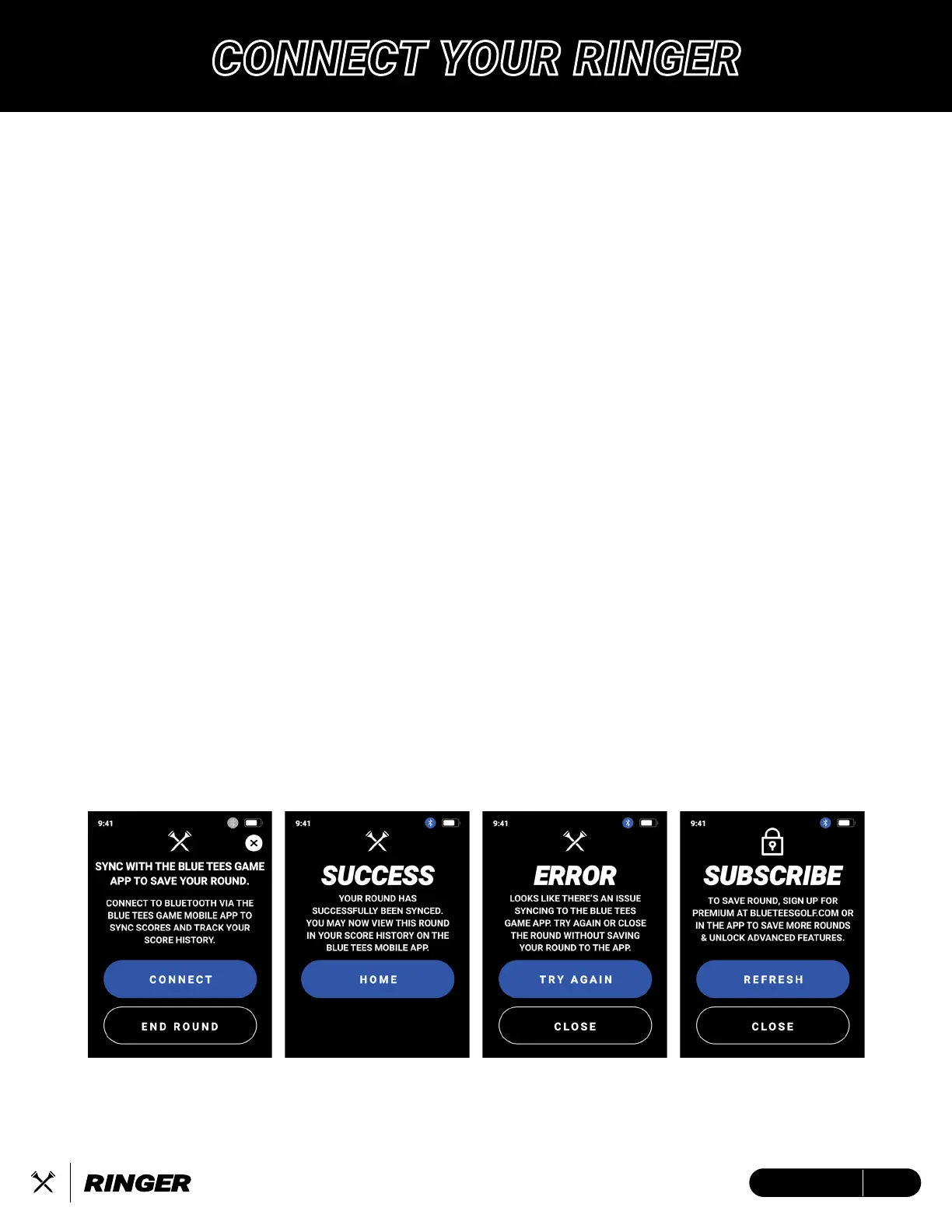
Save and view your logged scores from the Blue Tees Game app, log in to your account to
subscribe and unlock the premium golf features.
Connect/Register device to your Blue Tees Game account:
1. Open/Download the Blue Tees Game mobile app, Create an Account or Login
2. Navigate to the ‘Devices’ section and select ‘Connect’
3. Confirm the six-digit code on your Ringer LCD screen
Subscribe to the Blue Tees Game app
1. Navigate to blueteesgolf.com and select ‘MEMBERSHIP’
2. Choose your select Premium Membership plan and checkout
3. Connect the email used during checkout to your Blue Tees Game account
Save/Upload your round score and statistics:
1. If not already connected, at the end of your round, connect the Ringer device to your Blue
Tees Game account
2. Auto-save and score upload will be initiated once successfully connected and synced.
Note: If round sync is unsuccessful, the Ringer device internal memory will store this data until
next round sync attempt.
Update Firmware:
1. Open/Download the Blue Tees Game mobile app, Create an Account or Login
2. Connect your Ringer device via Bluetooth to the Blue Tees Game mobile app
3. After connecting your device, navigate to the device settings screen and search for the
firmware update (if available).
4. Follow on-screen instructions to complete firmware update


 To Next Page