Turning off the system automatically
The system turns off when a certain driving dis‐
tance or speed is exceeded.
Turning the system on/off manually
Press the button.
When driving forward, the system can no longer
be turned on manually after a certain speed is
reached.
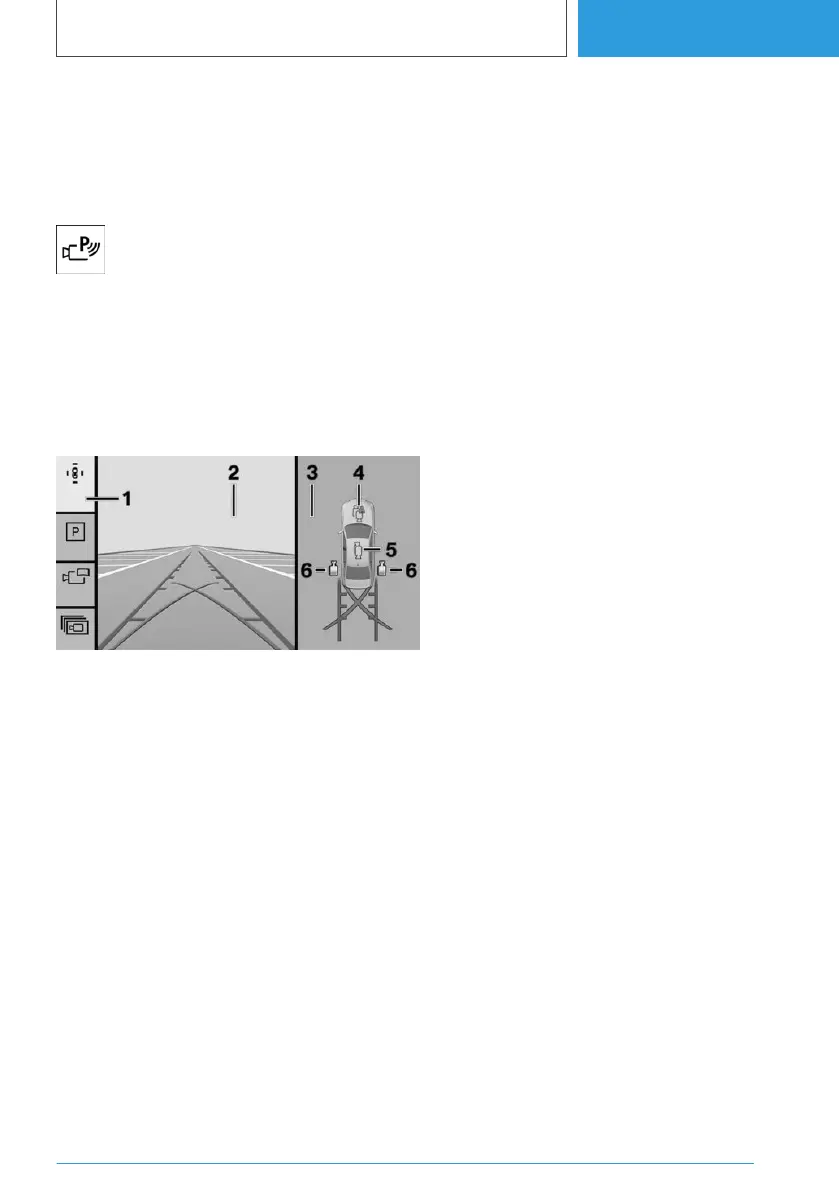
Display on the control display
Overview
1 Toolbar, left
2 Camera image
3 Selection window
4 Automatic camera perspective
5 Semi-automatic camera perspective
6 Flank view
Automatic camera perspective
The automatic camera perspective displays a
steering angle-dependent view looking towards
the vehicle's direction of travel.
This perspective adapts to the current driving sit‐
uation.
As soon as obstacles are detected, the view
switches to a fixed display of the area in front of
or behind the bumper or, if necessary, to a flank
view.
When the reverse gear is engaged, the auto‐
matic camera perspective is, if necessary, exited
and the system uses a semi-automatic camera
perspective to the rear. If required, select the au‐
tomatic camera perspective manually with re‐
verse gear engaged. The automatic camera per‐
spective is retained for the current parking
manoeuvre.
Semi-automatic camera perspective
Depending on the parking direction and engaged
selector lever position, a fixed camera perspec‐
tive is displayed with the areas in front of or be‐
hind the vehicle.
Flank view
Flank view can be selected for the right or left
side of vehicle.
This view displays the area at the side to assist
with positioning the vehicle at the kerb or along‐
side any other obstacles.
Flank view looks from the rear to the front. If
there is a hazard, it automatically focuses on pos‐
sible obstacles.
3D view
When the 3D view is selected, a circle is dis‐
played on the control display.
Specified perspectives can be selected on the
circle.
The current perspective is identified by a camera
icon.
Select another camera function to exit the func‐
tion.
Lateral Parking Aid
Principle
The side Park Distance Control is automatically
displayed and warns of obstacles next to the ve‐
hicle.
Seite 259
Parking
CONTROLS
259
Online Edition for Part no. 01405A38CB9 - VI/21



 To Next Page