Icon Function
Side lights.
Lights off.
Parking light, left.
Parking light, right.
Wiper system
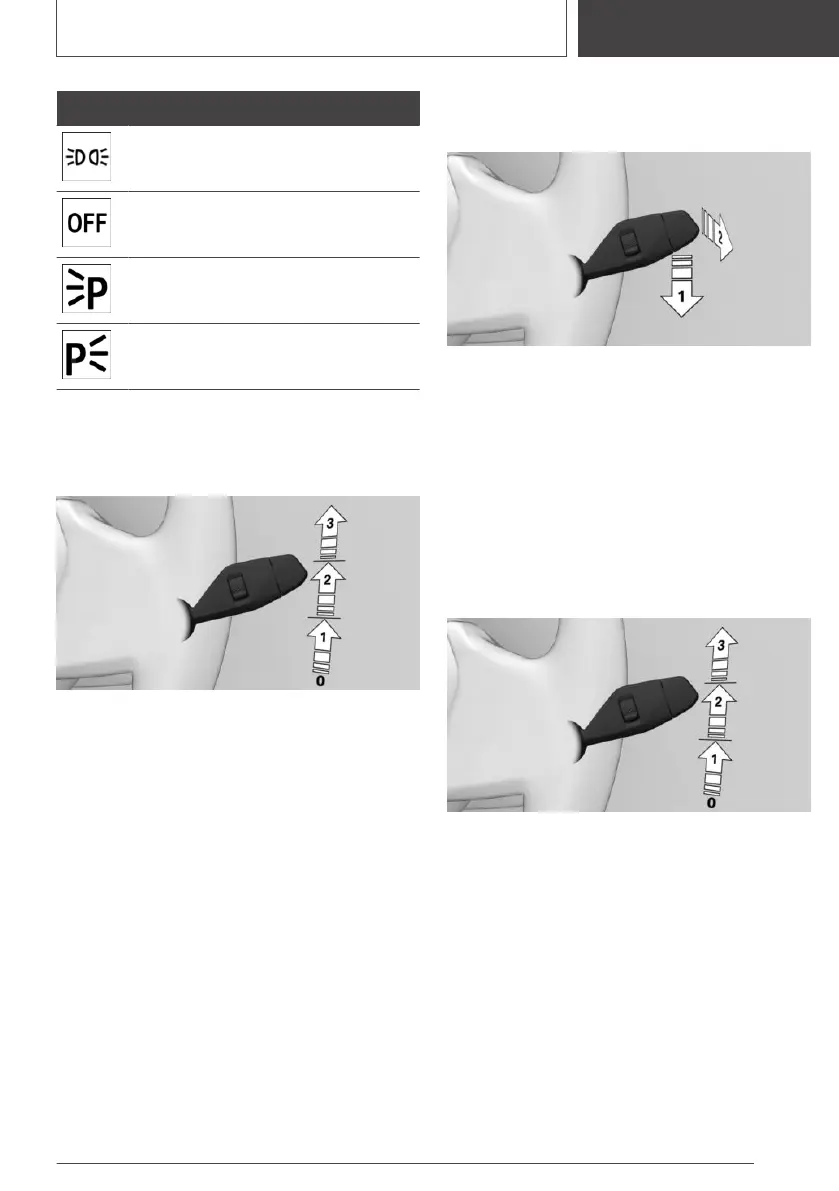
Switching on the wiper system
Press the lever upwards to the desired position.
▷ Rest position of the wipers: position 0.
▷ Rain sensor: position 1.
▷ Normal wiper speed: position 2.
▷ Fast wiper speed: position 3.
Switching off the wiper system and flick-
wiping
Press the lever downwards or forwards.
▷ To switch off: press lever downwards, ar‐
row 1, until position 0 is reached.
▷ To flick-wipe: press the lever downwards
from position 0, arrow 1, and press the lever
forwards to position 0 or position 1, arrow 2.
The lever returns to position 0 when re‐
leased.
Activating/deactivating the rain sensor
To activate: press the lever upwards once from
position 0, arrow 1.
To deactivate: press the lever back to position 0.
Seite 37
On the move
QUICK REFERENCE
37
Online Edition for Part no. 01405A38CB9 - VI/21



 To Next Page