(PICTURE6.6-1)
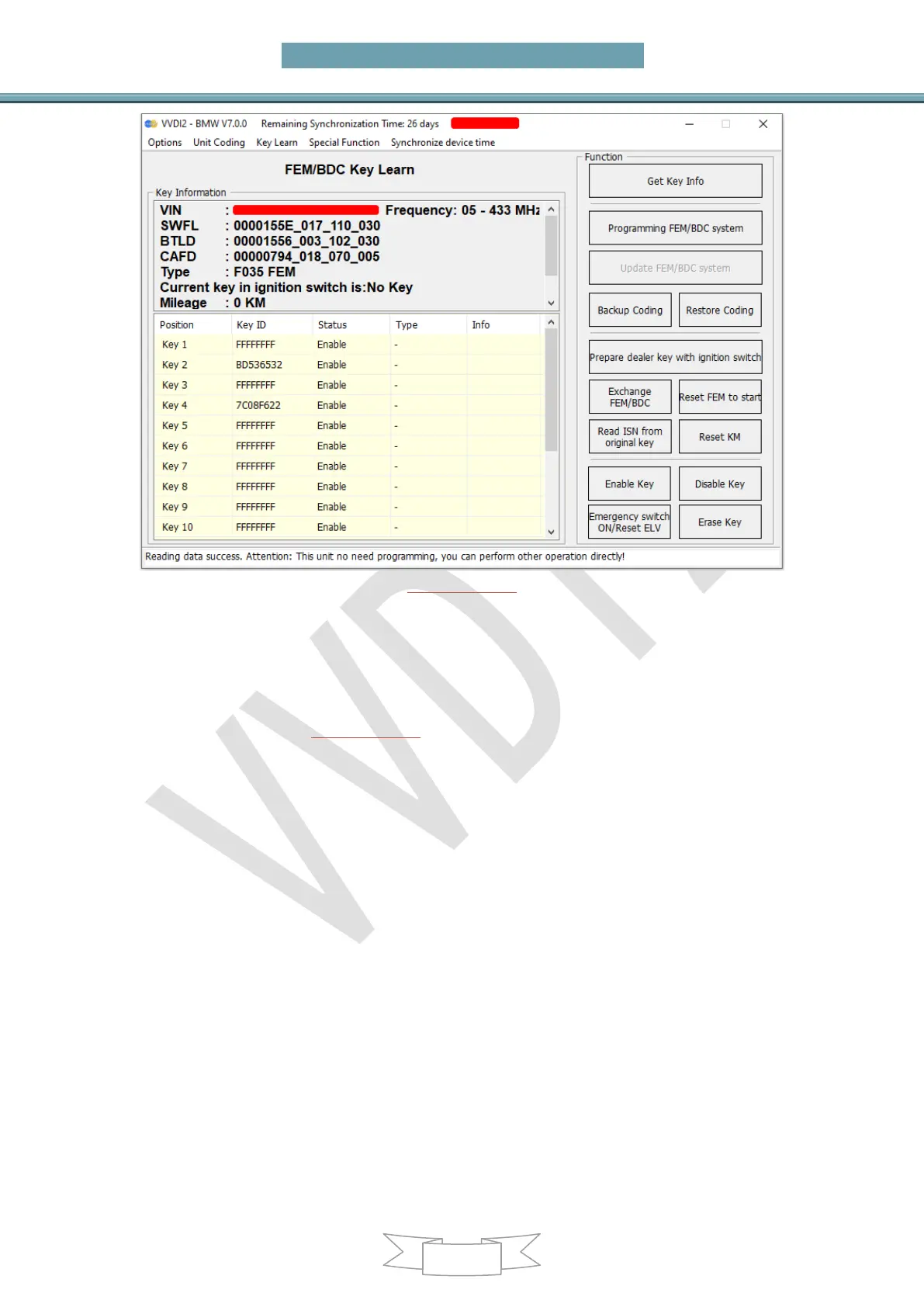
Get key info: Get key info in the FEM/BDC system and accord to prompt whether
need to Programming FEM/BDC system or Update FEM/BDC system
Programming FEM/BDC system: Programming FEM/BDC system to make it
support get key info by OBD. Whether add key or all key lost need to Programming
FEM/BDC system before make a new key if prompt that it needs to Programming
FEM/BDC system. (PICTURE6.6-2)
Step instructions/Notes:
The steps : ①Backup the code file ->>>②Read the EEPROM dump file on the
module chip ->>>③Load the EEPROM dump to generate the service mode data
file ->>>④Write the service mode data file in step ④ back to the chip ->>>⑤
Connect the module to program ->>>⑥Restore the original EEPROM data file in
step ② ->>>⑦Restore the code in step ①
Be careful to remove static electricity from your body before reading the chip. It is
better to wear insulated gloves for operation. Please refer to the "Location Map"
to find the position of the chip on the FEM/BDC module. It is recommended to
use the VVDI Prog "Free Clipping" or "MINI PROG" for operation. Clean the
insulators on the pins before operation. If it is the way of disassembling and
reading the chip, pay attention to protect the surrounding components, the
surrounding components are easily damaged by high temperature
When reading the original EEPROM dump of the 95128/95256 chip on the
FEM/BDC module, it is best to read it several times to compare whether the
dump is same, if it all same, proceeding to the next step
The process needs to read and write 95128/95256 chip on the FEM/BDC module.
If this chip is improperly operated during the reading and writing process, it is


 To Next Page