EasyManua.ls Logo

Bosch AMAX panel 2000 - User Manual

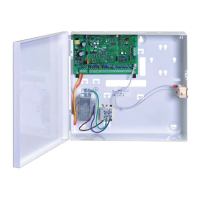
Bosch AMAX panel 2000
24 pages
Print Icon
To Next Page IconTo Next Page
Loading...
AMAX panel 2000 / AMAX panel 2000 EN
F.01U.249.500
en User Guide

Other manuals for Bosch AMAX panel 2000

Questions and Answers

  • D
    David AndersonSep 10, 2025
    What to do if there is abnormal PSTN or domestic dialing communication with my Bosch Control Panel?
    • B
      Brandon MoraSep 10, 2025
      If an extension system is used in the telephone network, dialing delay needs to be added in programming. If the network supports ADSL, the control panel needs to be connected through an ADSL filter.
  • Z
    zpotterSep 12, 2025
    Why is there no immediate response from zone testing right after powering up my Bosch Control Panel?
    • H
      hamiltonjonathanSep 12, 2025
      To work normally, operate the system one minute after powering up.
  • B
    Bradley BirdSep 14, 2025
    Why is there no remote arming function on my Bosch Control Panel?
    • S
      Stephanie PerkinsSep 14, 2025
      Check if the remote arming function is switched off. Ensure that Location 152 and 153 are not set as 0.
  • H
    Hannah WarnerSep 16, 2025
    Why is there no RPS software function on my Bosch Control Panel?
    • A
      Ann AndersonSep 16, 2025
      Check if the function is switched off. Ensure that Location 152 and 153 are not set as 0.

Summary

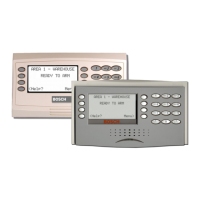
Introduction to AMAX Panel Keypad Operations

Quick Keypad Operation Instructions

Summary of keypad commands for arming, disarming, and other system functions.

Keypad Indicators

Zone Indicators (1-8)

Status indication for zones 1 through 8 on the keypad.

AWAY Mode Indicators

Indicators related to the system's AWAY arming status.

STAY Mode Indicators

Indicators related to the system's STAY arming status.

MAINS Power Indicators

Indicators showing the status of the AC main power supply.

Faults Indicators

Indicators for system faults or tamper conditions.

Keypad Sounds

Button Press and Operation Sounds

Sounds indicating button presses, refused operations, and successful functions.

System Status Sounds

Sounds indicating walk test mode, exit time, and entry delay.

Arming and Disarming the System

Arming the System

Procedures for arming the system in AWAY, STAY, and Forced modes.

Disarming the System

Procedures for disarming the system using a code, key, or remote.

Faults or Tamper conditions

System Fault or Tamper Analysis Mode

Mode for analyzing system faults and tamper conditions via keypad indicators.

Types of Faults and Tamper Conditions

Lists accessory module failures, power faults, and tamper conditions.

Walk test mode

Entering Walk Test Mode

Steps to enter the walk test mode for testing detection devices.

Event Memory Recall mode

Playback of System Events

How to playback and interpret the last 254 system events.

Reset the Control Panel

Resetting Alarms and Faults

Procedure to reset active alarms, faults, or tamper conditions.

Bypassing

Bypassing Zones

How to disable specific zones for one arming cycle.

Bypassing Faults and Tamper Conditions

How to disable faults or tamper conditions for one arming cycle.

Enable; Disable the installers code

Installer Code Management

How users can enable or disable the installer code for system access.

Change individual code

Changing User Codes

Procedure for users to change their personal access codes.

Keypad alarm operation commands

Duress Alarm Activation

How to activate a silent duress alarm for holdup situations.

Emergency Alarm Functions

Procedures for triggering panic, fire, and medical emergency alarms.

Domestic Dialing

Domestic Dialing Functionality

How the system dials contacts during alarms and confirms calls.

Bosch AMAX panel 2000 Specifications

General IconGeneral
Event Log256 events
CommunicationPSTN, optional GSM/GPRS
Battery backup12V 7Ah rechargeable lead-acid battery
Operating temperature0°C to +50°C
Weight3 kg
Zones8 zones on board, expandable to 32

Related product manuals