EasyManua.ls Logo

Bosch AMAX 4000 - User Manual

Bosch AMAX 4000
52 pages
Print Icon
To Next Page IconTo Next Page
Loading...
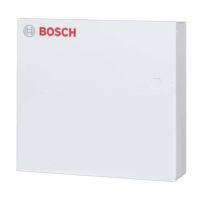
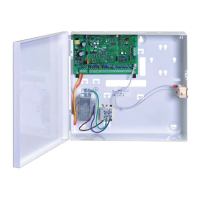
AMAX panel
AMAX panel 2100 | AMAX panel 3000 | AMAX panel
3000 BE | AMAX panel 4000
en Operation Manual

Table of Contents

Other manuals for Bosch AMAX 4000

Questions and Answers

  • B
    bwilliamsAug 13, 2025
    What to do if my Bosch Keypad is not responding to any key presses?
    • D
      Douglas ChenAug 13, 2025
      If your Bosch Keypad is not responding and emits a wrong tone when pressing any key, it could be due to abnormal RBGY wiring, the keypad being locked after entering wrong passwords multiple times, or an incorrect jumper setting when using multiple keypads. To fix this, reconnect the RBGY wiring, wait 3 minutes before operating the keypad if it's locked, or reset the jumper referring to the information on keypad address settings.
  • K
    Kathryn MeyerAug 16, 2025
    How to troubleshoot a Bosch Keypad with no display after power up?
    • N
      nreynoldsAug 16, 2025
      If there is no display on your Bosch Keypad after powering it up, it could be due to AC power or battery fuse failure, or abnormal RBGY wiring. Check if the AC power and battery fuses are properly connected and functioning normally. Also, try reconnecting the RBGY wiring.
  • L
    Lisa SmithAug 25, 2025
    What causes the zone indicator to stay constantly on on my Bosch Keypad?
    • D
      Dr. Rebecca Guerra DDSAug 25, 2025
      If the zone indicator on your Bosch Keypad is constantly on, it could be due to wrong zone wiring, an abnormal detector function, or the zone EOL resistor not being correctly connected to the end of the detector. To resolve this, re-enter the zone wiring, reset the detector, and ensure the zone EOL resistor is correctly connected to the end of the detector.
  • S
    Scott BennettAug 31, 2025
    What to do if there is no display on the keypad after power up for Bosch AMAX 4000?
    • D
      danieldanielAug 31, 2025
      If your Bosch Security System keypad isn't displaying anything after powering up, it could be due to a failure in the AC power or battery fuses, or abnormal RBGY wiring. Check that the AC power and battery fuses are properly connected and functioning correctly. Also, try reconnecting the RBGY wiring.
  • H
    haysjessicaSep 4, 2025
    What to do if my Bosch Security System keypad is not responding?
    • C
      Clayton CooperSep 4, 2025
      If your Bosch Security System keypad is unresponsive and emits a wrong tone when you press any key, it could be due to: * Abnormal RBGY wiring. * The keypad being locked after entering incorrect passwords multiple times. * An incorrect jumper setting when using multiple keypads. To fix this, try reconnecting the RBGY wiring. If the keypad is locked, wait for 3 minutes before trying again. If you are using multiple keypads, reset the jumper referring to the keypad address settings information.
  • K
    Kristin JacksonSep 8, 2025
    How to fix a constant on zone indicator on a Bosch AMAX 4000 Security System?
    • T
      Tricia PetersonSep 8, 2025
      If a zone indicator on your Bosch Security System is constantly on, it could be due to incorrect zone wiring, a malfunctioning detector, or the zone EOL resistor not being correctly connected to the end of the detector. Try re-entering the zone wiring, resetting the detector, and ensuring the zone EOL resistor is correctly connected to the end of the detector.
  • D
    Debra Dean MDNov 19, 2025
    Why is the fault indicator constantly on or flashing on my Bosch Keypad?
    • M
      Marissa ThompsonNov 19, 2025
      The fault indicator may be constantly on or flashing on your Bosch Keypad due to several reasons: the date and time may not be set, the backup battery might not be connected or have a voltage lower than 12V, the alarm siren might not be connected, the telephone number may be incorrectly set, the telephone network might not be connected, the tamper switch may not be connected, or an external module required for programming might not be connected. To resolve this, set the date and time, connect the battery or ensure it has a voltage over 12V, connect the alarm siren (or substitute it with a 1K resistor), correctly set the telephone number, connect the telephone network, connect the tamper switch or short circuit jumper, and connect any necessary programming modules like DX2010, DX3010, B426,...
  • B
    Brenda NelsonNov 27, 2025
    Why is the fault indicator constantly on or flashing on my Bosch Security System?
    • S
      Sierra DelgadoNov 27, 2025
      If the fault indicator on your Bosch Security System is constantly on or flashing, there could be several reasons: * The date and time may not be set. * The backup battery might not be connected or have a voltage lower than 12V. * The alarm siren may not be connected. * The telephone number may be incorrectly set. * The telephone network may not be connected. * The tamper switch may not be connected. * An external module required for programming might not be connected. To resolve this, set the date and time, connect the battery or ensure its voltage is over 12V, connect the alarm siren (or substitute it with a 1K resistor), correctly set the telephone number, connect the telephone network, connect the tamper switch or a short circuit jumper, and connect any necessary progra...

Summary

Safety

Short information

Introduction

Provides an overview of the manual's content and purpose.

Technical data

Details technical specifications including frequency bands and power levels.

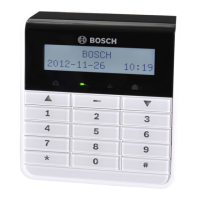
Keypads

Describes the text keypad used for operating AMAX panels.

Keypad indicators

Quick keypad operations instructions

User menu

Arming and disarming areas

Arming areas

General guide on how to arm different areas of the security system.

Arming in AWAY mode

Instructions for arming the system in AWAY mode via keypad or master keypad.

Arming in STAY mode

Forced arming

Disarming areas

Disarming with a keypad

Step-by-step guide to disarm the system using a keypad.

Disarming with key switch

Disarming with RADION RF keyfob

Changing the menu language

How to change the menu language

Procedure for selecting and changing the system's interface language.

Changing date, time and daylight saving time

How to set date, time and the daylight saving time settings

Steps to configure the system's date, time, and daylight saving time preferences.

System test

Siren test

Procedure to test the functionality of the system's siren.

Communication test

Procedure to test communication links with a central monitoring station.

Walk test mode

Guide on how to enter and exit walk test mode for system checks.

Bypassing;isolating

Bypassing;unbypassing zones

Instructions for bypassing or unbypassing specific zones in the system.

How to bypass;unbypass a zone via text keypad

Detailed steps for bypassing zones using a text keypad interface.

How to bypass;unbypass a zone via LED;LCD keypad

How to view bypassed zones

Bypassing faults or tamper conditions

Isolating zones

How to isolate;unisolate a zone via text keypad

Detailed steps for isolating zones using a text keypad interface.

How to isolate;unisolate a zone via LED;LCD keypad

How to view isolated zones

Schedules

How to activate;deactivate a schedule

Procedure to enable or disable scheduled system operations.

Macros

Recording macros

Instructions on how to record custom macros for automating sequences.

Playing macros

Codes

Add;change user codes

Procedure for adding new users and modifying user codes and permissions.

Change individual code

Keypad alarm operation commands

Keypad panic alarm

How to trigger a silent panic alarm from the keypad.

Keypad fire alarm

How to trigger a silent fire alarm from the keypad.

Keypad medical alarm

How to trigger a silent medical alarm from the keypad.

Domestic dialing

Domestic dialing alarm

Functionality for the system to dial contact numbers during alarms.

Confirming the domestic call

Procedure to acknowledge domestic call alarms and confirm the event.

Event log recall mode

How to select all event log recall mode

Steps to access and view all logged events on the system's keypad.

How to select EN event log recall mode

Steps to access and view mandatory EN 50131-3 events.

How to select dialer event log recall mode

Steps to access and view mandatory EN 50136 dialer events.

Faults and tamper conditions

System fault or tamper analysis mode via text keypad

Method to analyze system faults and tampers using a text keypad.

System fault or tamper analysis mode via LED;LCD keypad

Method to analyze system faults and tampers using an LED/LCD keypad.

Resetting the control panel

How to reset the control panel

Procedure for resetting all active alarms, faults, and tamper conditions.

Troubleshooting

Bosch AMAX 4000 Specifications

General IconGeneral
SeriesAMAX
Battery BackupYes
Wired zones8
Event log1000 events
CommunicationPSTN
Remote ControlYes, via app

Related product manuals