EasyManua.ls Logo

Bosch AMAX panel 4000 - User Manual

Bosch AMAX panel 4000
176 pages
Print Icon
To Next Page IconTo Next Page
Loading...
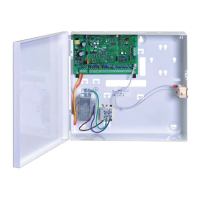
AMAX panel 4000 / AMAX panel 4000 EN
ICP-AMAX4-P1 / ICP-AMAX4-P2-EN / ICP-AMAX-P3-EN
en Installation Guide

Table of Contents

Questions and Answers

  • M
    Mary LaneAug 15, 2025
    Why is my Bosch AMAX panel 4000 not dialing when the alarm goes off?
    • D
      Dr. Gabrielle LeeAug 15, 2025
      If your Bosch Security System isn't dialing during an alarm, ensure the receiver parameters are correctly configured. Specifically, set the telephone number, configure the transmission format to CID, and map the zone alarm to the appropriate paths.
  • E
    Erica SmithAug 18, 2025
    What to do if the auxiliary power cannot be recovered after short circuit in Bosch AMAX panel 4000 Security System?
    • M
      michaelreynoldsAug 19, 2025
      If the auxiliary power cannot be recovered after a short circuit in your Bosch Security System, try powering up the AC power and battery again.
  • T
    twalkerAug 21, 2025
    Why is there occasionally abnormal communication in use of Contact ID/personal telephone alarm with Bosch AMAX panel 4000?
    • M
      Michelle PerezAug 21, 2025
      If you are experiencing abnormal communication with your Bosch Security System when using Contact ID or personal telephone alarm, and you are using an extension system or your telephone network supports ADSL, try adding a dial delay in programming or connect the system after the ADSL filter.
  • H
    hayden23Aug 25, 2025
    What to do if failure of battery is still displayed after the battery is replaced in Bosch AMAX panel 4000 Security System?
    • B
      Brandi TaylorAug 26, 2025
      If your Bosch Security System displays a battery failure even after replacing the battery, it may be because the system tests the battery 4 hours after being armed, or the battery voltage is below 12V. The fault should clear automatically after resetting the system or retesting the battery. You can also charge the new battery until it reaches a voltage of 12V or higher.
  • N
    nicholas40Aug 27, 2025
    What to do if over current protection of the auxiliary power in Bosch AMAX panel 4000?
    • A
      alexanderlindaAug 27, 2025
      If your Bosch Security System's auxiliary power is experiencing over current protection, it could be due to abnormal wiring of the 12V auxiliary power or because the auxiliary power exceeds the control panel's upper limit of 2000mA. Reconnect the auxiliary power, or use an external power supply for perimeter devices.
  • B
    Brittany WellsAug 30, 2025
    Why the control panel cannot send any reports in Bosch Security System?
    • G
      Gregory PowellAug 31, 2025
      If the control panel of your Bosch Security System is not sending reports, even when programmed to do so, it may be because the transmission format of the receiver is programmed to 0, meaning 'not used'. Program the transmission format of the receiver to 1 or 3.
  • J
    Jennifer CummingsSep 2, 2025
    What does it mean if the red LED on the main board goes off in Bosch AMAX panel 4000 Security System?
    • M
      Michael MitchellSep 2, 2025
      If the red LED on the main board of your Bosch Security System goes off, there may be an issue with the AC power or backup battery, or the main board may have failed. Check the AC power and backup battery. If the issue persists, replace the main board.
  • D
    dawnboyleSep 5, 2025
    What to do if AC power fault in Bosch Security System?
    • D
      Destiny PearsonSep 5, 2025
      If your Bosch Security System experiences an AC power fault, check if the 18V of the transformer is correctly wired and replace the fuse.
  • F
    faith19Sep 8, 2025
    Why is there no response from keypad and alarm siren when an alarm is triggered by the zone in Bosch Security System?
    • T
      Tanya WagnerSep 8, 2025
      If the keypad and alarm siren of your Bosch Security System are disabled when a zone triggers an alarm, it's possible that the zone silent alarm is enabled. Disable the zone silent alarm to restore normal function.
  • B
    barrettfrankSep 12, 2025
    Why does remote telephone arming fail on Bosch Security System?
    • L
      Laura HallSep 12, 2025
      If remote telephone arming fails on your Bosch Security System, ensure that remote telephone arming is enabled by programming address 0144 to a number from 1 to 15. Also, telephone arming is only available when the system has area 1 only.

Summary

Safety

Installation

Module Installation

Steps for installing the main enclosure and module.

Battery Installation

Installing and connecting the system's backup battery.

Settings

Communication and Reporting

Programming receiver contact details for reporting.

Zones

Configuring zone functions and types for detection.

Access Codes

Managing user codes for system operation.

Configuration

System Power Up

Initial system power-up and basic configuration steps.

Programming with the ICP-EZPK Programming Key

Using the ICP-EZPK key to copy and backup programming data.

Programming

Zone Programming

Configuring zone functions, types, and area assignments.

Output Programming

Programming output event types, modes, and timing.

Access Codes

Managing installer and user code digits and lengths.

Keypad Usage and Operations

Troubleshooting

Bosch AMAX panel 4000 Specifications

General IconGeneral
Operating Temperature-10°C to +55°C
CommunicationPSTN, IP, GSM
Battery Backup12V, 7Ah
HumidityUp to 93% non-condensing
Zones8 on-board, expandable to 32

Related product manuals