D8125INV
Installation
D8125INV Operation and Installation Guide
© 2005 Bosch Security Systems Page 19 49690E
5.
To set the point mode of the RF Transmitter, see Section 3.6.1.1 Point Mode, p.17 for information on
selectable Point Modes.
6.
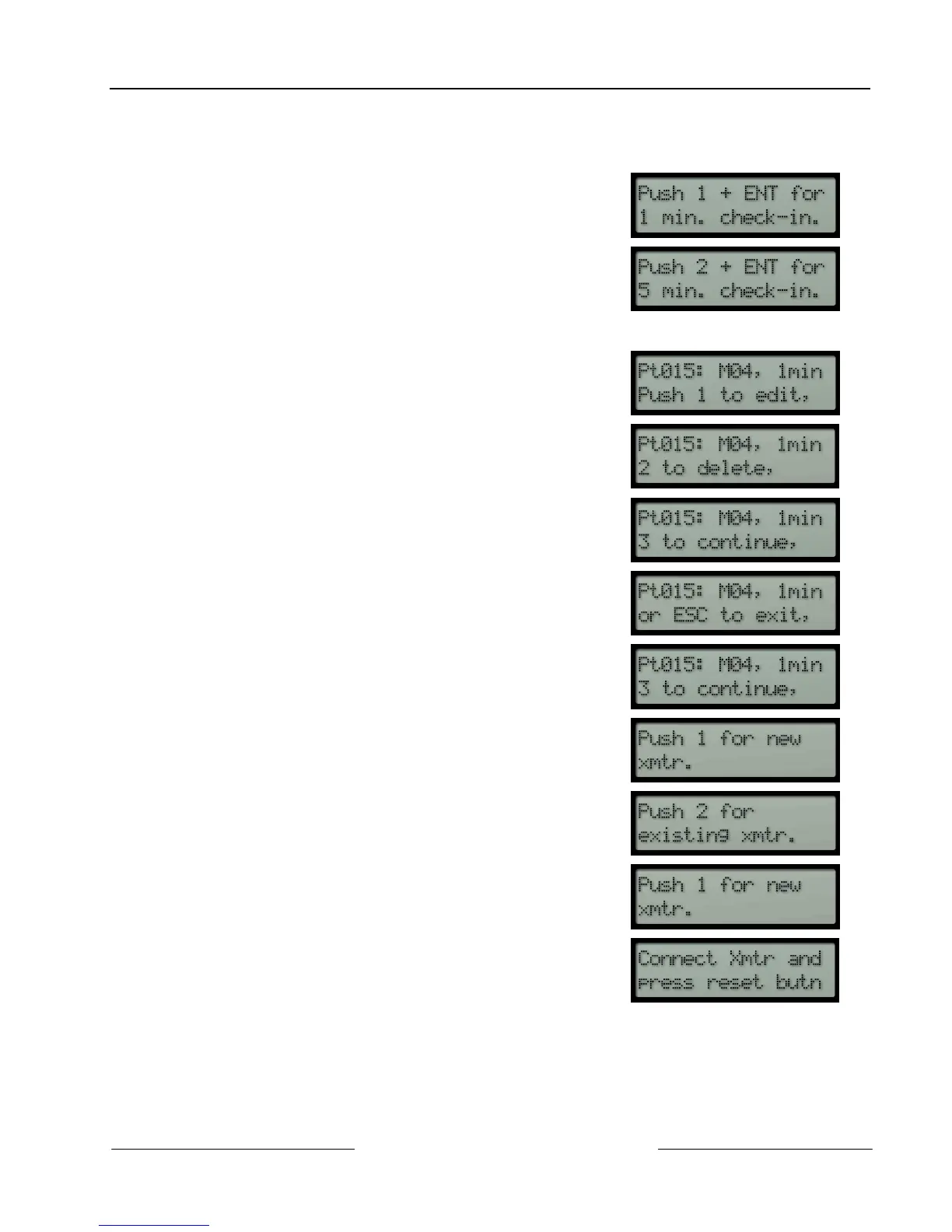
After the Mode is selected, the keypad will display the available
check-in time selection of either 1 minute (by pressing [1] +
[ENT]) or 5 minutes (by pressing [2] + [ENT]).
Enter the desired check-in time and press [ENT].
The check-in time is a supervisory signal that is sent from each
transmitter at this interval. Each transmitter shipped from
Inovonics comes defaulted with a 1 minute check-in time. To
extend battery life of the transmitter, this entry may be set to the
5 minute interval. For fire, set the entry to one minute.
7.
After the check-in time is entered, the D8125INV will display the
following.
8.
Push [3] to continue adding the transmitter
9.
The keypad displays two options:
• Push [1] for a new transmitter
• Push [2] for an existing transmitter
10.
Press [1] on the keypad
11.
When the keypad displays,




 To Next Page