D8125INV
Installation
D8125INV Operation and Installation Guide
© 2005 Bosch Security Systems Page 27 49690E
2.
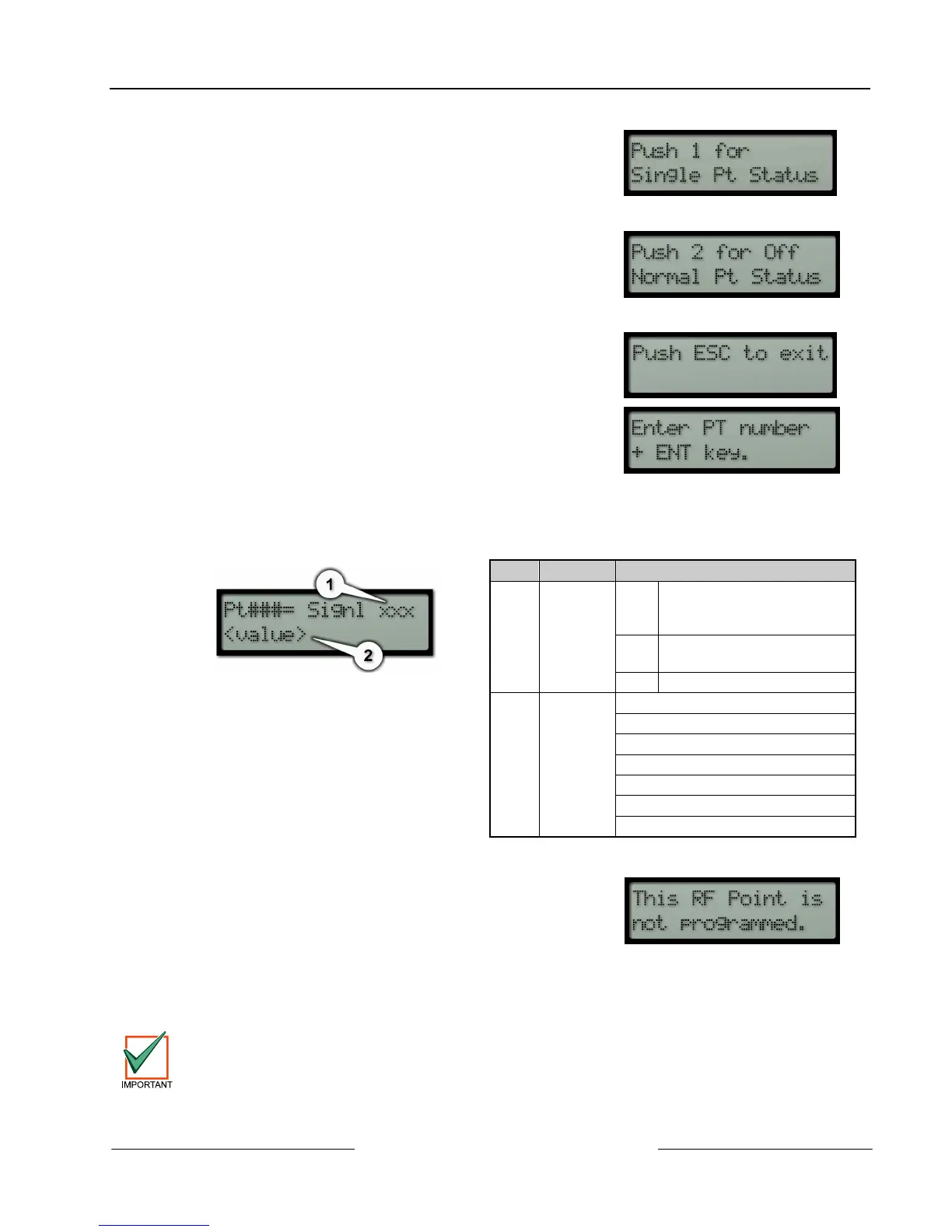
The keypad will then display the following menus (if there are
no system faults on the D8125INV):
See step 4 below
See step 5 below
3.
If [1] is pressed, this menu allows you to jump to any RF point
programmed into the D8125INV. If [1] is pressed from this
menu, the keypad will display:
4.
After a valid RF Point Number is entered, Figure 18 will be displayed.
Item Variable Description
1 xxx ? D8125INV has not received
at least 30 transmissions to
determine signal strength
Bad Transmitter must be
relocated
OK Good signal strength
2 <value> Normal
Faulted
Tamper
Missing
Low Bat
Tamper, Low Bat
Faulted, Low Bat
Figure 18: Point Number Status
Table 10: Variable Descriptions
If an invalid RF Point Number is entered, the following is
displayed:
If the D8125INV is connected to Zonex 1, enter point numbers
9-127 (or 9-75 if D7412G, D7412, D7412GV2, D7212, D7212G,
or D7212GV2 ).
Figure 19: RF Point not
programmed
Points 74 and 75 and Points 194 and 195 are reserved for the FA113 Keyfob.
If the D8125INV is connected to Zonex 2, enter point numbers 129-247. After entering the point
number and pressing the [ENT] key, the keypad will display Figure 18.




 To Next Page