DSA E-Series (E2700) Turning on the power and checking for problems in an E2700 controller-drive tray configuration | en 59
Bosch Sicherheitssysteme GmbH Installation manual 2015.10 | V2 | DOC
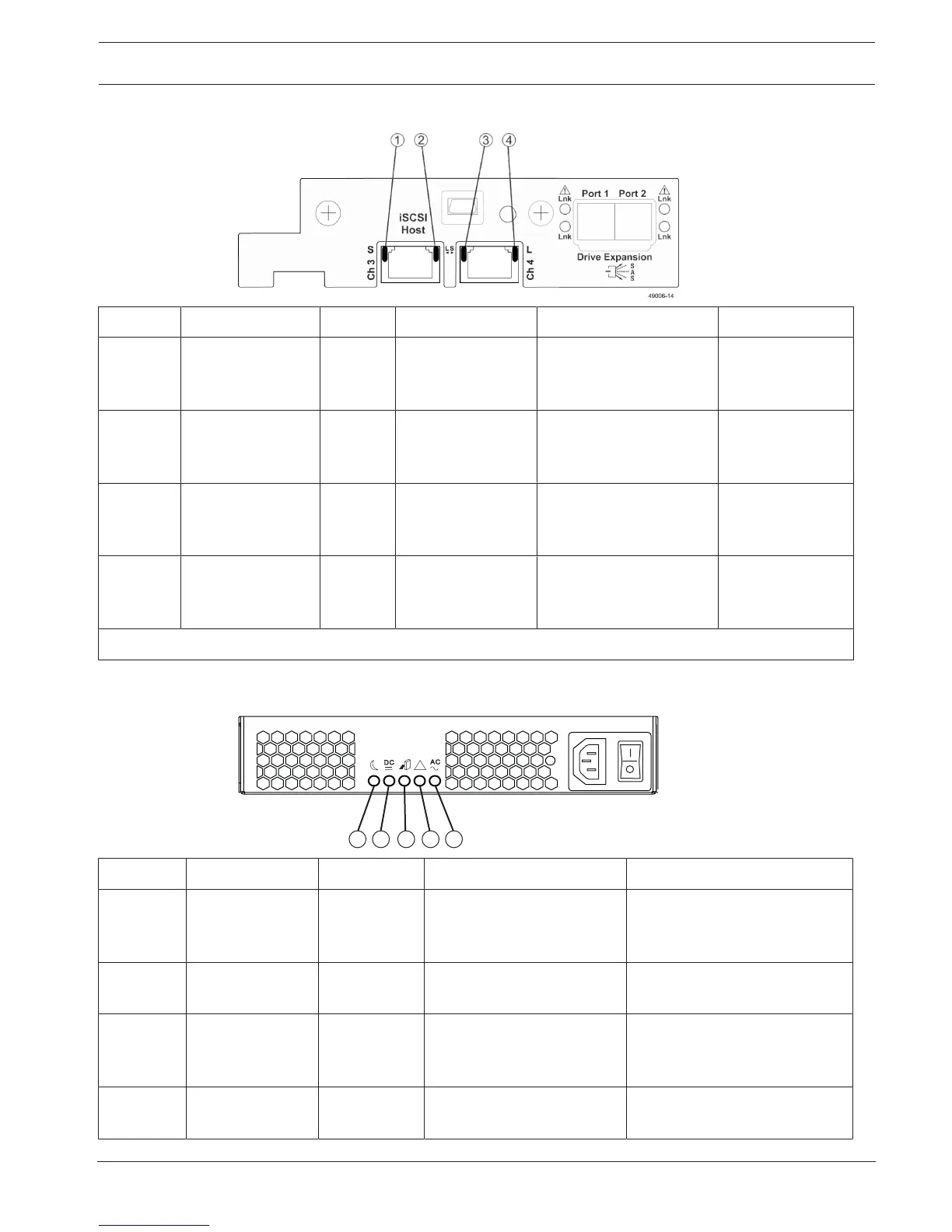
LEDs on the controller canister iSCSI host interface card sub plates
Location LED Color On Off Blinking
1 Host interface card
channel3 link
status
Green The link has auto-
negotiated to 10
Gb/s.
The link has auto-
negotiated to 1 Gb/s.
The link is in the
process of being
acquired.
2 Host interface card
channel3 link
activity
Green The link is up and
there is no activity.
The link is not active. The link is active.
3 Host interface card
channel3 link
status
Green The link has auto-
negotiated to 10
Gb/s.
The link has auto-
negotiated to 1 Gb/s.
The link is in the
process of being
acquired.
4 Host interface card
channel3 link
activity
Green The link is up and
there is no activity.
The link is not active. The link is active.
* You can also have a two-port iSCSI HIC.
LEDs on the power-fan canister
Location LED Color On Off
1 Standby power Green The controller-drive tray is
in Standby mode, and DC
power is not available.
The controller-drive tray is not
in Standby mode, and DC
power is available.
2 Power-fan DC
power
Green DC power from the power-
fan canister is available.
DC power from the power-fan
canister is not available.
3 Power-fan service
action allowed
Blue The power-fan canister can
be removed safely from the
controller-drive tray.
The power-fan canister cannot
be removed safely from the
controller-drive tray.
4 Power-fan service
action required
Amber A fault exists within the
power-fan canister.
Normal status.


 To Next Page