DSA E-Series (E2700) Turning on the power and checking for problems in an E2700 controller-drive tray configuration | en 67
Bosch Sicherheitssysteme GmbH Installation manual 2015.10 | V2 | DOC
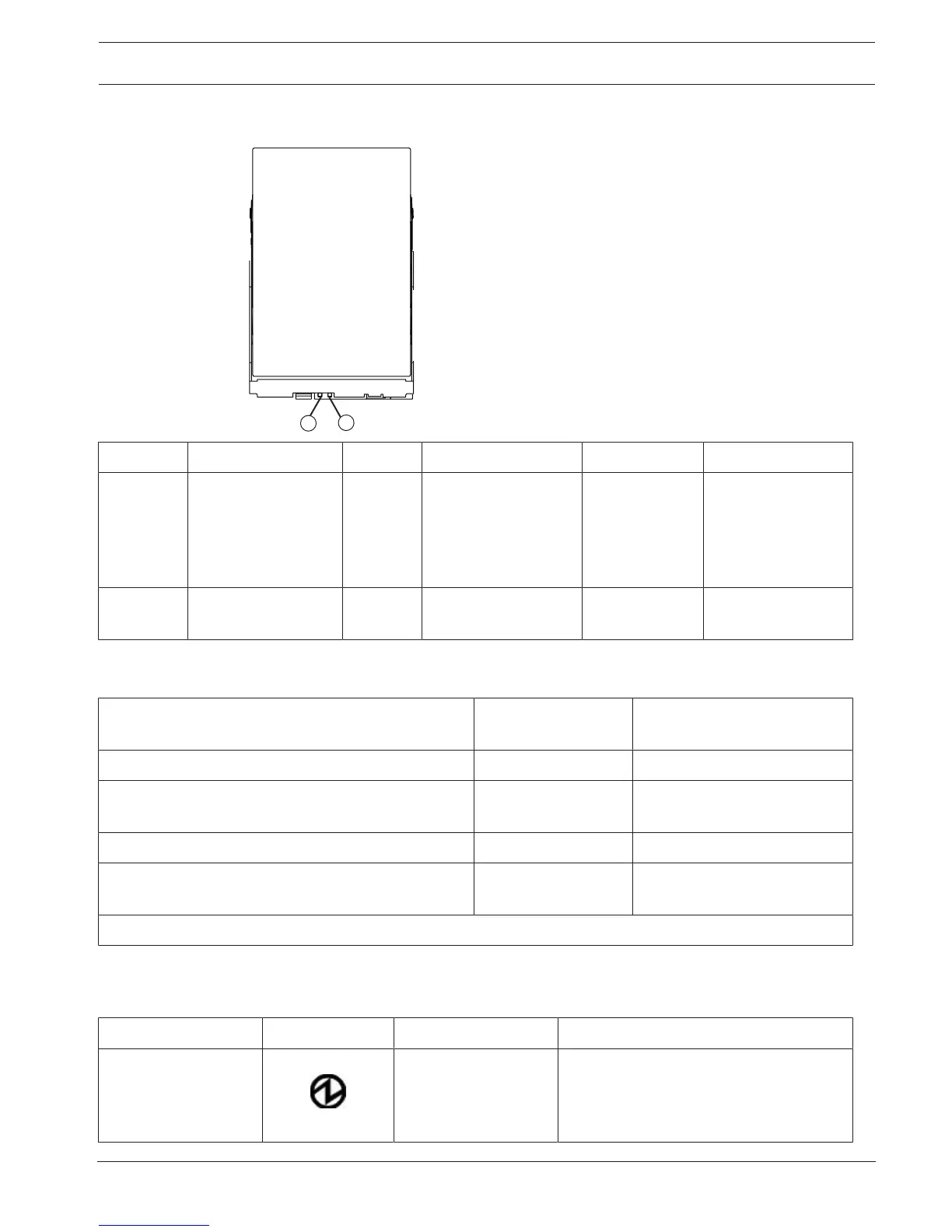
12.7 LEDs on the DE6600 drives
Location LED Color On Blinking Off
1 Drive service action
allowed
Blue The drive canister can
be removed safely
from the drive drawer
in the drive tray.
The drive canister
cannot be removed
safely from the drive
drawer in the drive
tray.
2 Drive service action
required
Amber An error has occurred. Normal status.
Drive state represented by the LEDs
Drive state
1
Drive activity LED
(green)
Drive service action required
LED (amber)
Power is not applied. Off Off
Normal operation – The power is turned on, but drive
I/O activity is not occurring.
On Off
Normal operation – Drive I/O activity is occurring. Blinking Off
Service action required – A fault condition exists, and
the drive is offline.
On On
1
To see the drive states represented by the LEDs, you must open the drive drawers one after the other.
12.8 General behavior of the LEDs on the drive trays
LED Symbols and General Behavior
LED Symbol Location General Behavior
Power Drive tray
ESM canister
Power-fan canister
On – Power is applied to the drive tray or
the canister.
Off – Power is not applied to the drive
tray or the canister.


 To Next Page