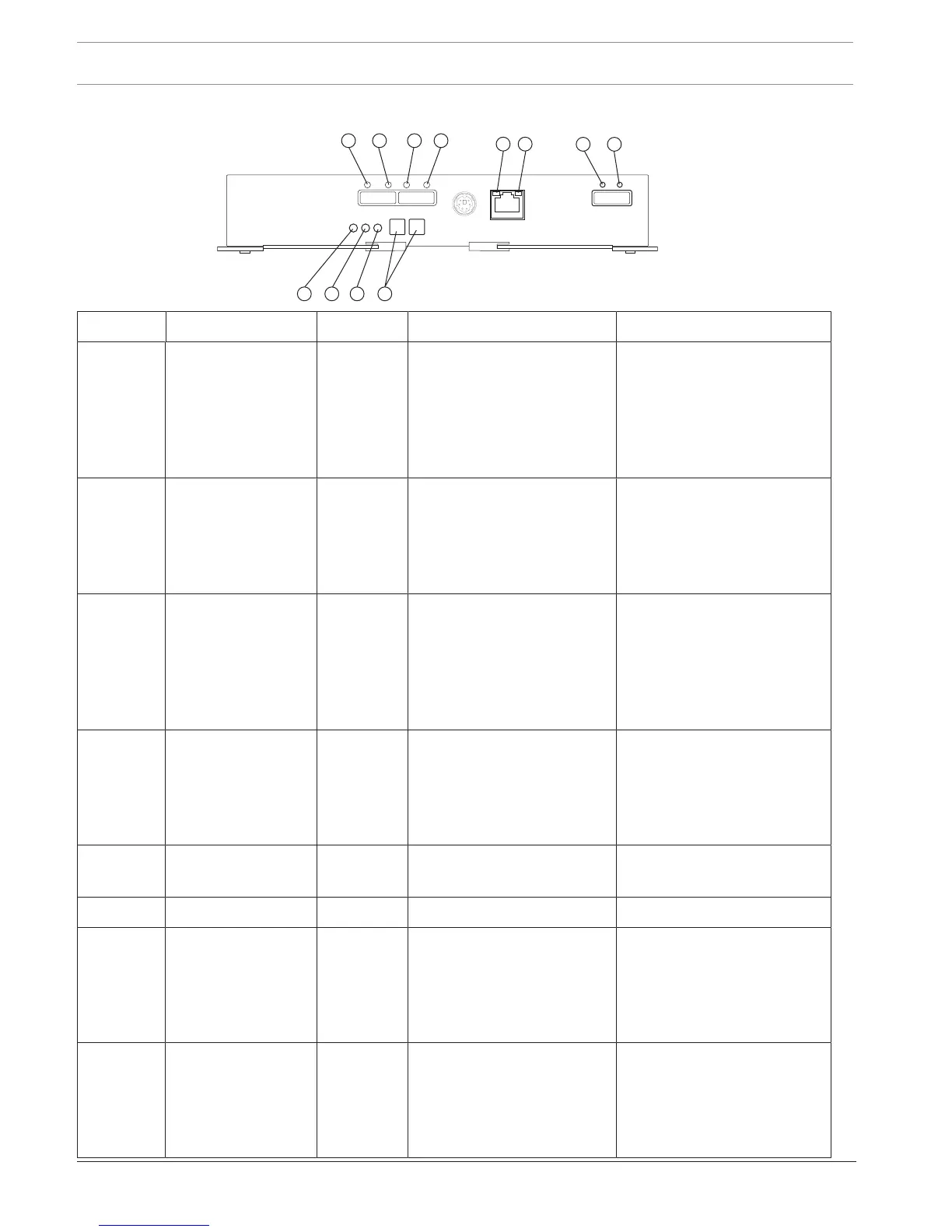
Location LED Color On Off
1 Host link 1 fault Amber At least one PHY of the four
connectors is working, but
another PHY cannot establish
the same link to the device
connected to the Host IN
port connector.
No link error has occurred.
2 Host link 1 active Green At least one of the four PHYs
in the In port is working, and
a link exists to the device
connected to the Host In
connector.
A link error has occurred.
3 Host link 2 fault Amber At least one PHY of the four
connections is working, but
another PHY cannot establish
the same link to the device
connected to the Host In
port connector.
No link error has occurred.
4 Host link 2 active Green At least one of the four PHYs
in the IN port is working, and
a link exists to the device
connected to the Host In
connector.
A link error has occurred.
5 Ethernet link active Green The link is up. (The LED
blinks when there is activity.)
The link is not active.
6 Ethernet link rate Green There is a 100BASE-T rate. There is a 10BASE-T rate.
7 ESM expansion link
fault
Amber At least one of the four PHYs
in the Out port is working,
but another PHY cannot
establish the same link to the
Expansion Out connector.
Normal status.
8 ESM expansion link
active
Green At least one of the four PHYs
in the Out port is working,
and a link exists to the
device connected to the
Expansion Out connector.
A link error has occurred.


 To Next Page