41
Upgrading the ControlSpace
®
SP-24 Firmware
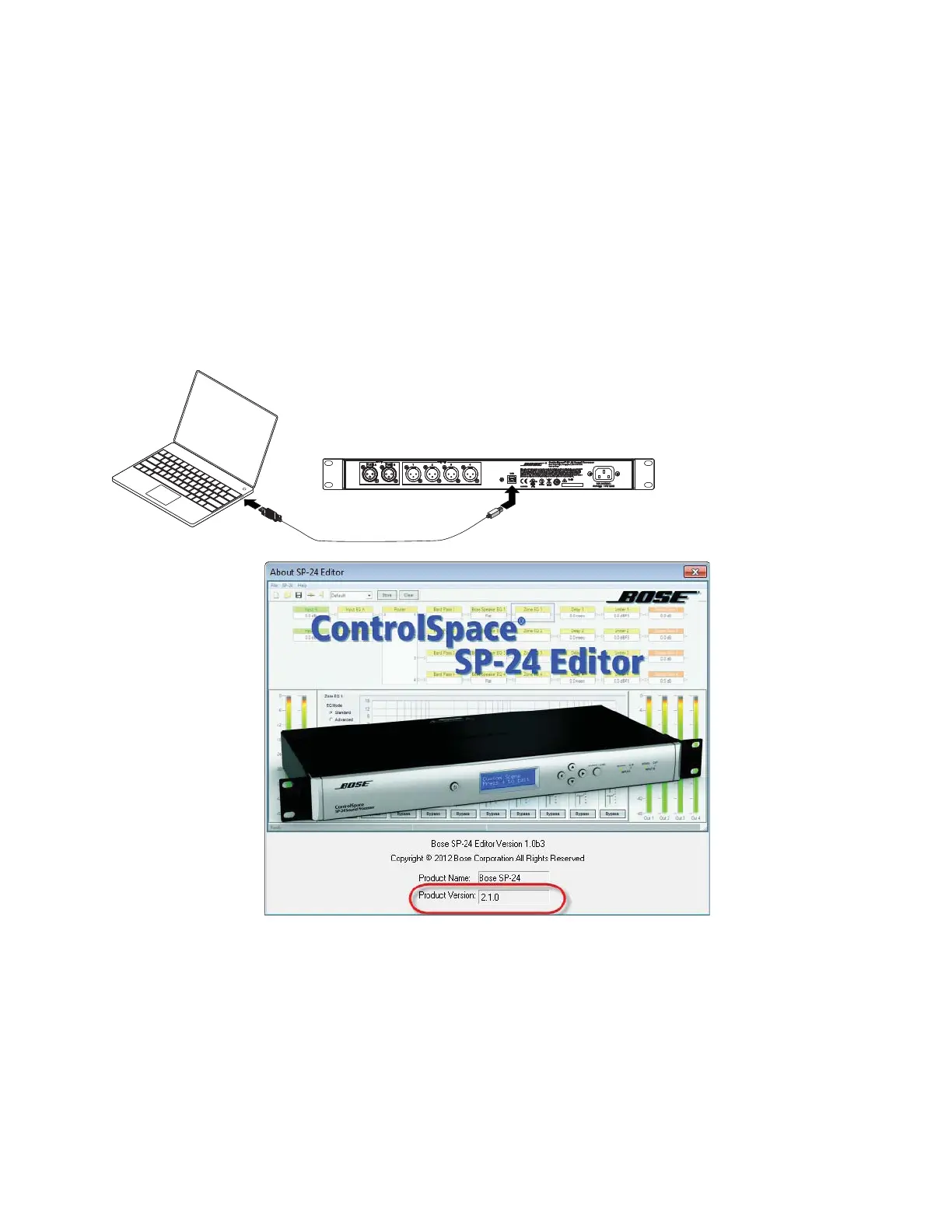
The ControlSpace SP-24 firmware and EQ presets can be updated by using the SP-24 Editor
software, and connecting the SP-24 unit to the PC using a USB A to B cable.
Download the application update installer to your PC and install it. The SP-24 Editor software
application can be downloaded from the http://pro.bose.com web site.
Firmware updates for the SP-24 sound processor are performed using the SP-24
Editor software. The current firmware version on the unit can be determined by selecting
Help> About Bose SP-24 Editor from the pulldown menu when you are in the Editor’s main
window. You will get the dialog box below, showing the firmware revision.
Note: The SP-24 must be connected with the USB cable and you must be on-line with the unit to
get this information to display.
Fig. 6.1- About SP-24 Editor Dialog, firmware version is shown in lower section
All loudspeaker database and firmware updates are provided using an application update in-
staller. To install the necessary files run the update installer.
Update Procedure
1. Download the application update installer to your PC and run the SP-24 Firmware Update
application. The SP-24 Editor software application can be downloaded from the
http://pro.bose.com web site.
SP-24 Editor
soft
are





 To Next Page