17
Setting the Function Used
When the Effects Are Off
(Bypass/Mute)
You can choose whether the AD-8 switches to Bypass mode
or Mute mode when you switch the effects off with the ON/
OFF pedal.
* This is set to switch to “Bypass” at the factory.
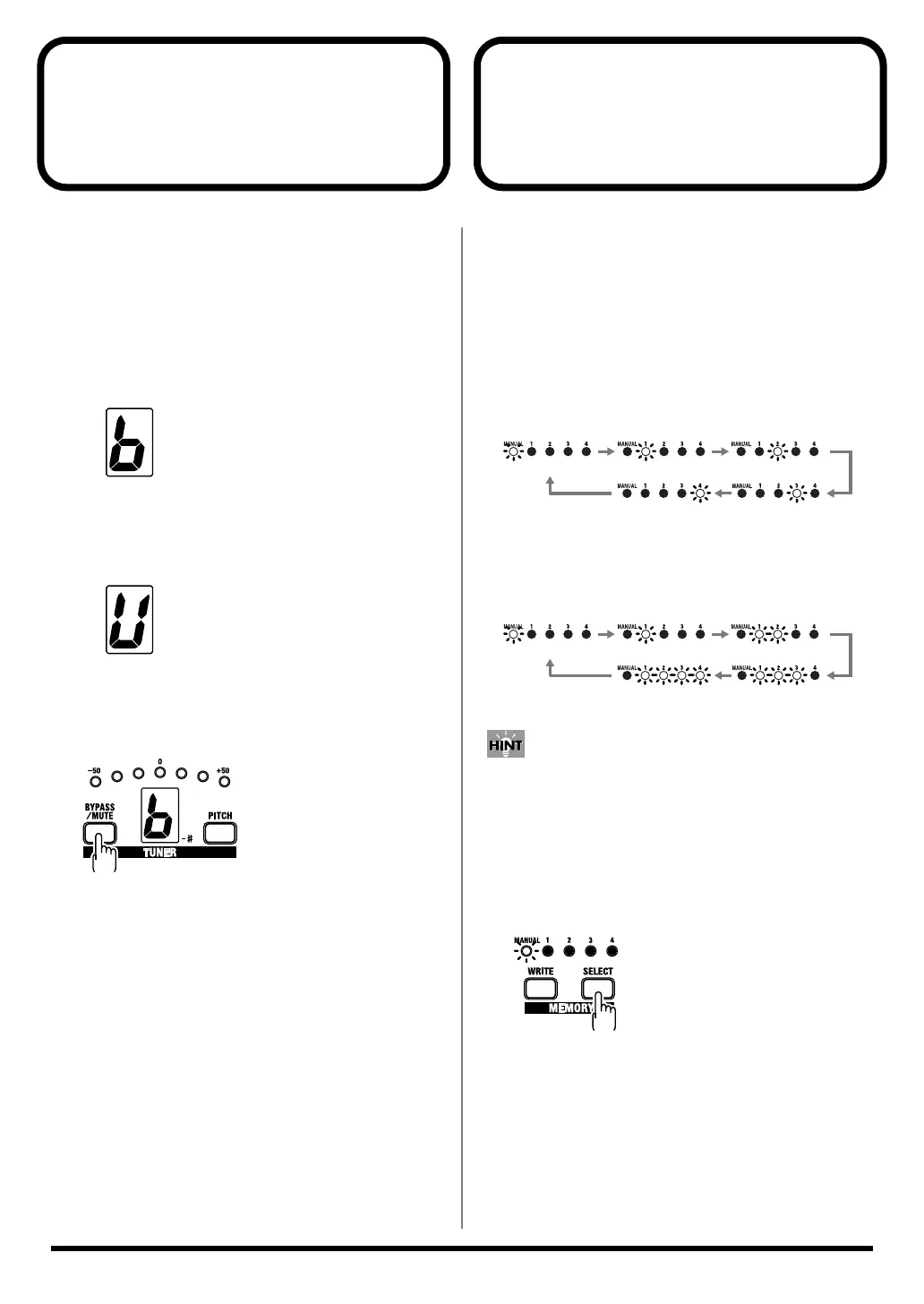
BYPASS:
Input sounds are output as is. Select this when you want to
use the guitar output without any changes in the sound.
fig.06-01a
MUTE:
No sound is output. Select this setting when you want to
mute the sound while tuning.
fig.06-01b
1.
Press the BYPASS/MUTE button.
The current settings are indicated in the TUNER display.
fig.06-01c
2.
Hold down the BYPASS/MUTE button to switch
the settings.
If nothing is altered during the next few moments, the
settings are stored, and the indication in the TUNER
display disappears.
* The settings remain stored in memory even after the power is
turned off.
Display
Display
Changing How Memory
Numbers Are Indicated
Not only can you confirm the currently selected memory
merely by checking the lit MEMORY number indicators, you
can also change the pattern in which the indicators light up.
Select the pattern that provides the easiest way to check the
memory in any particular environment.
* This is set to Lighting Pattern 1 at the factory.
Lighting Pattern 1 (Normal):
Only the indicator for the selected memory lights up (or
flashes).
fig.06-02
Lighting Pattern 2:
The number of indicators lighting up (or flashing)
corresponds to the selected memory number.
fig.06-03
When using the AD-8 in dimly lit surroundings, you can
confirm memory numbers more easily by using the Lighting
Pattern 2 setting.
1.
Hold down the SELECT button for at least two
seconds.
The lighting pattern is switched.
fig.06-04
* The settings remain stored in memory even after the power is
turned off.
MEMORY 1 MEMORY 2
MEMORY 3MEMORY 4
MANUAL
MEMORY 1 MEMORY 2
MEMORY 3MEMORY 4
MANUAL
AD-8_e.book 17 ページ 2007年6月20日 水曜日 午前9時34分


 To Next Page