EasyManua.ls Logo

Boss BE9ACP - Apple CarPlay Display Management

Boss BE9ACP
42 pages
Print Icon
To Next Page IconTo Next Page
To Previous Page IconTo Previous Page
Loading...
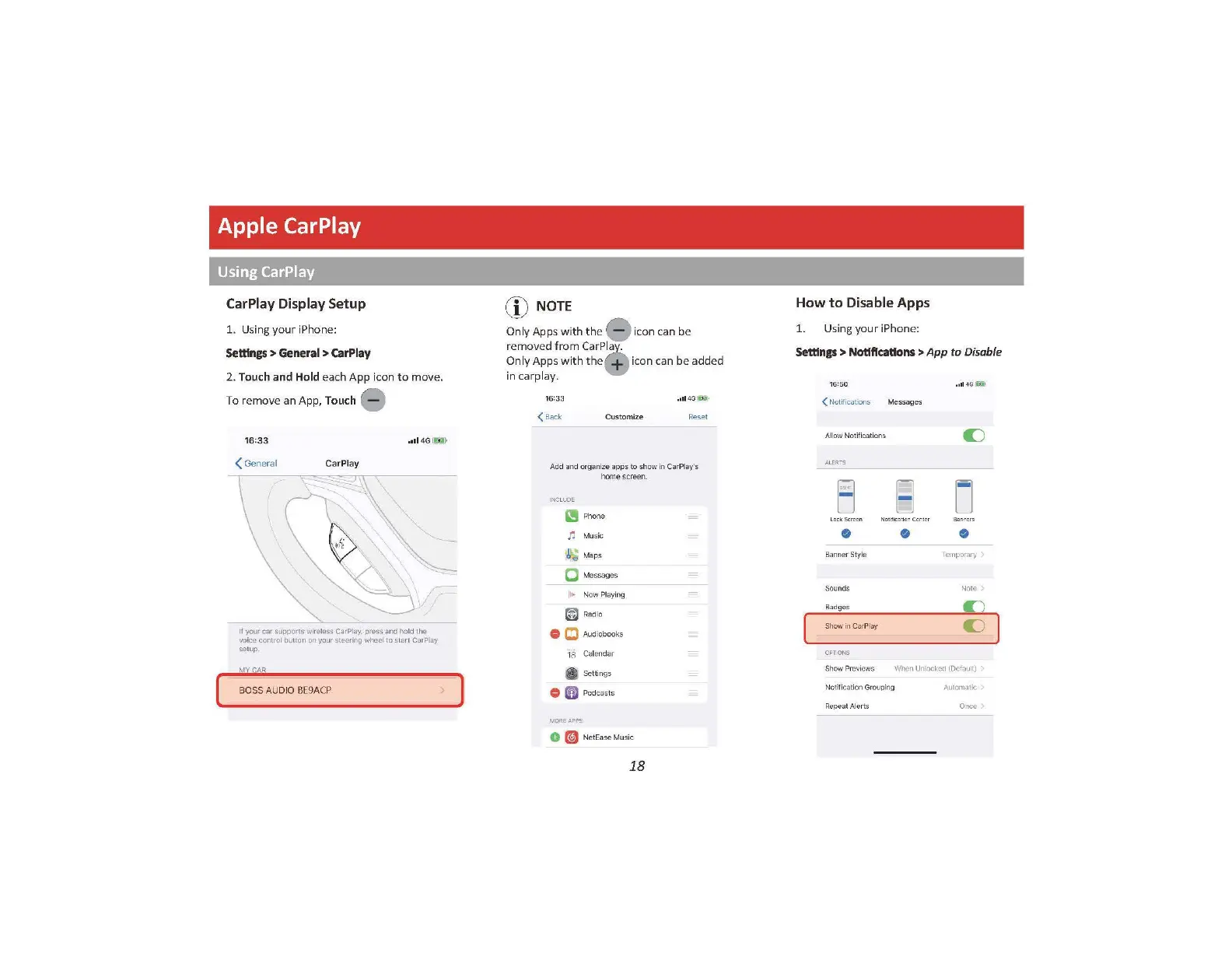
Apple CarPlay
Using CarPlay
[
CarPlay Display Setup
1.
Using
your
iPhone:
Settings
>
General
>
CarPlay
2. Touch
and
Hold each App icon
to
move.
To re
mo
ve an App, Touch -
16:33
( General CarPlay
,lll
4G
ffl}
If
your
car
supports
wire
less
CarP
lay,
press
and
ho
ld
the
voice control button
on
your steering wheel to
start
CarPlay
se
tu
p.
MY
f
AR
BOSS
AUDIO
BE9A
CP
!°'
)
NOTE
-.,
_!
,.,
Only Apps
with
th
e ic
on
can
be
removed
from
CarPla
.
Only Apps
with
th
e icon c
an
be added
in carpla
y.
,111
4G
(tiiJ•
<
Back
Cu
st
om
ize Reset
Add
and
organ
i
ze
apps
to
show
in
Ca
rPl
ay's
hom
e scree
n.
INCLUDE
m Pho
ne
n
Mu
s
ic
~ ;
Map
s
C M
es
sages
Iii
~ N
ow
Pl
ay
i
ng
~
Radio
0
CJ
Audiobooks
1A
Cal
endar
&
Se
t
tin
gs
0 a Podcasts
MORE
APPS
0
ml
NetEa
se
Mu sic
18
How
to
Disable Apps
1. Using yo
ur
iPhone:
Settings
> Notifications >
App
to
Disa
ble
15 :
50
o111
4G
!iw-
<
Notif
i
cat
ions M
essa
g
es
Allow
N
ot
ific
at i
ons
C)
ALElrS
8 D
Not
il
icl:
ionCcrtcr
Ba
n
ner
Style Temporary
So
un
ds
Note
Bad
gm;
Sh
ow
in C
ar
Pl
ay
C)
CFfONS
Sh
ow Previews When Unlocked (Default)
Notification Grouping Automatic
Repeat Aler
ts
Once

Related product manuals