EasyManua.ls Logo

Boss BE9ACP - Radio; Display Overview; Controls; Tuning

Boss BE9ACP
42 pages
Print Icon
To Next Page IconTo Next Page
To Previous Page IconTo Previous Page
Loading...
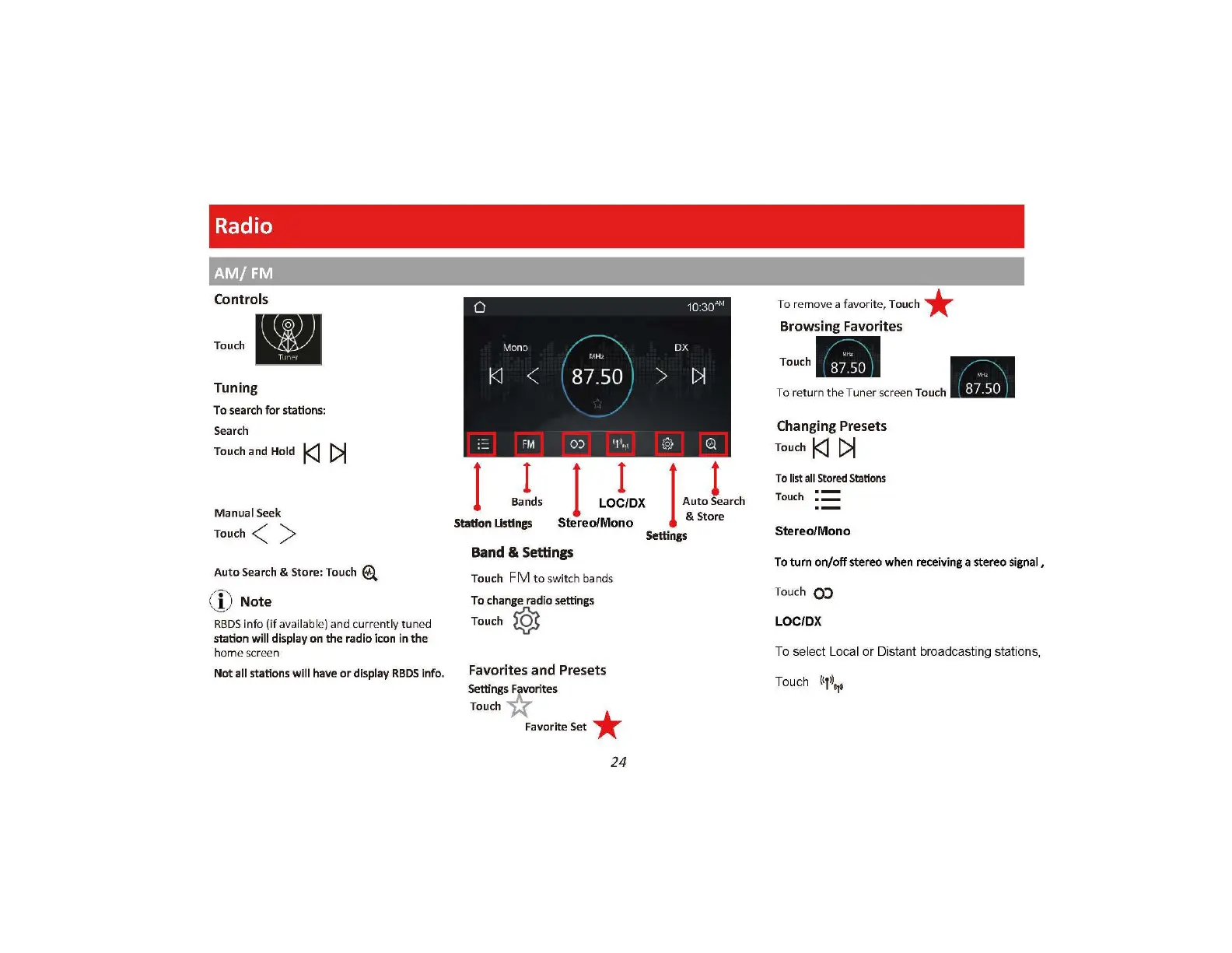
Radio
AM/FM
Controls
Touch
Tuning
To search for stations:
Search
Touch and
Hold
l<J
[>I
Manual Seek
Touch<
)
Auto Search & Store: Touch
@.
;'
9'
,
\],
)
Note
RBDS
info (if available)
and
curre ntly tuned
station
will
display
on
the
radio
icon
in
the
home screen
Not
all
stations
will
have
or
display
RBDS
i
nfo.
0
Mono
---\
./
r.tH
..
k1
<
87
.50 )
I
·-
FM
0)
(1
1\ ~
I
I
Bands
I Jox
Station
Ustlngs
Stereo/Mono
Band
&
Settings
Touch
FM
to
switch bands
To
change
radio
settings
Touch
~
Favor
ites
and
Presets
Settings~ rites
Touch J{"
Favorite Set *
24
10:30
At
,,
DX
>
~
@
Q
I
Auto Jearch
& Store
Settings
To remove a fa
vo
rit
e,
Touch *
Browsing Favorites
Touch-
-
To return
th
e Tuner scr
ee
n Touch : I
Changing Presets
Touch
l<J
[>I
To
list
all
St
ored
Stations
Touch
:==
S
te
reo/Mono
To turn
on/o
ff
st
ereo
when receiving a
ste
re
o si
gnal,
T
ouc
h
CO
LOC/DX
To
se
l
ec
t
Lo
cal or Distant broadcasting stat
io
ns,
Touch
l<T\
o

Related product manuals