EasyManua.ls Logo

Boss BE9ACP - Calling; History; Private Mode

Boss BE9ACP
42 pages
Print Icon
To Next Page IconTo Next Page
To Previous Page IconTo Previous Page
Loading...
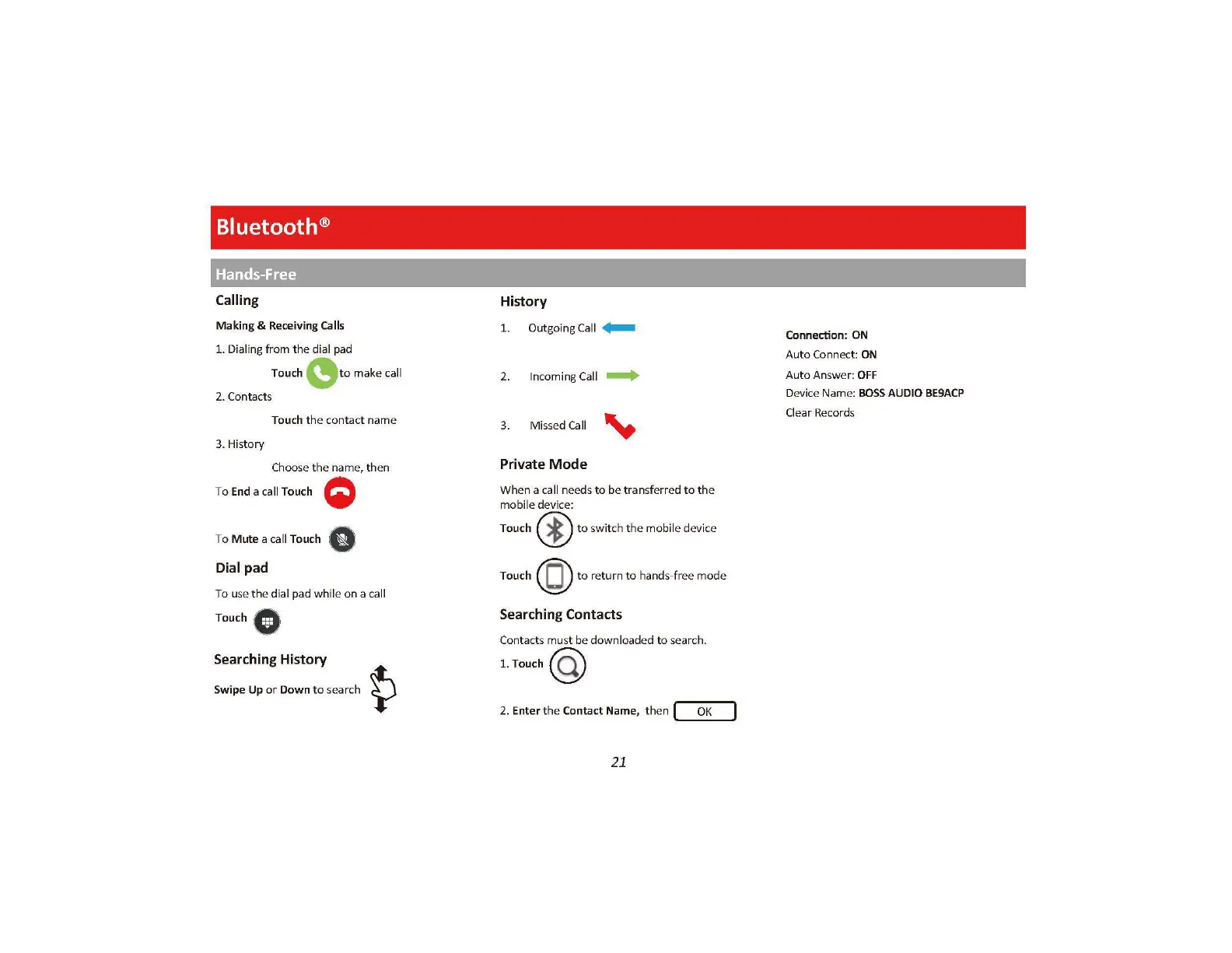
Bluetooth®
Hands-Free
Calling
Making & Receiving Calls
1.
Dialing from the dial
pad
Touch
(9
to
make call
2. Contacts
Touch
the
contact name
3. History
Choose
the
name,
then
To End a
call
Touch Q
To
Mute
a call Touch 8
Dial pad
To use
the
dial pad while
on
a call
Touch 8
Searching History
Swipe
Up
or
Down
to
search
History
1.
Outgoing Call
+--
2. Incoming Call
--+
3. Missed Call
~
Private
Mode
When a call needs
to
be
transf
e
rr
ed
to
the
mobile device:
Touch @
to
switch
th
e mobile device
Touch
(Q)
to
return
to
hands-free
mode
Searching Contacts
Contacts must be downloaded
to
search.
1.Touch@
2. Enter
the
Contact Name,
then
I
OK
21
Connection: ON
Auto
Connect: ON
Auto
Answer:
OFF
Device Name:
BOSS
AUDIO
BE9ACP
Cl
e
ar
Records

Related product manuals