EasyManua.ls Logo

Boss BE9ACP - Troubleshooting and Specifications; Troubleshooting Common Issues

Boss BE9ACP
42 pages
Print Icon
To Next Page IconTo Next Page
To Previous Page IconTo Previous Page
Loading...
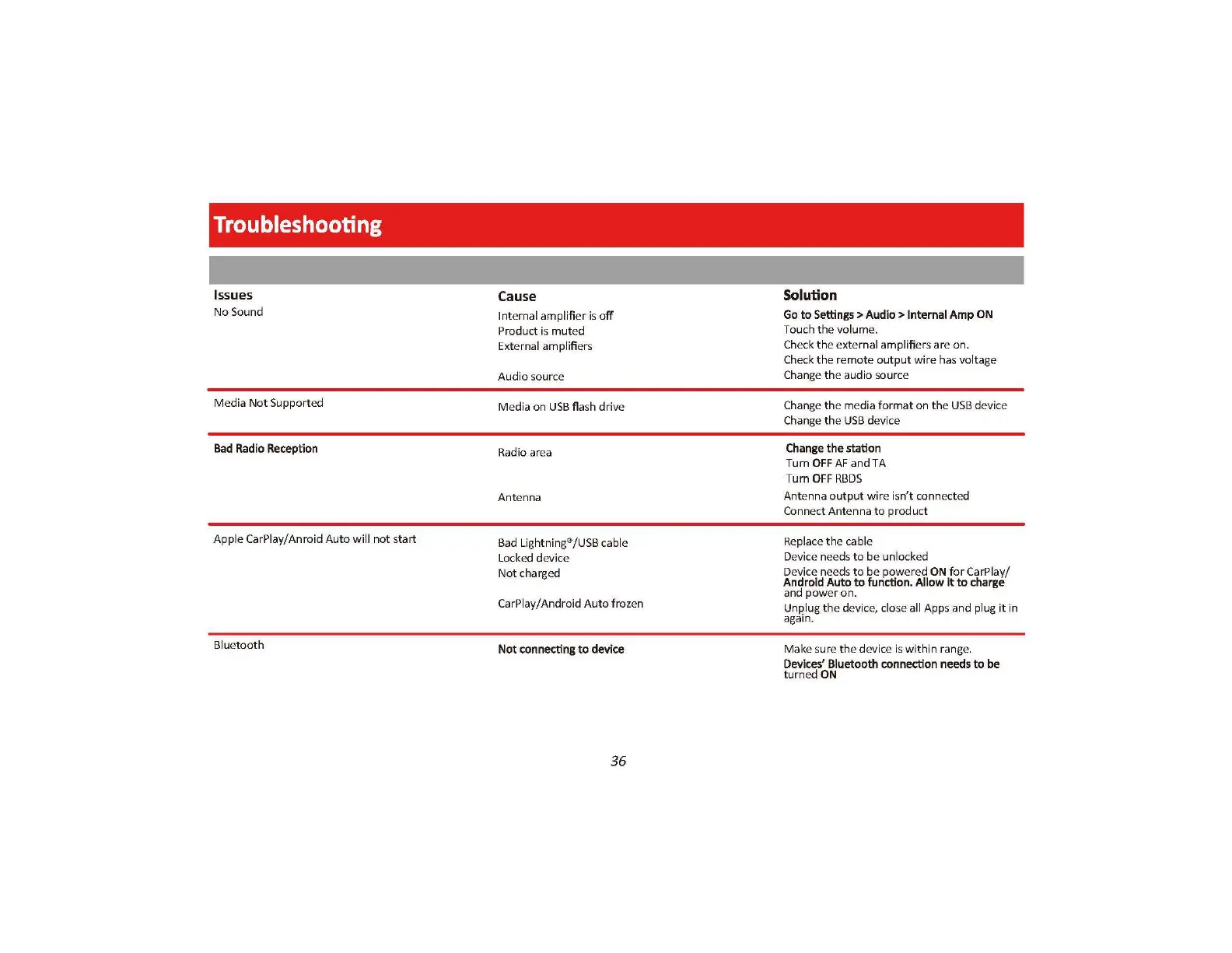
Troubleshooting
Issues
No
Sound
Media Not Supported
Bad
Radio
Reception
Apple CarPlay/ Anroid
Auto
will
not
s
tart
Bluetooth
Cause
Int
ernal amplifier is
off
Product
is
muted
External amplifie
rs
Audio source
Media
on
USB
flash
driv
e
Radio
ar
ea
Ant
e
nna
Bad
Li
g
htnin
/
USB
cable
Locked device
Not
charged
CarPlay/Android
Aut
o frozen
Not
connecting
to
device
36
Solution
Go
to
Settings>
Audio>
Internal
Amp
ON
Touch
th
e volume.
Che
ck
the
external amplifiers are on.
Check
th
e remote
out
p
ut
w
ir
e h
as
v
olt
age
Chang
e
th
e audio
so
urce
Change
th
e me
di
a
fo
r
mat
on
th
e
USB
device
Chan
ge
th
e
USB
device
Change
the
station
Turn
OFF
AF and TA
Turn
OFF
RBDS
Ant
enna o
utput
w
ir
e isn't conn
ec
ted
Conne
ct
Antenna to product
Replace
th
e cable
Device needs
to
be unlocked
Device ne
ed
s to be po
we
red
ON
for CarP
la
y/
Andro
id
Auto
to
function.
Allow
it
to
charge
and
pow
er
on.
Unplug
th
e devi
ce,
cl
ose all Apps and plug
it
in
again.
Make s
ur
e
th
e device is w
it
hin ran
ge.
Devices'
Bluetooth
connection
needs
to
be
turn
ed
ON

Related product manuals