EasyManua.ls Logo

Boss BE9ACP - Display Settings; Illumination Control; Gamma; LED Touch Buttons

Boss BE9ACP
42 pages
Print Icon
To Next Page IconTo Next Page
To Previous Page IconTo Previous Page
Loading...
Settings
Display
Bluetooth
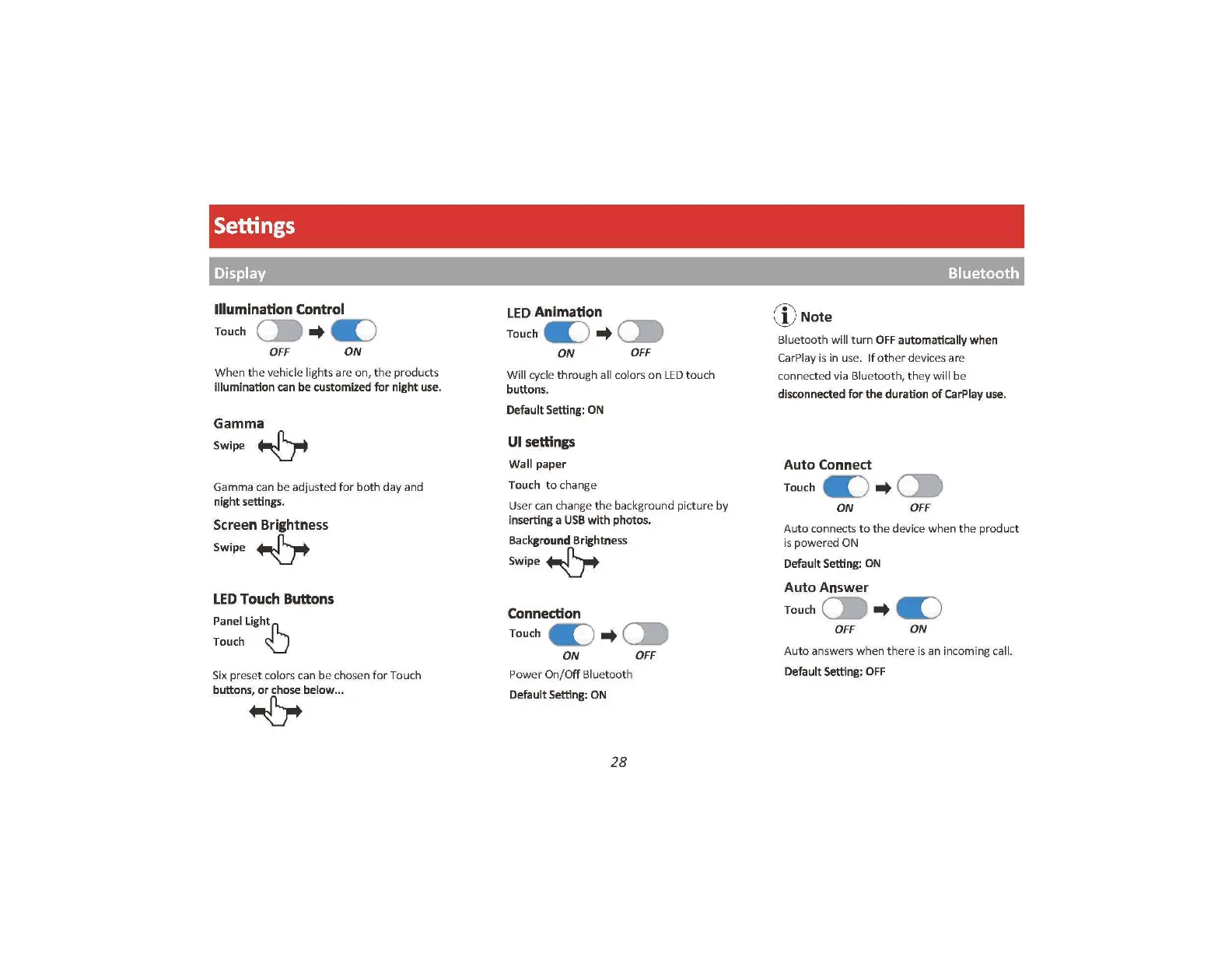
Illumination Control
Touch
C:.
-+
a:)
OFF
ON
When
the
ve
hicle lights are
on
,
the
products
illumination
can
be
customized
for
night
use.
Gamma
Swipe
~
Gamma can be a
dju
sted
for
both day and
night
settings.
Screen Brightness
Swipe~
LED
Touch
Buttons
PanelLightn-,._
Touch U
Six
preset colors can be chosen
for
Touch
buttons,
or
chose
below ...
~
LED
Animation
Touch
a:)
-+
C:.
ON
OFF
Will cycle
throu
gh all colors
on
LED t ouch
buttons.
Default Setting:
ON
UI settings
Wall paper
Touch
to
change
User
can
change
th
e background
pi
c
ture
by
inserting a
USB
with photos.
Background
Brightness
Swipe~
Connection
Touch
a:)
-+
C:.
ON
OFF
P
ower
On/
Off
Bluetooth
Default
Setting:
ON
28
('
e\
\J)
Note
B
lu
eto
oth
will
turn
OFF
automatically
when
CarPlay is in use. If o
th
er devi
ces
are
co
n
ne
cted via Bluetoo
th,
th
ey will be
disconnected
for the
duration
of
CarPlay
use
.
Auto
Connect
Touch
a:)
-+
~
ON
OFF
Auto
connec
ts
to
th
e device
wh
en
th
e product
is
power
ed ON
Default
Setting:
ON
Auto
Answer
Touch
C:.
-+
a:)
OFF
ON
Aut
o
an
s
we
rs
wh
en
th
ere is an in
co
min
g call.
Default Setting:
OFF

Related product manuals