EasyManua.ls Logo

Boss ELITE BE7ACP-SD - CarPlay Display and App Management

Boss ELITE BE7ACP-SD
42 pages
Print Icon
To Next Page IconTo Next Page
To Previous Page IconTo Previous Page
Loading...
Apple CarPlay
Using
CarPlay
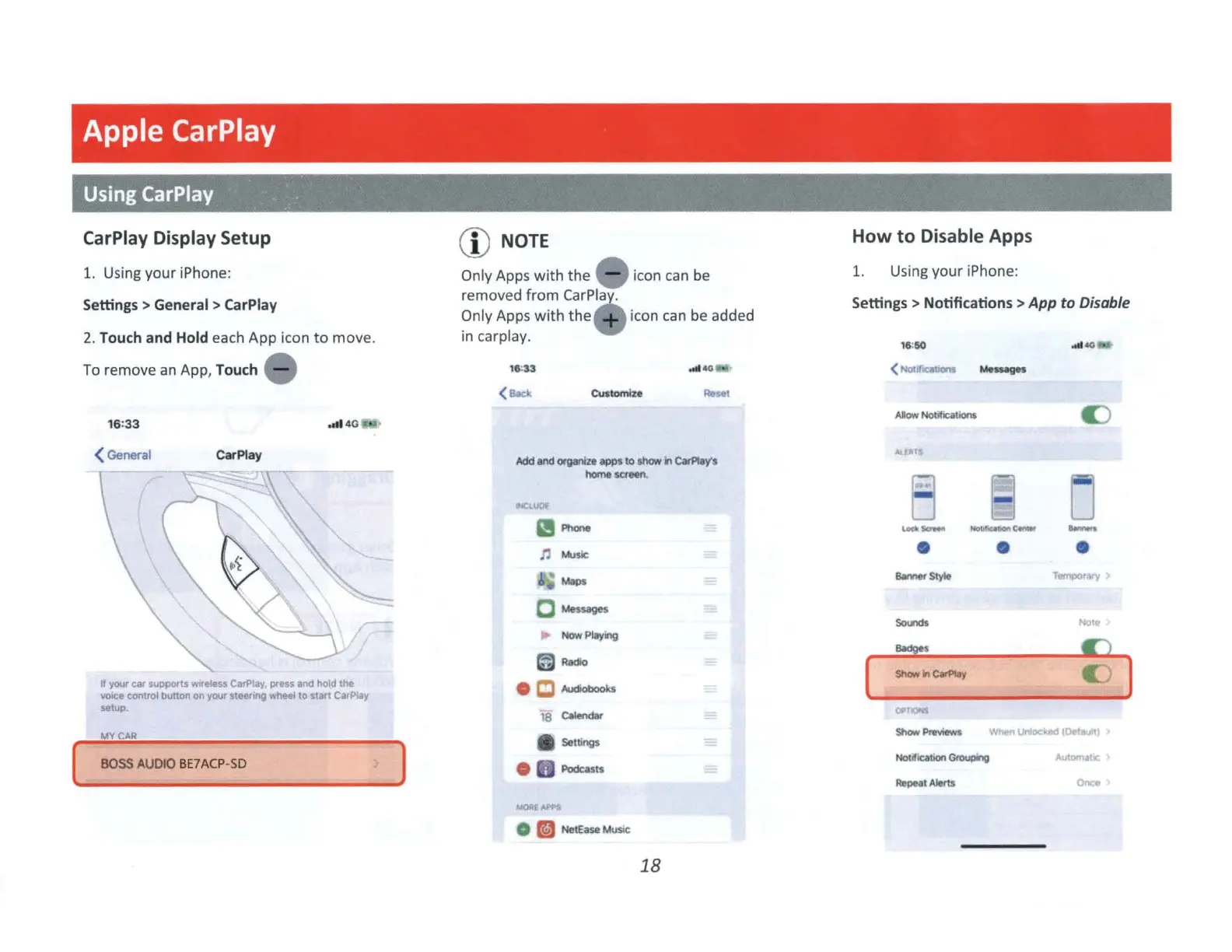
CarPlay Display
Setup
1. Using your iPhone:
Settings > General > CarPlay
2.
Touch and Hold each App icon
to
move.
To
remove
an
App, Touch
,otl4
G
( General CarPlay
If
your
Cllr
suppo,ts
wwele:;a CarPlay, press and
hold
the
~ooce
control
button
on
your
steering wtleel
to
start CarPlay
setup
MY
C'.AR
BOSS
AUDIO
BE7ACP
-S
D
CD
NOTE
Only Apps
with
the icon
can
be
removed
from
CarPla
Only Apps
with
the
icon
can
be
added
in carplay.
(
Bade
CUstomlze
Rosel
Add
and
organia
apps
to
show
r1
~ys
homesctNn.
Phone
n
~$It
i
~
o
¼!uages
Now
Playing
18
Calenda
r
A Settings
Podcasts
MORE
0
~
Ne
tE
ase
MU$1C
18
How
to
Disable Apps
1. Using your iPhone:
Settings > Notifications >
App
to Disable
[
Alow
NOOlicatlon
s
0
-
D
Showln~
~PreYlewS
No
llf
,cat,on
Gtouplng
AltPNI
Alerts
0
o )
UnloC~
(C>Naull)
Automa!ic
Onco

Related product manuals