EasyManua.ls Logo

Boss ELITE BE7ACP-SD - Troubleshooting Issues; Common Sound and Media Problems

Boss ELITE BE7ACP-SD
42 pages
Print Icon
To Next Page IconTo Next Page
To Previous Page IconTo Previous Page
Loading...
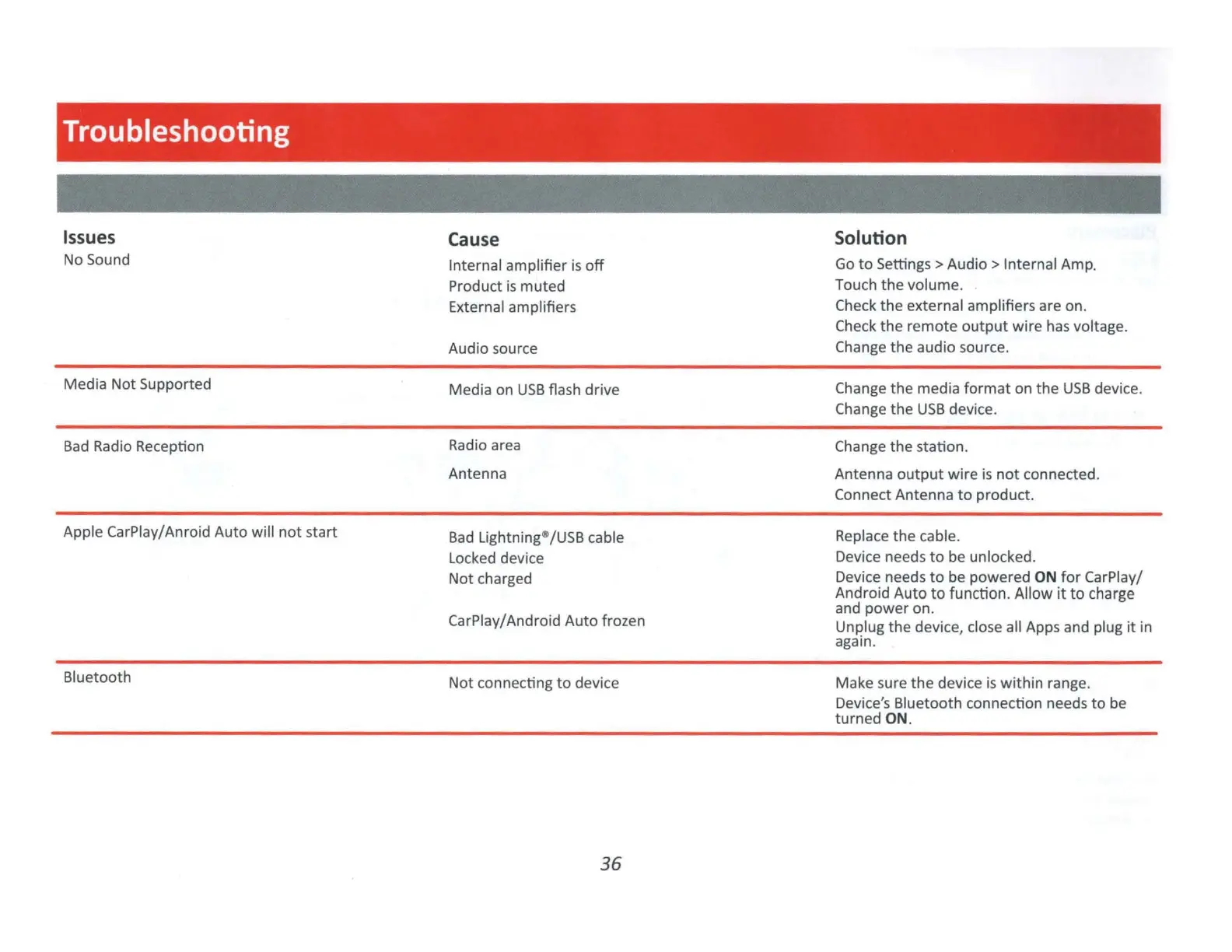
Troubleshooting
Issues
No Sound
Media Not Supported
Bad
Radio Reception
Apple CarPlay/Anroid Auto will
not
start
Bluetooth
Cause
Internal amplifier
is
off
Product
is
muted
External amplifiers
Audio source
Media on
USB
flash drive
Radio area
Antenna
Bad
Lightning
fl
/USB cable
Locked device
Not charged
CarPlay/Android
Auto
frozen
Not connecting
to
device
36
Solution
Go
to
Settings>
Audio>
Internal Amp.
Touch the volume.
Check
the
external amplifiers are on.
Check
the
remote
output
wire
has
voltage.
Change the audio source.
Change the media
format
on
the
USB
device.
Change
the
USB
device.
Change
the
station.
Antenna
output
wire is
not
connected.
Connect Antenna
to
product.
Rep
lace
the
cable.
Device needs
to
be unlocked.
Device needs
to
be
powered
ON
for
CarPlay/
Android Auto
to
function. Allow it
to
charge
and
power
on.
Unplug
the
devi
ce
, close all Apps and plug
it
in
again.
Make sure
the
devi
ce
is
wi
th
in range.
Device's Bluetooth connection needs
to
be
turned
ON
.

Related product manuals