EasyManua.ls Logo

Boss ELITE BE7ACP-SD - Bluetooth and Camera Settings

Boss ELITE BE7ACP-SD
42 pages
Print Icon
To Next Page IconTo Next Page
To Previous Page IconTo Previous Page
Loading...
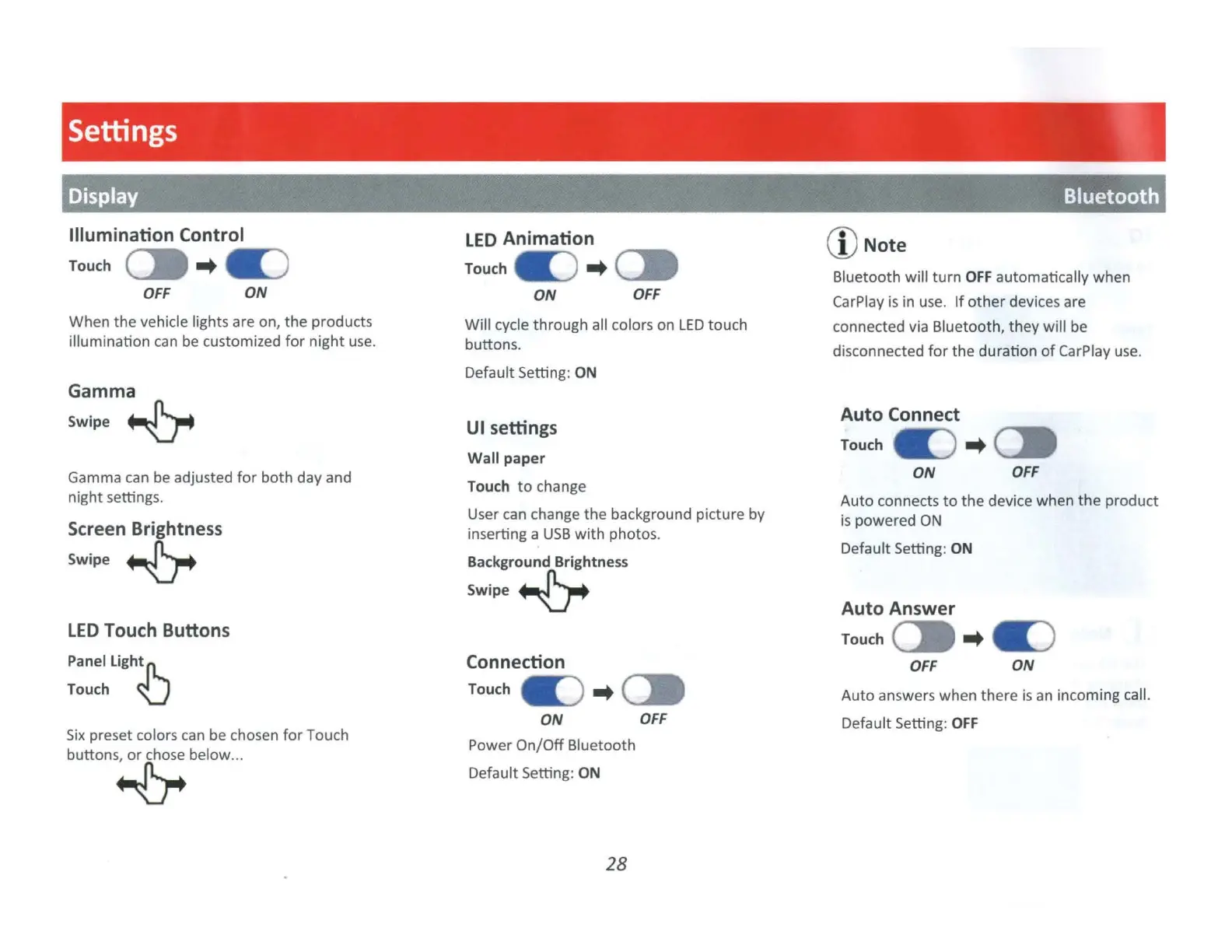
Settings
Display Bluetooth
Illumination Control
Touch
(]I
-.
.:)
OFF
ON
When
the
vehicle lights are on,
the
products
illumination can be customized
for
night
use.
Gamma
Swipe~
Gamma can
be
adjusted
for
both
day and
night settings.
Screen Brightness
Swipe~
LED
Touch Buttons
Panel Lightfl..
Touch U
Six
preset colors
can
be chosen
for
Touch
buttons~
below
...
LED
Animation
Touch
.:)
..
(]I
ON
OFF
Will cycle
through
all colors
on
LED
touch
buttons.
Default Setting: ON
UI settings
Wall paper
Touch
to
change
User can change
the
background picture by
inserting a
USB
with
photos.
Background
Brightness
Swipe~
Connection
Touch
.:)
..
ON
OFF
Power
On/Off
Bluetooth
Default Setting: ON
28
(D
Note
Bluetooth
will
turn
OFF
automatically when
CarPlay is in use.
If
other
devices are
connected via Bluetooth,
they
will
be
disconnected
for
the
duration
of
CarP
lay use.
Auto
Connect
Touch
.:)
..
(]I
ON
OFF
Auto
connects
to
the
device when
the
product
is
powered
ON
Default Setting: ON
Auto
Answer
Touch
(]I
-.
a:)
OFF
ON
Auto
answers
when
there
is
an incoming call.
Default Setting:
OFF

Related product manuals