Using LOOP FX
31
Overview Basic Operation Saving Track
Phrase Memory
Rhythm System Settings USB MIDI AppendixLOOP FX
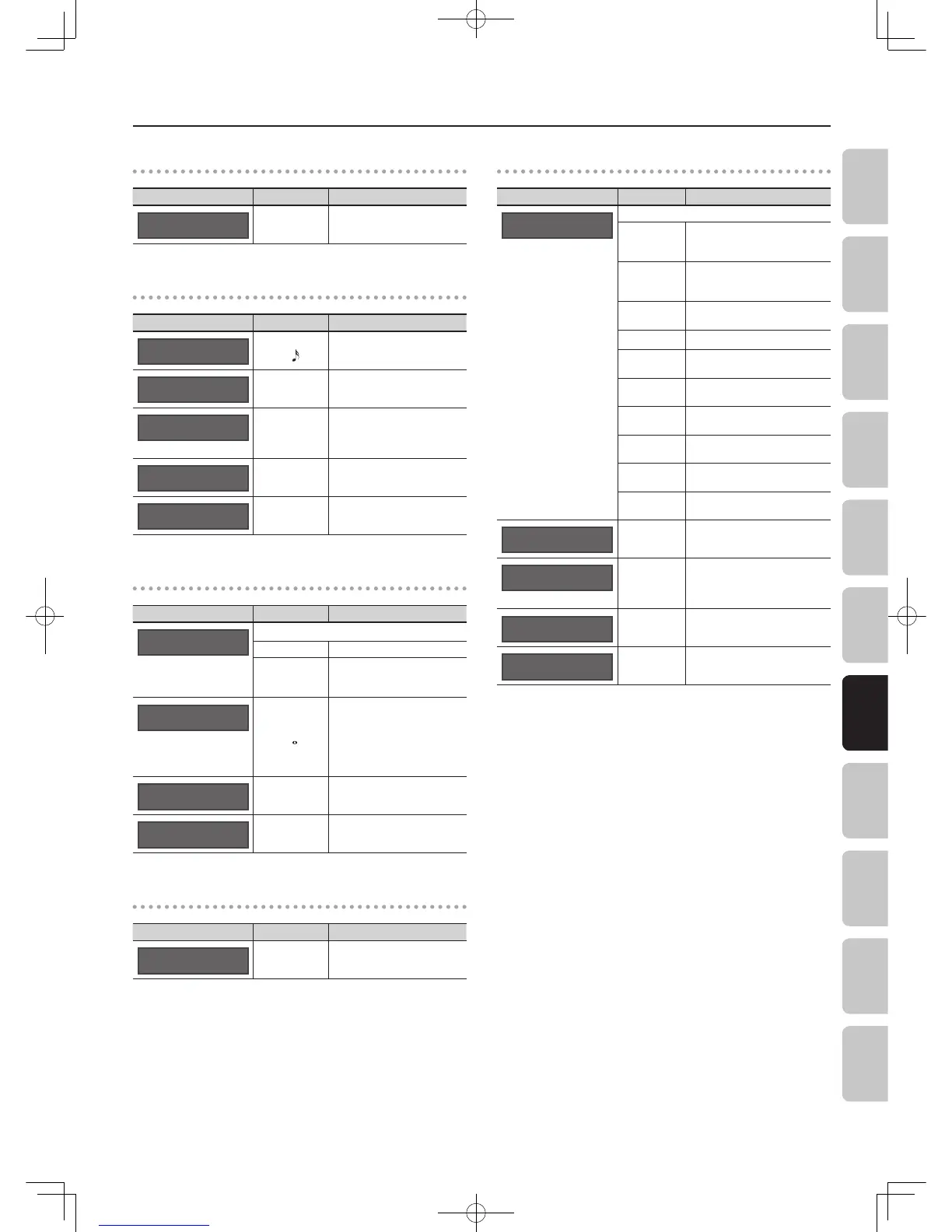
GT->BASS
Parameter Value Explanation
FX:Level
50
0–100
Adjusts the volume level of the
eect.
FILTER settings
Parameter Value Explanation
FX:Rate
50
OFF–100,
4 MEAS–
Adjusts the rate of modulation.
FX:Depth
50
0–100 Adjusts the depth of modulation.
FX:Freq
50
0–100
Adjusts the cuto frequency of
the lter.
Increasing this value will raise the
cuto frequency.
FX:Resonance
7
1–10 Adjusts the intensity of the eect.
FX:Level
80
0–100
Adjusts the volume level of the
eect.
DELAY settings
Parameter Value Explanation
FX:Mode
SINGLE
Use this to choose the type of delay.
SINGLE A simple monaural delay.
PAN
Provides a tap delay eect that
divides the delay time between
the left and right channels.
FX:D.Time
400msec
1–600 msec,
1 MEAS–
Adjusts the delay time.
* If the note length exceeds the
upper limit for the delay time,
some fraction of that length
(1/2, 1/4, 1/8, etc.) will be used
for synchronization.
FX:Feedback
20
0–100
Adjusts the number of repetitions
for the delay.
FX:E.Level
50
0–120
Adjusts the volume level of the
delay.
LO-FI setting
Parameter Value Explanation
FX:Level
50
0–100
Adjusts the volume level of the
eect.
DISTORTION settings
Parameter Value Explanation
FX:Mode
NATURAL OD
Selects the type of eect.
NATURAL OD
Produces the natural sounding
distortion of a slightly overdriven
amp.
BLUES OD
This is a unique overdrive that
faithfully reproduces the nuances
of picking.
OD-1
The sound of the BOSS OD-1. It
produces sweet, mild distortion.
WARM OD A warm overdrive.
DISTORTION
This is a sharp distortion with rich
sustain.
MODERN DS
This is the sound of a large
high-gain amp.
STACK
This is the sound of a vintage
stack-type amp.
LOUD
This distortion sound is ideal for
performing heavy ris.
METAL ZONE
This is a distortion that emphasizes
the midrange.
60S FUZZ
This is a distortion that is
distinctively rough and heavy.
FX:Drive
50
0–120
Adjusts the intensity of the
distortion.
FX:Bottom
0
-50–+50
Decreasing this value will produce
a sound with the low end cut, and
increasing this value will boost the
low end in the sound.
FX:Tone
0
-50–+50 Adjusts the tone.
FX:Level
50
0–100
Adjusts the volume level for
DISTORTION.


 To Next Page