2-16
MRI Scan Procedure Protocol
After the Scan
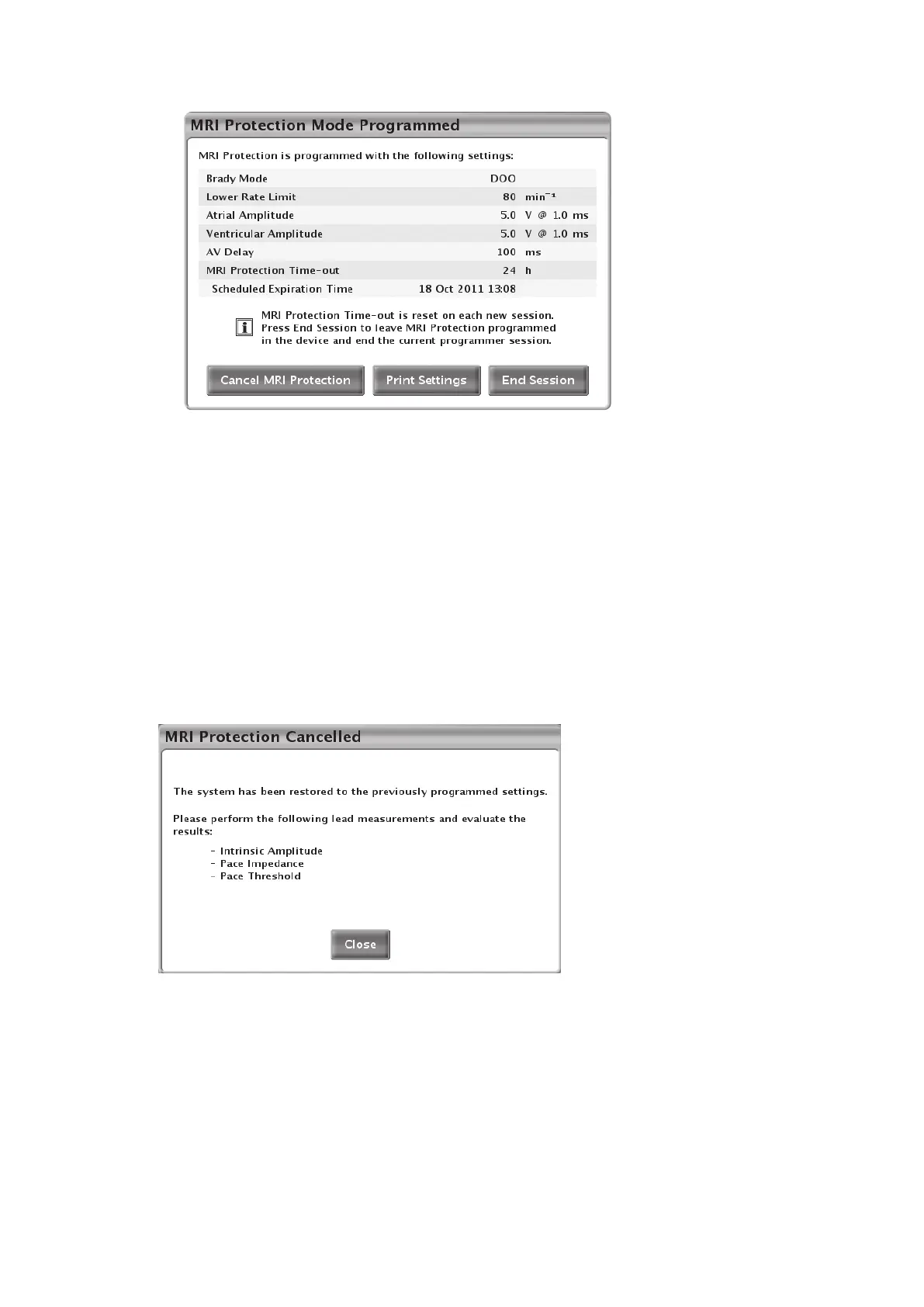
Figure 2–10. MRI Protection Mode Programmed (Cancel MRI Protection)
Following user-initiated cancellation of MRI Protection Mode, the PRM will automatically navigate
to the Lead Tests screen and prompt the user to perform the following lead tests (Figure 2–11
MRI Protection Cancelled dialog on page 2-16):
• Lead impedance
• Pacing threshold
• Intrinsic amplitude
These tests may be performed subsequent to automatic (Time-out) exit from MRI Protection
Mode as well.
Figure 2–11. MRI Protection Cancelled dialog
On exit from MRI Protection Mode, a summary report of the MRI is stored as an MRI episode and
can be printed as an episode report using the PRM printer. The MRI Protection episode can also
be accessed and viewed via the Arrhythmia Logbook. A sample stored event detail printout is
shown in Figure 2–12 Sample stored event detail printout on page 2-17.
The MRI episode can also be viewed on the Arrhythmia Logbook via remote patient monitoring (if
available).



 To Next Page