13
Maximum conversation time can
b
e edited in the range 1 to 255 s
with the XA/300LR customization
o
ption using software
PCS/300LR.
C
ALL USING
CUSTOMIZED CODE
1) Key the customized code in
directly using the numerical key-
pad.
2) Lift the receiver.
3) Send the call with the key .
It is not necessary to type in the
complete code if you use the
pre-set texts that can be selec-
ted using the
F3 key.
A
NSWERING A CALL
FROM ENTRY PANELS
When a porter call is received
from the entry panel, the switch-
board emits a call note that lasts
for a preset time of 30 s (can be
edited in the range 1 to 255 s
with the IPD/300LR customiza-
tion option using softwar
e
PCS/300LR), and the description
of the entry panel the call is
made from flashes on screen.
If the entry panel features a cam-
era, the relevant image will
appear in the background (in
installations with more than one
porter switchboard, the image is
displayed when the receiver is
lifted).
At this point, the door lock
release or auxiliary command
can be sent directly without lifting
the receiver, and current commu-
nication cut of
f by pr
essing the
ESC key, or the porter call
answered by lifting the receiver.
Conversation time with the entr
y
panel is determined by the
switchboard by replacing the
r
eceiver or pr
essing the
ESC
key
. Whatever the case, the max-
imum time is 4 min.
If there is no answer before the
call time is up, the description of
the entry panel the call is made
fr
om is stor
ed in the
Call from
entry panel.
To delete the stored call (up to 10),
you have to press the key.
ANSWERING
A
CALL
FROM RECEIVERS
Following a call to the porter sent
by the r
eceiver
, the switchboar
d
generates a call note lasting 30 s
and the scr
een featur
es: the
associated name (if entered),
customized code, total number
of calls not dealt with (up to 50)
and the or
der in which they
came in.
T
o call users in the or
der of their
respective incoming calls, sim-
ply lift the switchboard receiver
and pr
ess the
key
.
If you want to call users in a dif-
INSTRUCTIONS FOR
USING THE UNIT
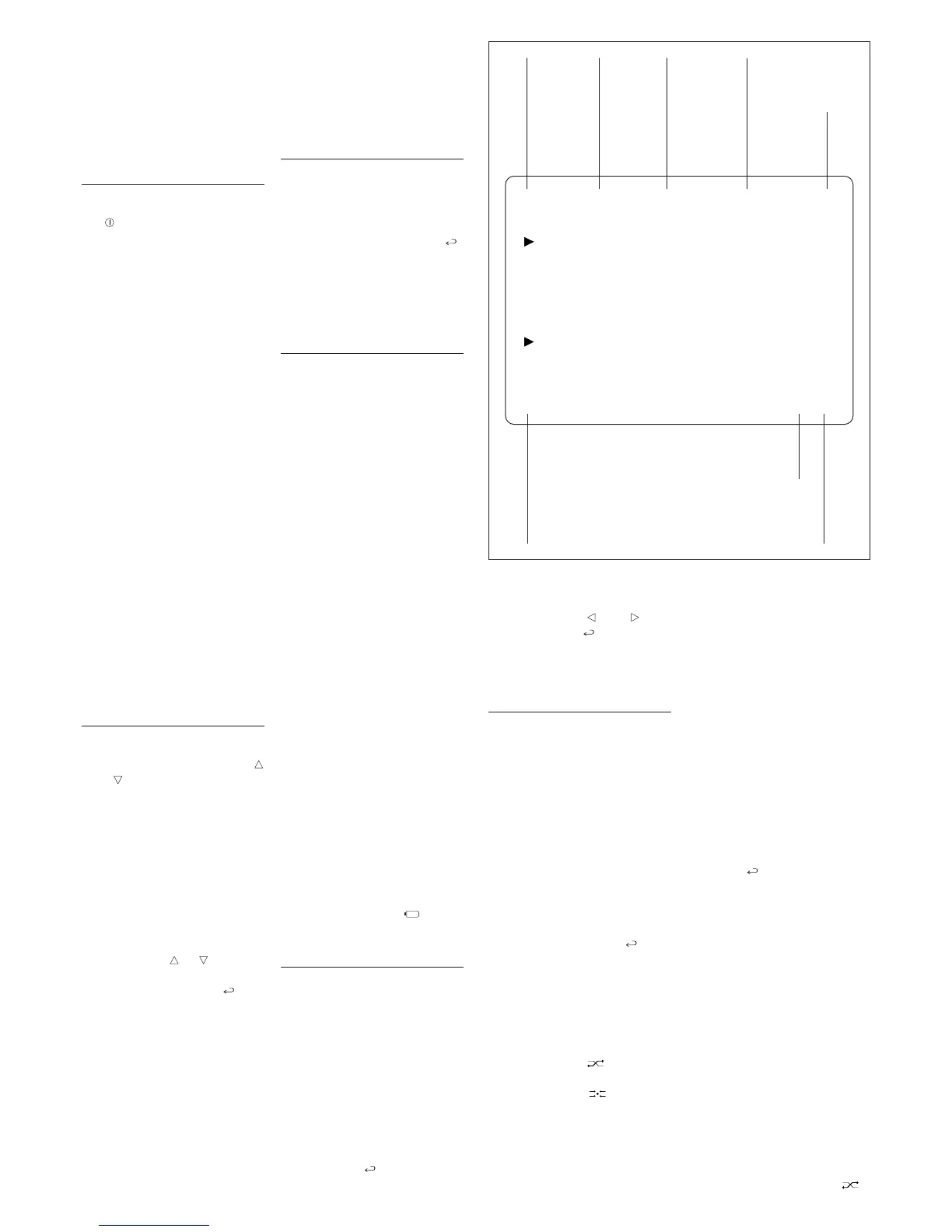
When the switchboard is operat-
ing, the display gives the infor-
mation illustrated in fig. 2.
SWITCHING THE
S
WITCHBOARD ON/OFF
Switch on the unit by pressing
the key (LED red lights): after
approx. 4 s, the switchboard is
operative.
A low note sounds to indicate
standby status when the unit is
s
witched on and any incorrect
commands entered, whilst a
higher note sounds when keys
are pressed correctly.
After the switchboard has
remained idle for a time pro-
grammable in the range 1 to 54
min, its monitor switches to
standby.
T
he red LED flashes to indicate
this status.
The monitor automatically
switches back on when any key
is pressed or when the switch-
board receives a call.
To switch off the switchboard,
exit any currently running proce-
dures (
ESC key) and press the
stand-by key for at least 1 s (the
red LED goes blank).
If the call diversion is set to
another switchboard (see pro-
gramming chapter on page 8),
when you switch off the applian-
ce, all calls received will be tran-
sferred automatically.
CALL USING NAME
SEARCH FEA
TURE
1) Select the user name or por
ter
to be called by pr
essing keys
and briefly (if there is no
name, the customized code is
displayed).
Scanning is performed in alpha-
betical or
der in this or
der of prior
-
ity: space, numbers and letters.
Every time the key is pressed, the
next name appears whilst, if the
key is kept pr
essed, a sear
ch is
performed by scrolling through
the initial letters in alphabetical
order or reverse order depending
on whether key or is used.
2) Lift the receiver.
3) Send the call with the
key
.
If a porter camera has been
enter
ed in the video entr
y con
-
trol installation (by means of
softwar
e PCS/300LR, supplied
with the interface IPC/300LR),
the camera’s image appears on
the porter’s screen and receiv-
er
’
s monitor
.
Maximum conversation time
depends on the setting con-
tained in the power supplier con-
nected to the receiver (factory
setting: 60 s).
ferent order of priority, instead,
simply select the receiver to be
called with keys and , and
confirm with the key.
Any unwanted calls can be
deleted using the © key.
CALLS
INTERCEPTION/TRANSFER
Switchboards in non-interception
mode (direct mode) only receive
calls from the entry panel intend-
ed for the actual porter (corre-
sponding to the first key on
pushbutton panels, or to key
P
on digital panels).
If is transpires from the conver-
sation with the entry panel that a
caller wishes to talk with a user,
the porter can call the user
immediately without r
eplacing
the receiver by keying in or
selecting the relevant user code
and confirming with the
key
.
Once conversation with the user
is over
, the por
ter can r
esume
communication with the entr
y
panel by pressing the
ESC key
(or replacing the receiver), or
can put the entry panel caller
through to the user with the rele-
vant transfer key .
To switch to interception status,
simply pr
ess the
key briefly
(after approx. 1 s, the
INT mes-
sage appears in the relevant
field to indicate this new status).
Default setting for inter
ception
status: total inter
ception for all
r
eceivers.
To edit this setting, see chapter
entitled
Programming intercep-
tion level
.
In this operating mode, any call
made from the entry panel will be
sent to the switchboard.
The call is announced by an
acoustic note, a (flashing) mes-
sage indicating which entry
panel the call has been made
from, a message indicating the
customized code of the receiver,
and the image, wher
e applica
-
ble, displayed on the monitor (for
video entry control installations
only).
When the r
eceiver is lifted, the
switchboard communicates direc-
tly with the entry panel.
When the key is pressed, the
call is forwarded to the receiver
(call status is announced by an
acoustic note and the user’s
code flashing), and the entr
y
panel making the call is placed
on standby, and cannot listen in
on the private conversation.
The called receiver can con-
verse with the porter and can
view the image from the entry
panel the call is made from (in
video entry control installations
only) on the monitor.
Once conversation with the user is
over, the porter can resume com-
munication with the entry panel by
pr
essing the
ESC key (or r
eplac
-
ing the receiver and lifting it
again), or can put the entry panel
caller thr
ough to the user by
pressing the transfer button .
2ndF A-Z 12:00 INT OCC.
-----------------------------------------------------
NAME OF CALLED USER OR
U
SER NUMBER ENTERED
11
USER NAME
FROM RECEIVER 11
-----------------------------------------------------
E.P. DESCRIPTION 01/01
Enables
keypad’s
2
nd
function
Upper/
lower case
System clock
(where
featured)
Interception
status
DIR = Direct
Busy status
Call from
entry panel
Total no. of
call received
from user
Active
user call
position
2


 To Next Page