EasyManua.ls Logo

Bpt IPD/300LR US - System Settings; Access Code and Clock Settings; Call Output and Stand-by Time

Bpt IPD/300LR US
32 pages
Print Icon
To Next Page IconTo Next Page
To Previous Page IconTo Previous Page
Loading...
9
A-Z DIR
--------------------------------------
Stand-by time:
(1-54)
5 min
SETUP MENU
Ring volume
Users management
Calls filter
Call divert
Entry panels selection
Setup access code
Set clock
Call output mode
Stand-by
time
14
A-Z DIR
--------------------------------------
Setup access code:
12345
S
ETUP MENU
Lingua/Language
Ring volume
U
sers management
Calls filter
Call divert
E
ntry panels selection
Setup
access
code
Set clock
C
all output mode
A-Z DIR
--------------------------------------
Day of week:
(1-7)
1
A-Z DIR
-
-------------------------------------
Set clock:
hour (0-23) min (0-59)
1 : 00
SETUP MENU
Lingua/Language
R
ing volume
Users management
Calls filter
C
all divert
Entry panels selection
Setup access code
S
et
c
lock
Call output mode
11
12
CALL OUTPUT MODE
All
calls
Alarm calls only
Ext. panel calls only
SETUP MENU
Lingua/Language
Ring volume
Users management
Calls filter
Call divert
Entry panels selection
Setup access code
Set clock
Call
output
mode
13
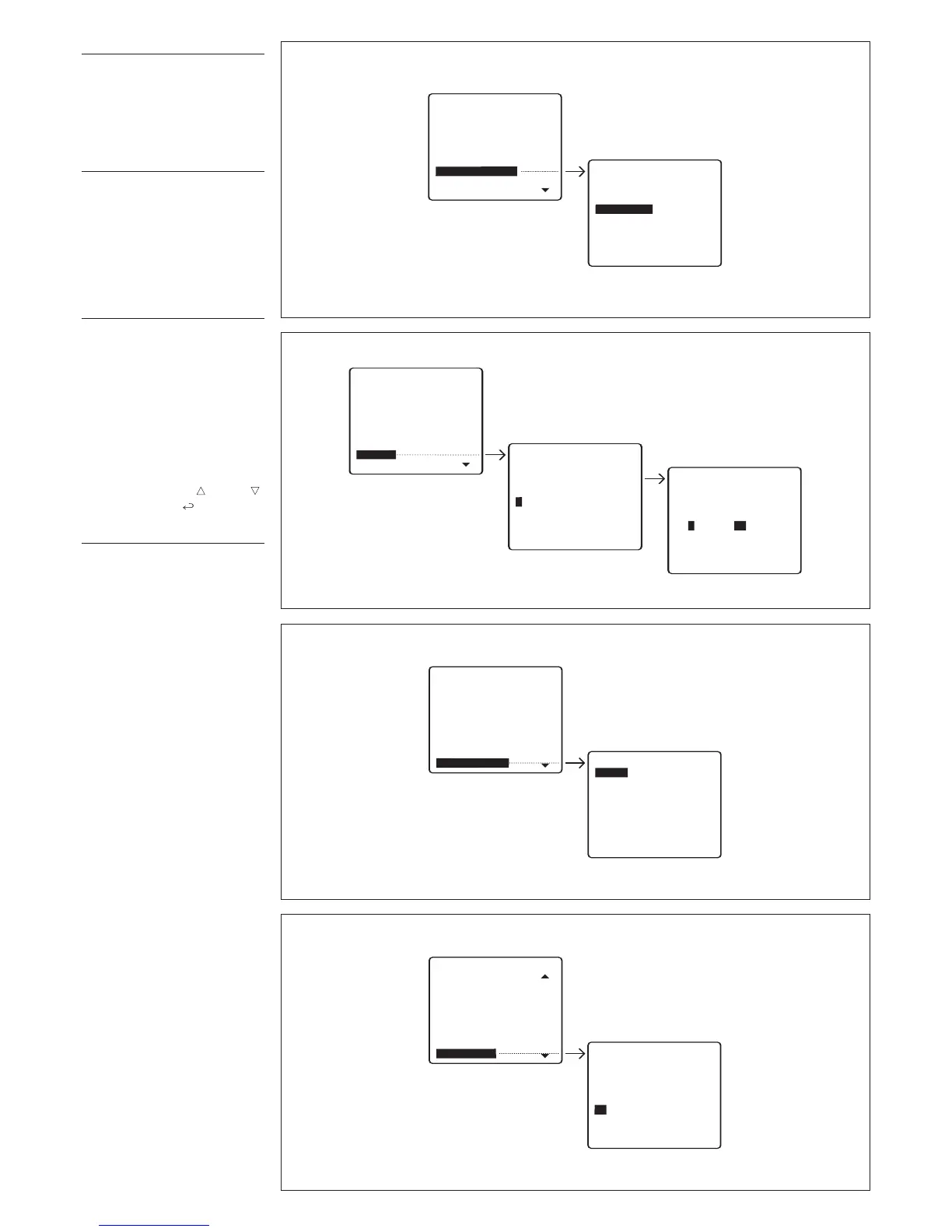
Setup access code
Sets code required to access
s
etup menu (fig. 11).
The default code is
12345.
Up to
9 numbers and letters can be
entered.
Set clock
If a clock is present in the
s
ystem, it is possible to set the
clock parameters directly from
the switchboard (days of the
week, hours and minutes) (fig.
12).
C
all output mode
Enables you to select the call
status output mode available for
additional bells (fig. 13).
Default setting: call status output
is enabled for any incoming call.
The output can be set so that it is
activated only when alarm calls
are received, or only when calls
are received from the entry
panel, by selecting the relevant
mode with keys and .
Confirm with the
key
.
Stand-by time
Sets how long the switchboard
may remain idle before screen
goes blank (fig. 14).
Default time is 5 min. This setting
can be edited by entering a time
in the range 1 to 54 min.
The relevant status is indicated
by the stand-by LED flashing. To
switch the screen back on, sim
-
ply pr
ess any key
.

Table of Contents

Related product manuals