14
SELF-CONNECTION
T
O ENTRY PANELS
T
he switchboard features a ded-
icated key for self-connection
and scanning of entry panels.
Lift the receiver and press the
key until the desired entry
panel is selected.
Via the selected entry panel, you
can check audio, video (only in
installations featuring 300-series
audio/video entry panels), and
door lock release and auxiliary
controls.
ENTERING/EDITING
U
SER NAMES
Access the programming menu
by pressing keys and at the
same time and then enter the
access code (preset code:
1
2345
)
and confirm with the
key.
Select the Users management
function with the key and con-
firm.
PROGRAMMING
INTERCEPTION LEVEL
AND FILTER APPLICATION
FOR PORTER CALLS
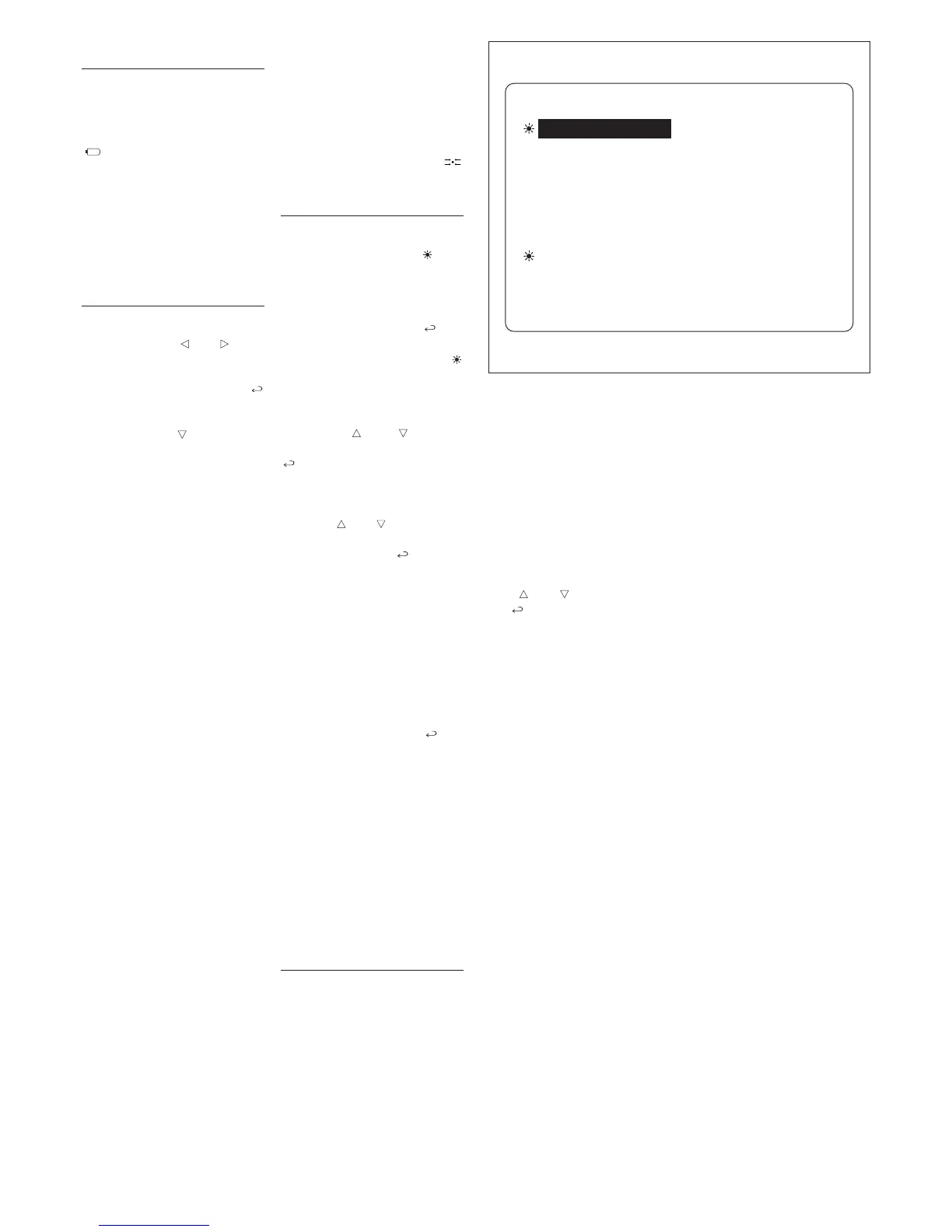
To access the interception and
filter activation menu (fig. 3),
press the interception key
for at least 2 s.
USER CALLS INTERCEPTION
The active interception level is
indicated by the symbol , and
you can choose between total
and partial.
To switch to partial interception
mode, select the
Total intercep-
tion
option and press the key:
the new partial interception level
is indicated by the symbol
moving to Entry panel, block and
user interc. modes.
At this point, choose the individ-
ual devices to be intercepted by
using keys and to move
through the list, and confirm with
.
Once inside the individual menu,
you can select the type of device
(entry panels, blocks or users)
with keys and
,
then change
active status (
DIRECT or INTER-
CEPTED
) using the
key
.
Press the
ESC key to exit each
individual menu.
Note. 300-series block intercep-
tion also includes all X2 entry
panels belonging to said block in
the same way that user intercep-
tion is active for calls from any
entry panel.
If you want to cancel the individ-
ual interception settings, you can
select the
Interception reset
function, then press the key
and
Yes when prompted to con-
firm.
For instance, when an individual
user so r
equests, the inter
cep
-
tion status of a receiver can be
changed without cancelling total
interception so that calls to said
user are automatically intercept-
ed when switching to partial
inter
ception status.
To do this, follow the above-men-
tioned pr
ocedur
e without chang
-
ing total interception status.
PORTER CALL FILTER
The porter call activation func-
tion, in installations with a num
-
ber of porter switchboards, lets
the porter receive/not receive
calls made to the porter either
fr
om a given entr
y panel (por
ter
calls or intercepted calls) or from
X2 receivers or entry panels
belonging to a given 300-series
block.
By enabling or disabling the fil-
ter
, r
egar
dless of settings made
in the IPD/300LR unit’
s pr
ogram
-
ming menu, an area or block
switchboard can switch to gen-
eral or main level instantly (inso-
far as the existing communica-
tion lines allow).
The unit comes factory set for all
entry panels and all blocks to
call the porter switchboard(s)
inserted in the installation.
The first porter to answer the call
is put through to the caller,
bypassing all other porters.
To activate the filter, select the
Call filter active option using
keys and , and confirm with
the
key
.
3
INTERCEPTION MENU
Total interception
Entry pan. 300 interc.
Blocks 300 interc.
Users interception
Interception reset
Calls filter ON
All calls


 To Next Page