Operations
Load Ribbon
38
Y882746 BPP81 User Manual 5/13/08
Load Ribbon
Always use ribbon that is wider than the media to protect the printhead from wear. For direct
thermal printing, do not load ribbon in the printer.
The standard Thermal Transfer option (black ribbon spindle) uses ribbon coated on the
outside. To avoid damaging your printer, follow the directions for the Thermal Transfer option
installed in your printer.
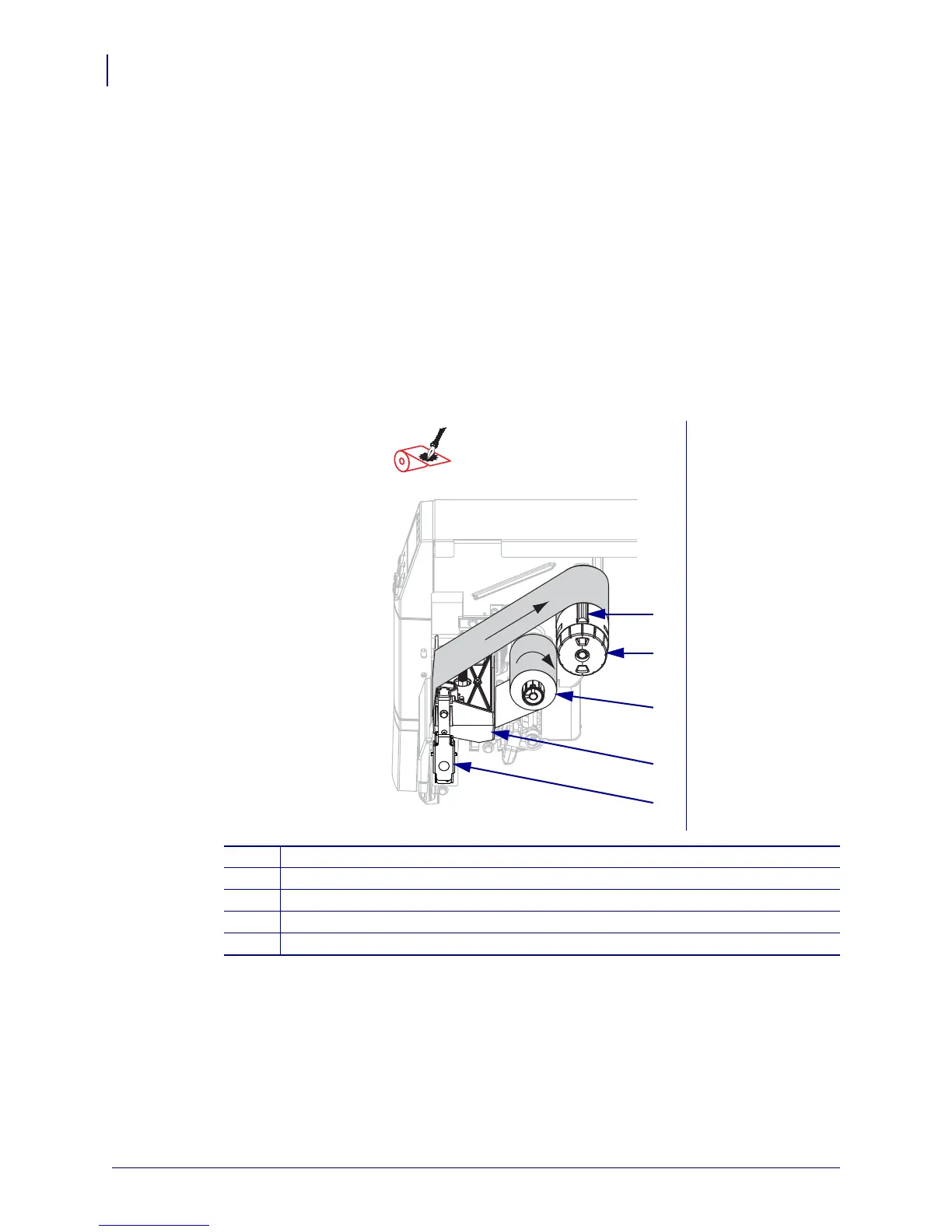
Figure 8 shows the ribbon paths for ribbon coated on the outside. The coated surfaces of the
ribbon are shown in gray when they are visible. To determine which side of a ribbon is printed,
see Coated Side of Ribbon on page 28.
Figure 8 • Ribbon Path
Ribbon Coated Outside
(black ribbon spindle)
1
Tension blade
2
Ribbon take-up spindle
3
Ribbon supply spindle
4
Printhead assembly
5
Printhead release latch



 To Next Page