3
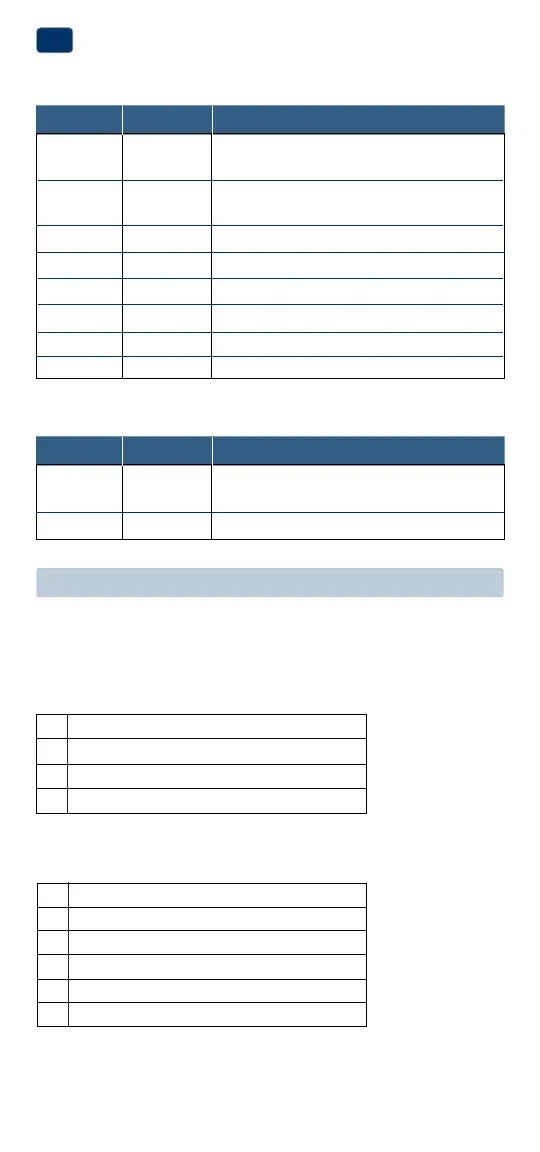
Terminal Function Description
Rc* Input 24VoltACCoolingTransformer
(DualTransformerSystemsOnly)
Rh* Input PowerConnection(24VoltACHeating
TransformerorMillivoltPowerSource)
O Output ReversingValve(CoolActive)
B Output ReversingValve(HeatActive)
Y Output
1stStageCompressor(appearsas Y1on1200NC)
G Output FanControl
W Output 1stStageConventionalHeat
C Input 24VoltACTransformerCommon
Connect Your Wires
3
Wiring Terminations
Terminal Function Description
W1/E Output (W1)1stStageConventionalHeat
(E)EmergencyHeatRelay
W2 Output 2ndStageHeat/AuxiliaryHeat
Additional Terminations (1200NC only)
Heat Only or Millivolt
Set Installer Switch to NORM
Rh*
PowerConnection
W HeatRelay(appearsasW1/Eon1200NC)
G FanRelay[note 4]
C 24VoltACTransformerCommon[note 1]
1 HEAT / 1 COOL Single or Dual Transformer
Set Installer Switch to NORM
Rh*
24VoltACPower(heatingtransformer)[note 2]
Rc*
24VoltACPower(coolingtransformer)[note 2]
W HeatRelay(appearsasW1/Eon1200NC)
Y CompressorRelay(appearsasY1on1200NC)
G FanRelay
C 24VoltACTransformerCommon[note 1, 3]
Typical Wiring Configurations
NOTE: The “Installer Switch” option will be configured in the next step.
Conventional Systems
*AppearsasRon1200NC(singletransformer)


 To Next Page