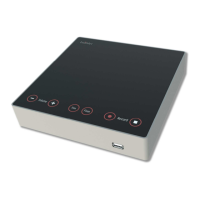
DCen mini
DIGIMIC®
14 Copyright by BRÄHLER ICS AG
Operation
Volume
With the two buttons VOLUME (-) and VOLUME (+) the volume can be adjusted. The illumination of these
buttons depends on the set level.
dark: low or off
bright: loud
This setting affects the volume of the microphones loudspeakers as well as the level of the PA OUT
connector.
Balance
With the second pair of buttons, the balance between the microphone speakers and the output level at the
PA OUT connector is set.
If the balance is in the middle both buttons light up brightly and both outputs are at full capacity. Pressing the
button BALANCE LS the button BALANCE PA gets darker and the level at the output OUT PA gets lower.
Microphone Operation Mode
With the buttons VOX and FLOAT the microphone mode is selected. The default mode is the AUT3
Microphone (automatic).
Pressing the button VOX the mode voice activation limit is selected. Pressing the button FLOAT the
microphone mode AUTF (Automatic FLOAT) is selected. If an external control via network changes to the
mode MAN (manual), both buttons light up. If another mode is selected, the both buttons light up with half
brightness.
AUT3 push to talk up to 3 delegates. Further requests are rejected. Participants can switch off or on their
microphones at all times.
VOX limited: voice activation for up to 3 activated microphone units.
AUTFloat AUTF3, the first of three speakers will be replaced by the last speaker (FIFO = First In First Out).
Several participants can be active simultaneously up to a set limit. If another microphone is switched
on, the microphone was turned on first, is switched off.
Switch for different sensitivities
Often the microphone signal of the delegate units is send to an external amplifier or mixing console. For this
is the PA OUT connector. Usually this occurs setting the switch to +4 dBu (line level). For amplifier systems
(PA), which have only a microphone input, the switch position is -36 dBu. With this setting such a device is
feed in with a microphone instead of a line level.
Shut off
Pressing the ON / OFF button for two seconds will shut off the DCen mini.
Factory setting
In the initial phase, the current configuration of the system can be erased and reset to the factory settings.
This requires that the buttons FLOAT and VOX are pressed simultaneously and maintained while the system
is switched on with the ON / OFF button.
To confirm the procedure the four buttons located on the left are flashing cyclical (Volume -, Volume +, LS
balance, balance, PA).


 To Next Page