4.1 Channel
( Analog input, Digital input, Analog output, Math input )
Analog input
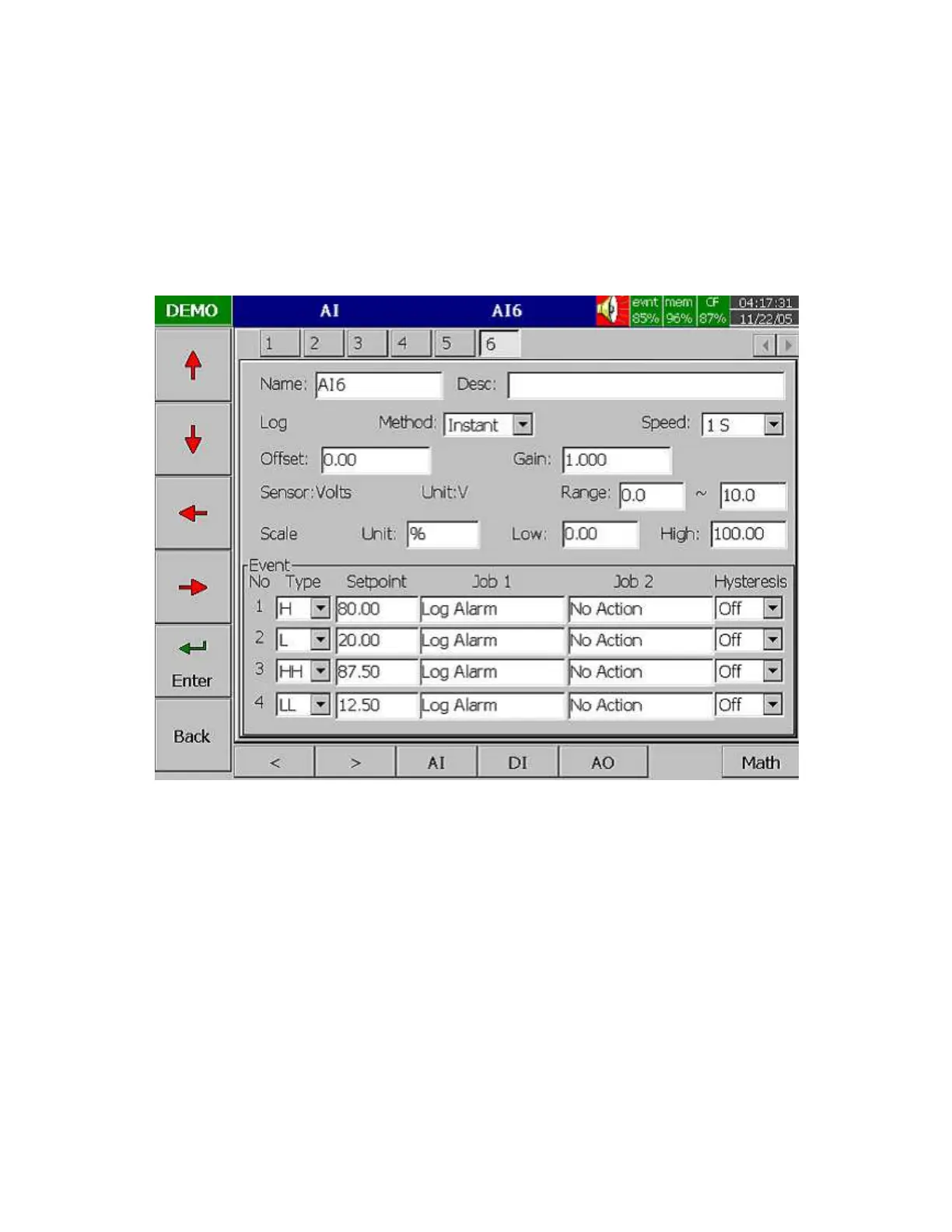
After entering the Configuration mode, select Channel and press the Enter key to get into Channel mode.
It displays the Analog input AI first. Press directional keys
〈
〉
at the bottom to select the channel.
Afterwards, press directional keys
↑↓←
→
on the left hand side to select the column. After
Configuration 4.1 to 4.8, press Back key to return to real-time display, all configurations will be
memorized.
Figure 4 – 2
Name: It is to define the name for each channel in maximum 6 characters. Press Enter, a keyboard
and several keys appear. BackSP key means backspace, Select key means to select a character or
number, Caps on means characters in capital, and Caps off means characters not in capital.
Desc: The description about a specific channel on the display.
Log Method: The method of logging measured data. Select the column, and then choose the Log
method of Instant, Average, Minimum or Maximum data.
Disable: Select Disable while a specific channel is not required at this time.
Instant: logging in the last measured data at the sampling interval
Average: logging in averaged measured data at the sampling interval
Minimum: logging in minimum measured data at the sampling interval
Maximum: logging in maximum measured data at the sampling interval



 To Next Page