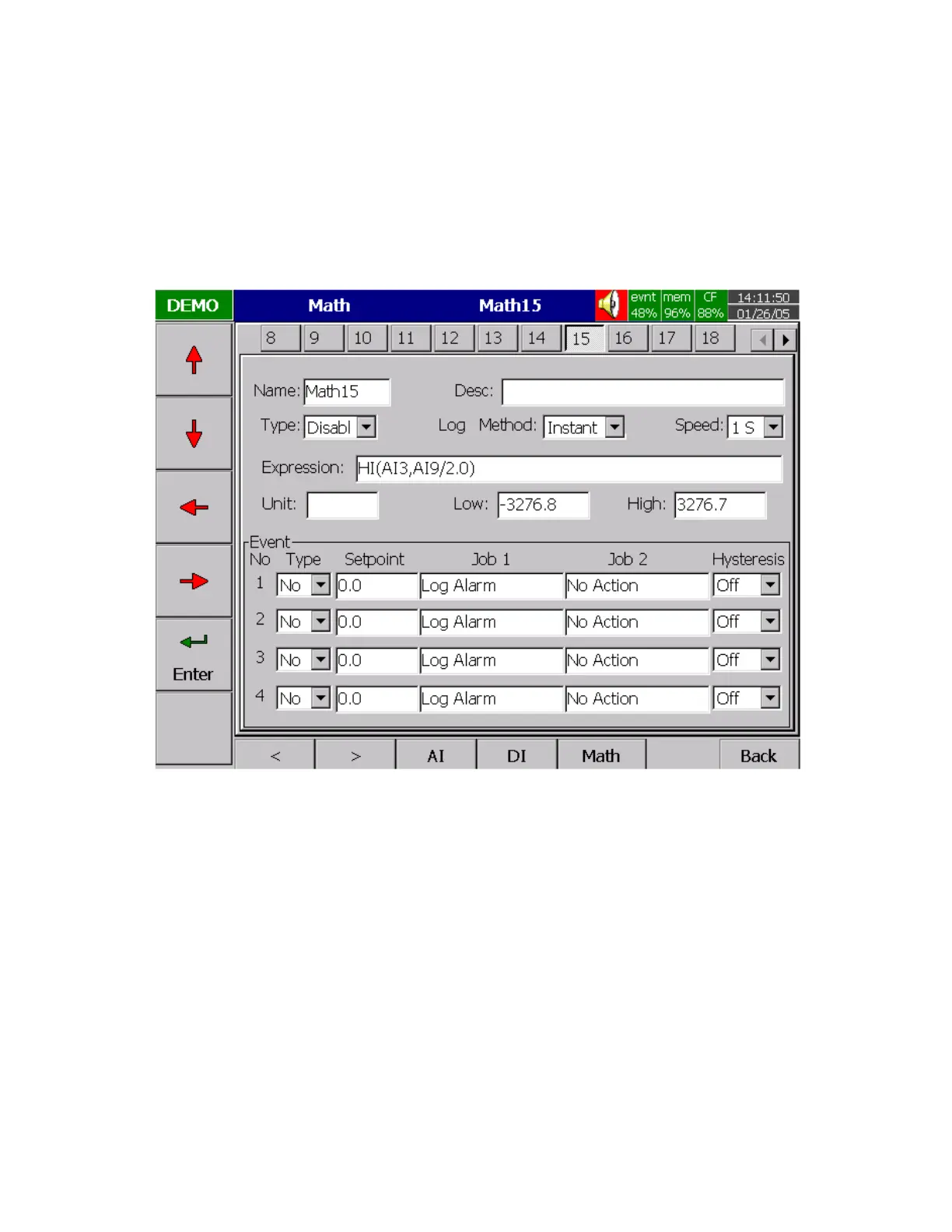
Math input
Press Math key to select the Mathematics input. Except for Expression, it is similar to do the setting up for
Analog input above. Define the name, Description, and select Type, Log Method, Log Speed, Unit, Scale
Low, Scale High, and Event. Enter Expression column, it appears Source, Operator and a keyboard. The
Source covers all available Analog inputs, Math inputs and Counters. The Operators are Mathematics
expressions described below. Use Source, Operator and keyboard to define the Math equation. Press
directional keys
〈
〉
at the bottom to select one from 18 available Math. Press Back key to memorize the
Math settings.
Figure 4 – 3
If the Math option been ordered, the following Math functions are available in the Channel mode of
configuration. The equation is used to produce derived variable by using measured data or computed data
as variable. The result of Math can be displayed and stored. The Math expression / equation can be keyed
in maximum 36 characters.



 To Next Page