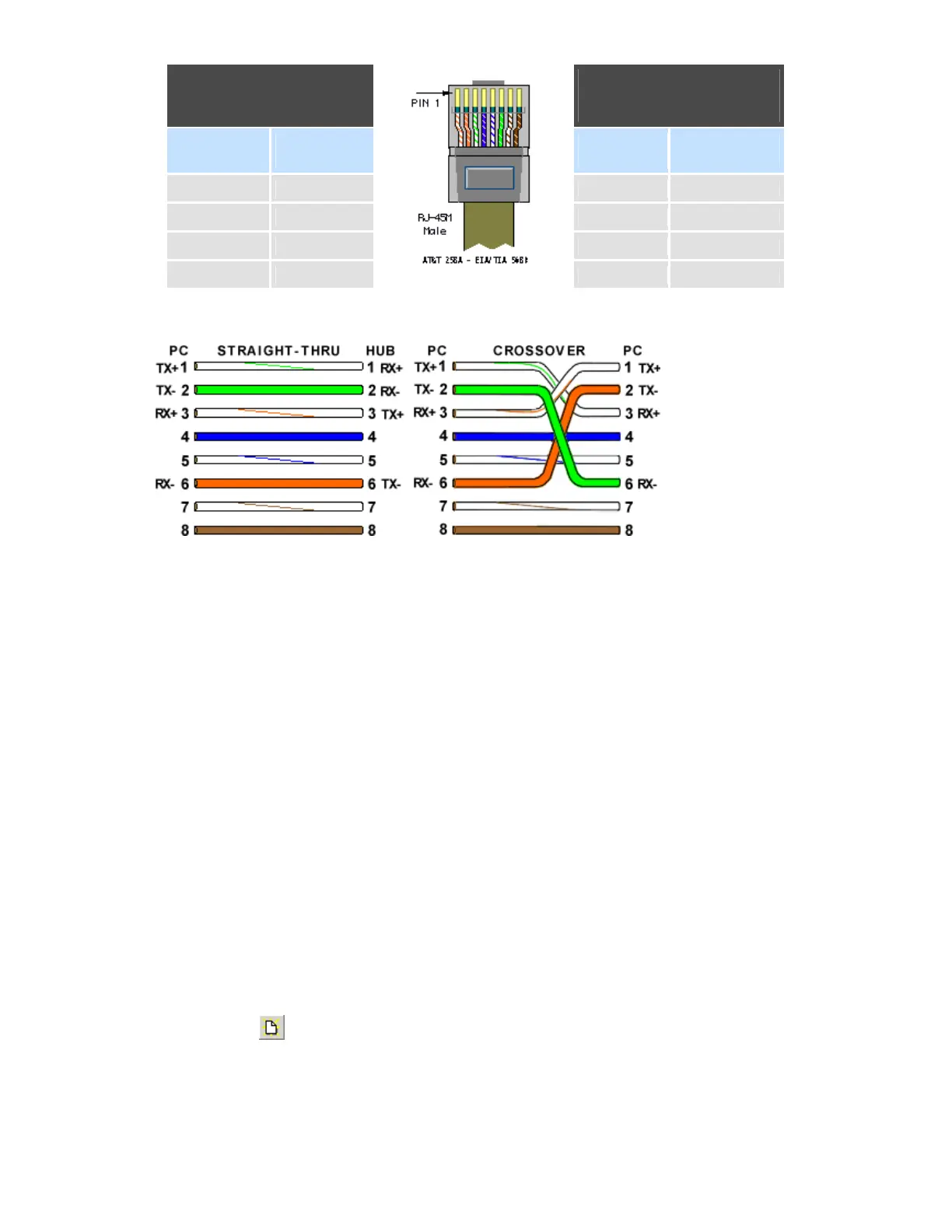
Straight Through
Cable
VR06-LAN/HUB
Crossover
Cable
VR06-PC/Notebook
RJ-45
PIN
RJ-45
PIN
RJ-45
PIN
RJ-45
PIN
1 Tx+ 1 Rc+ 1 Rx+ 3 Tx+
2 Tx- 2 Rc- 2 Rc- 6 Tx-
3 Rc+ 3 Tx+ 3 Tx+ 1 Rc+
6 Rc- 6 Tx- 6 Tx- 2 Rc-
6. Connect proper UTP Ethernet cable as per the requirements and observe the communication status
between the Recorder and PC/LAN HUB at the LED’s dedicated for the purpose near female RJ
45 connectors.
Recorder side
Link (Green LED)
Green lit: Cable connected between the recorder and PC/LAN HUB
Green Off: No Link between the recorder and PC/LAN HUB
Tx/Rx
Orange Lit continuous: No cable connection
Orange slow blink: Communication established between recorder & PC/LAN HUB
7. If the communication between the recorder and PC/LAN HUB is successful, then start Observer II
in the PC as follows
Start-Programs-Observer II – Configuration
For the first time, Under Historical folder .prj file shall not be available.
Open new file
Enter new name for the project, Ex: Boiler



 To Next Page