Caution:
If you are using a 9201W+ welder, do not select the 100V
or 115V tap; doing so will cause equipment damage and
will void the warranty.
5. Close and secure the cover door.
3.4.3 Start Cable Connections
If your welder is equipped with a base, plug the base cable into the back
of your welder.
The welder can also be started by an EXTERNAL START signal. To do so,
connect a J911 cable between the connector on the rear panel (see Figure
2-3 "Rear Panel," callout 4) and your start signal.
Warning.
If you wish to use a J911 cable, you must first have
signed a Branson Product Liability Agreement.
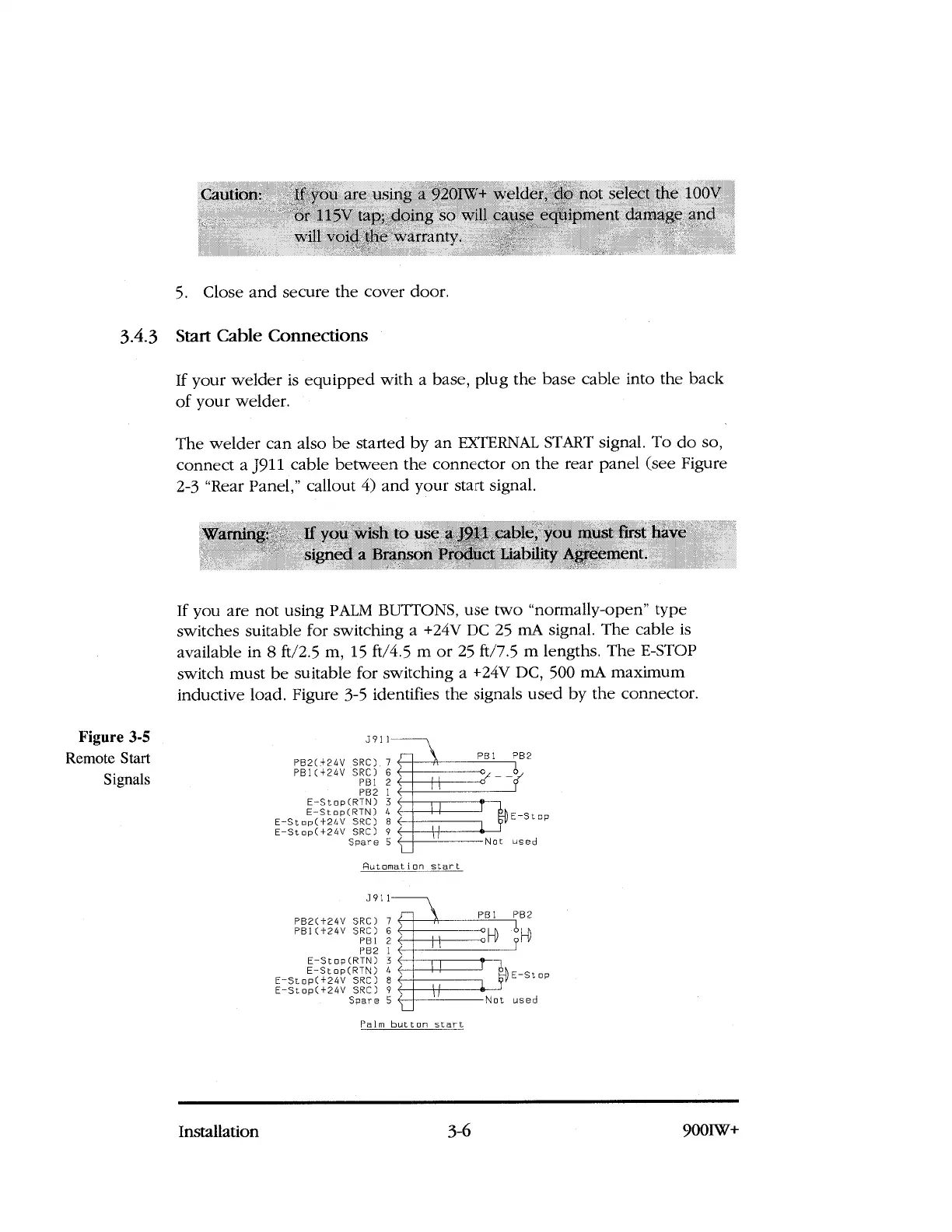
If you are not using PALM BUTTONS, use two "normally-open" type
switches suitable for switching a +24V DC 25 mA signal. The cable is
available in 8 ft/2.5 m, 15 ft/4.5 m or 25 ft/7.5 m lengths. The E-STOP
switch must be suitable for switching a +24V DC, 500 mA maximum
inductive load. Figure 3-5 identifies the signals used by the connector.
Figure 3-5
Remote Start
Signals
3911
PB2(+24V SRC)
.
7
PB1(+24V SRC) 6
PB1 2
PB2 1
E-Stop(RTN) 3
E-Stop(RTN) 4
E-Stop(+24V SRC) 8
E-Stop(+24V SRC) 9
Spare 5
Automation start
3911
PB2(+24V SRC) 7
PB1(+24V SRC) 6
RBI 2
PB2 1
E-Stop(RTN) 3
E-Stop(RTN) 4
E
-
Stop(+24V SRC) 8
E-Stop(+24V SRC) 9
Spare 5
Palm button start
Installation
3-6
900IW+



 To Next Page