Do
not
move
piggyback
terminal
2.
Disconnect the welder from the power source.
3.
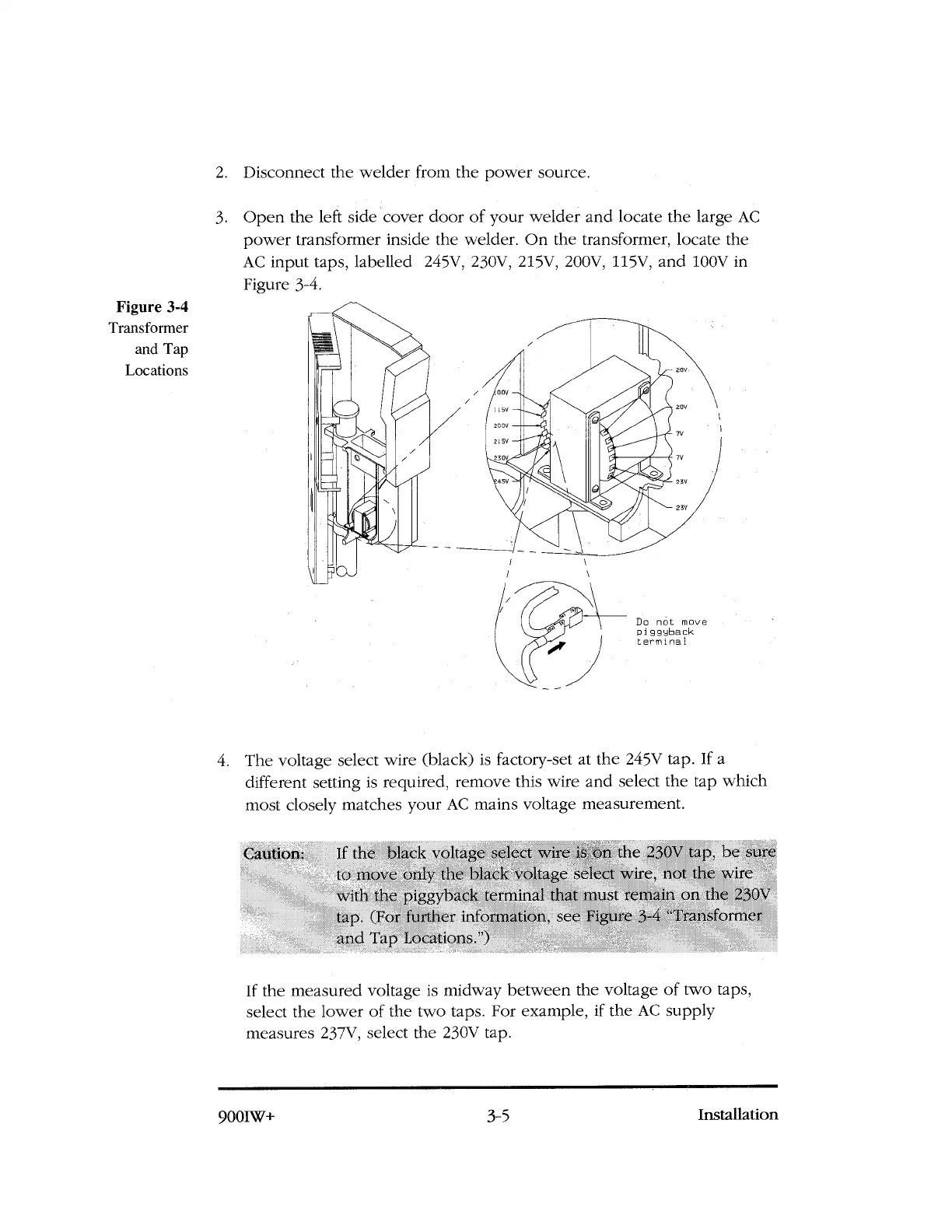
Open the left side cover door of your welder and locate the large AC
power transformer inside the welder. On the transformer, locate the
AC input taps, labelled 245V, 230V, 215V, 200V, 115V, and 100V in
Figure 3-4.
Figure 3-4
Transformer
and Tap
Locations
4. The voltage select wire (black) is factory-set at the 245V tap. If a
different setting is required, remove this wire and select the tap which
most closely matches your AC mains voltage measurement.
Caution:
If the black voltage select wire is on the 230V tap, be sure
to move only the black voltage select wire, not the wire
with the piggyback terminal that must remain on the 230V
tap. (For further information, see Figure 3-4 "Transformer
and Tap Locations.')
If the measured voltage is midway between the voltage of two taps,
select the lower of the two taps. For example, if the AC supply
measures 237V, select the 230V tap.
900IW+
3-5
Installation



 To Next Page