EasyManua.ls Logo

Branson 900IW+ Series - Page 67

Branson 900IW+ Series
108 pages
Print Icon
To Next Page IconTo Next Page
To Previous Page IconTo Previous Page
Loading...
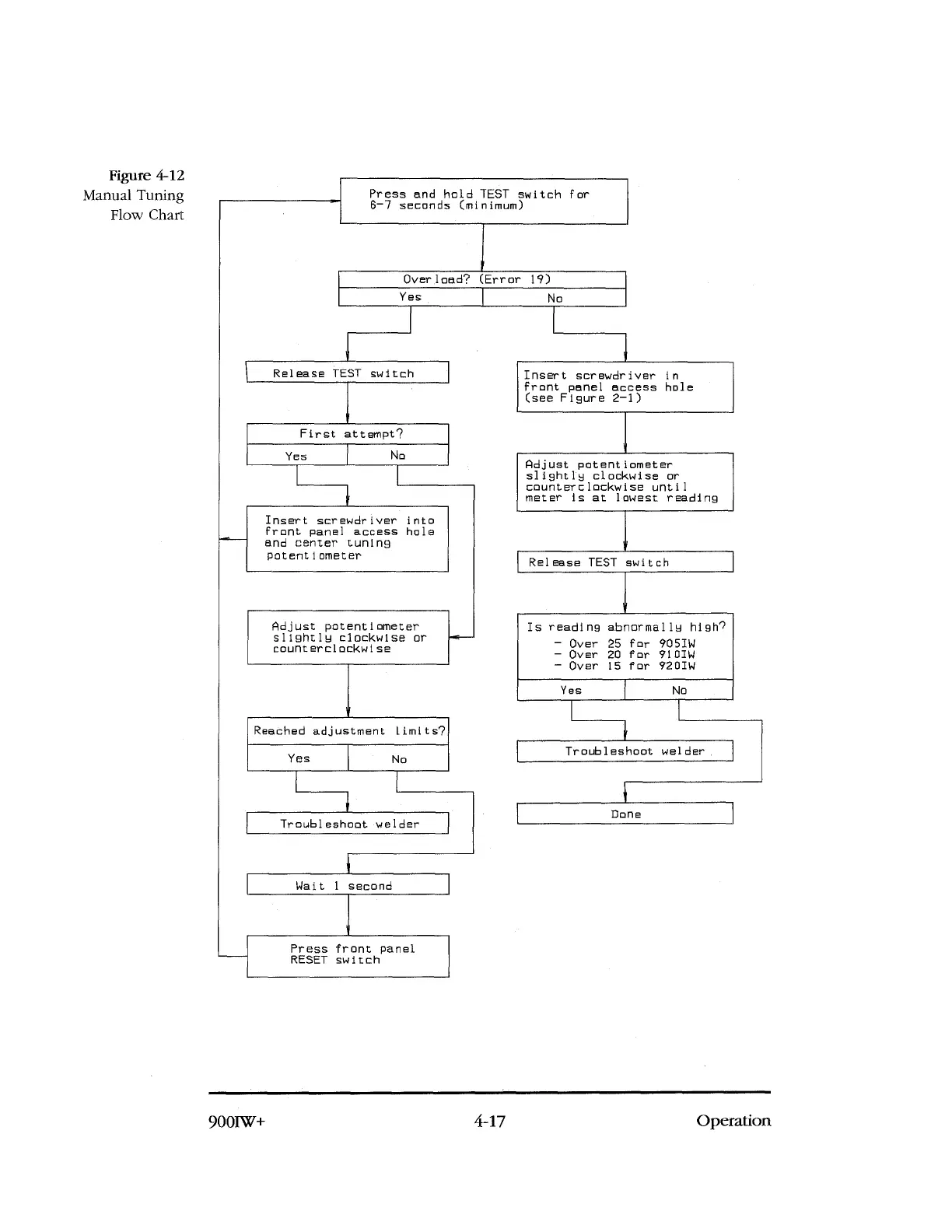
Figure 4-12
Manual Tuning
Flow Chart
Press and hold TEST switch for
6
-
7 seconds (minimum)
Overload? (Error 19)
Yes
No
Release TEST switch
First attempt?
Yes
No
Insert screwdriver into
front panel access hole
and center tuning
potentiometer
Adjust potentiometer
slightly clockwise or
counterclockwise
Reached adjustment Limits?
Yes
No
Troubleshoot welder
Insert screwdriver in
front panel access hole
(see Figure 2
-
1)
Adjust potentiometer
slightly clockwise or
counterclockwise until
meter is at lowest reading
Release TEST switch
Is reading abnormally high?
-
Over 25 for 905IW
-
Over 20 for 710IW
-
Over 15 for 920IW
Yes
N
Troubleshoot welder
Done
Wait 1 second
Press front panel
RESET switch
900IW+
4-17
Operation

Table of Contents

Related product manuals