I E16x442 Rev: 00 Page 37 of 73
7. Programming of the Monitors
7.1. Programming of the Monitors via Front Keyboard
Select a parameter via its ‚name’ Pgg.ss,
in that gg : Parameter-group number and
ss : Step-number within the group,
then display the value and alter if required.
Procedure:
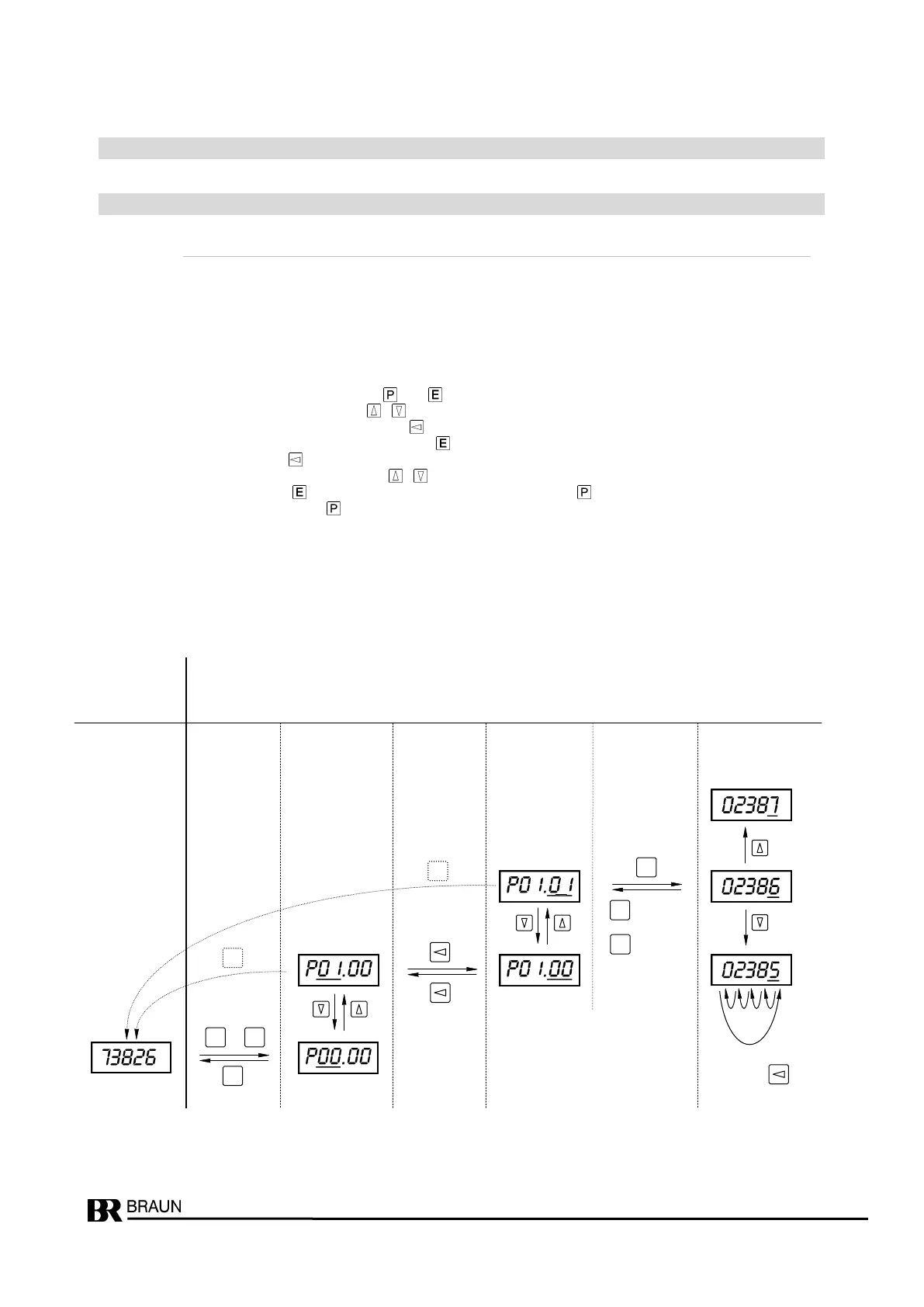
Initiate programming phase by pressing keys and together; instead of the normal display P00.00. appears
Select the group or step number with keys , .
Switch between Groups and Step Fields with the . key
Current value of the Parameters is displayed with key .
Select active position with the . key
Adjust the number in the active field with keys , .
Acknowledge and set with key , Discard (original value remains) with key .
Return to operational mode with the key. The display then returns to the current ‘is’ speed (with E1665) resp.
to the current test-speed (with E1697)
See example below: Change parameter P01.01 from 2386 to 2387 or 2385.
Normal Display While Programming
Display active digit(s) blinking (shown underlined here)
Select Select Change
Toggle Group Toggle Step-No. Toggle Parameter Value
with with with
key(s) Key Key
Enter : new, changed value is valid
Cancel : original value still valid


 To Next Page