CONTROL PANEL
1Dzslc 5
2 Ffam_ T DDugh
3 Fm;t&N_t S pIz= Dough
4 V41w|oWhiner 9 BaBel Dough
•5 BatbmrBraad_l ,16 Jam
Cake.
r
Iku'mJl,m• • • •
/=1=_ I_==dm_'w j
.0" 0"0 0 0 m
lmir Iraud I_m Ihitl r,,mplita
"timer Menu
CB C[I
CrustControl Loaf Size
j T
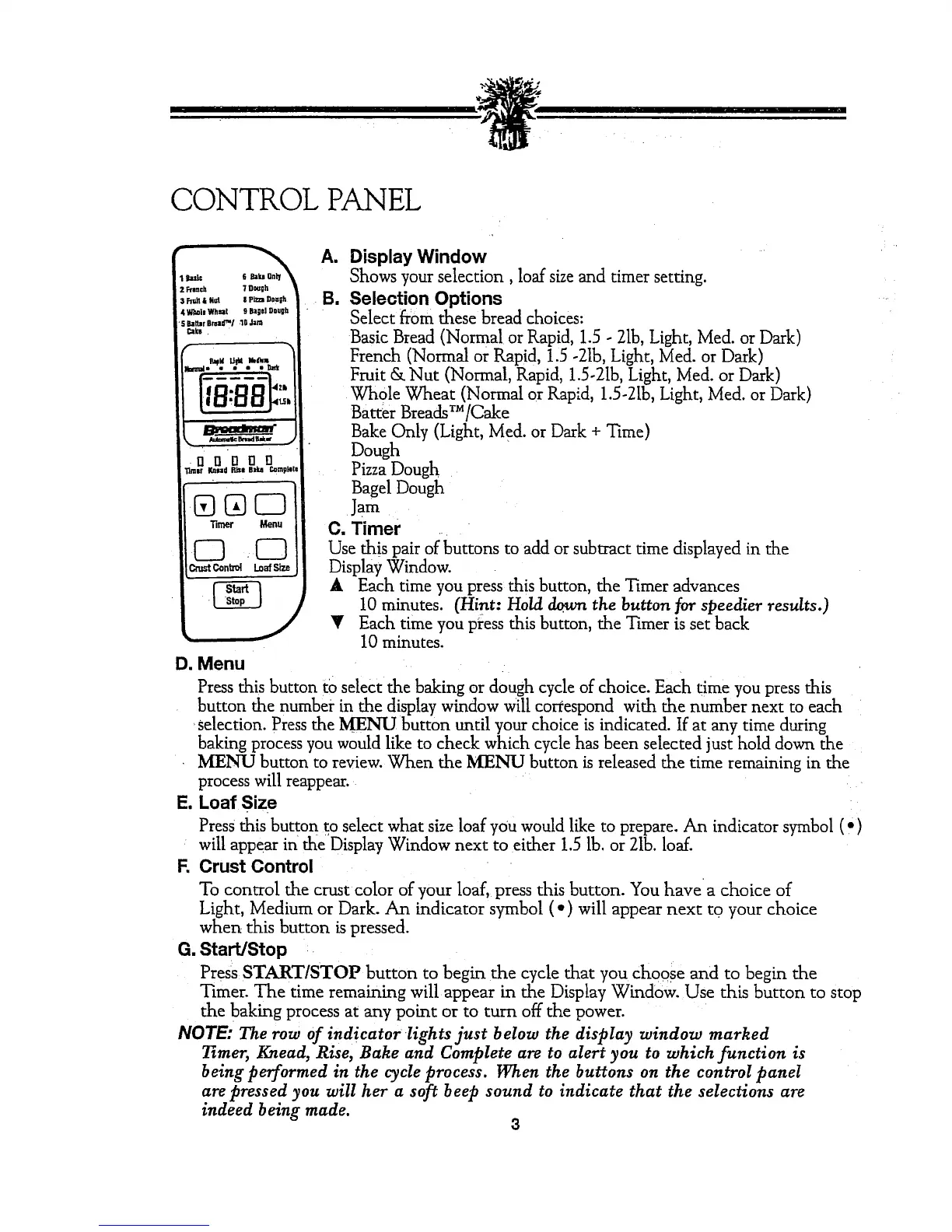
A. Display Window
Shows your selection, loaf size and timer setting.
B. Selection Options
Select from these bread choices:
Basic Bread (Normal or Rapid, 1.5 - 21b,Light, Med. or Dark)
French (Normal or Rapid, 1.5 -21b, Light, Med. or Dark)
Fruit & Nut (Normal, Rapid, 1.5-21b,Light, Med. or Dark)
Whole Wheat (Normal or Rapid, 1.5-21b,Light, Med. or Dark)
Batter BreaclsT_/Cake
Bake Only (Light, Med. or Dark + Time)
Dough
PizzaDough
Bagel Dough
Jam
C. Timer
Use this pair of buttons to add or subtract time displayed in the
Display Window.
A Each time you press this button, the Timer advances
10 minutes. (Hint: Hold down the button for speedier results.)
Each time you press this button, the Timer is set back
10 minutes.
D. Menu
Press this button to select the baking or dough cycle of choice. Each time you press this
button the number in the display window will correspond with the number next to each
selection. Press the MENU button until your choice is indicated. If at any time during
baking process you would like to check which cycle has been selected just hold down the
MENU button to review. When the MENU button is released the time remaining in the
process will reappear.
E. Loaf Size
Press this button to select what size loaf you would like to prepare. An indicator symbol (')
will appear in' theDisplay Window next to either 1.5 lb. or 21b.loaf.
F. Crust Control
To control the crust color of your loaf, press this button. You have a choice of
Light, Medium or Dark. An indicator symbol (") will appear next to your choice
when this button is pressed.
G. Start/Stop
Press START/STOP button to begin the cycle that you choose and to begin the
Timer. The time remaining will appear in the Display Window. Use this button to stop
the baking process at any point or to turn off the power.
NOTE: The row of indicator lights just below the display window marked
Timer, Knead, Rise, Bake and Complete are to aIert you to which function is
being performed in the cycle process. When the buttons on the control panel
are pressed you will her a soft beep sound to indicate that the selections are
indeed being made.
3



 To Next Page