22
4.4 Other settings
4.4.1 Time, date, unit and other setting
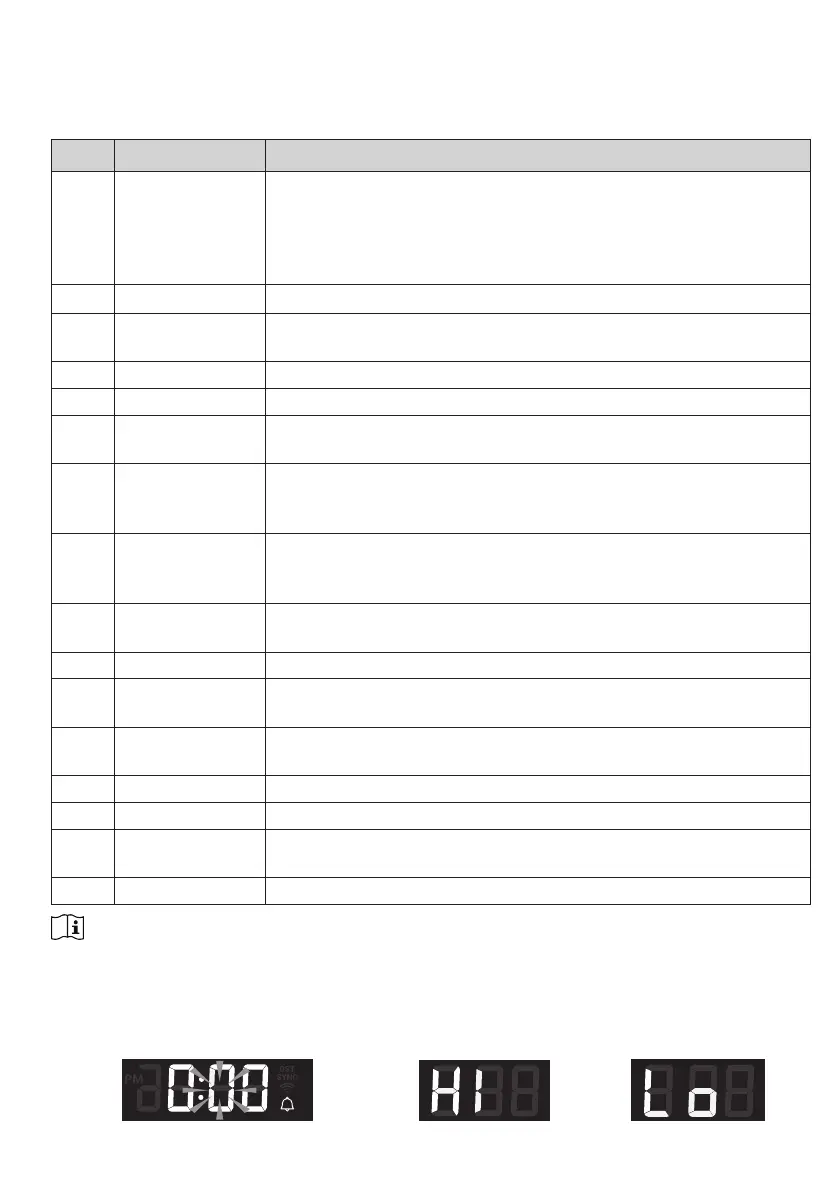
Press and hold the [ SET ] key for 2 seconds to enter the setting mode. Press [ + / WIND ] or
[ - / BARO ]
keytoadjust,andpress[ SET ] key to proceed with next step of the setting. Please
refer to following setting procedures.
Step Mode Setting procedure
[SET]
+2s
DST (Daylight
Saving Time
Press [ + / WIND ] or [ - / BARO ] key to select AUTO / ON / OFF
AUTOistoadjustthedaylightsavingtimeautomaticallybasedon
time zone entered.
ON is to add one hour on current default time.
OFFistocompletelyturnotheDSTfunction.
[SET] Time Press [ + / WIND ] or [ - / BARO ]
keytoadjusttheminute/hour
[SET] 12/24 hour format Press [ + / WIND ] or [ - / BARO ] key to select 12 or 24 hour
format
[SET] Year Press [ + / WIND ] or [ - / BARO ]
keytoadjusttheyear
[SET] Date Press [ + / WIND ] or [ - / BARO ]
keytoadjusttheday/month
[SET] MD / DM display
format
Press [ + / WIND ] or [ - / BARO ] key to select "Month / Day" or
"Day / Month" display format
[SET] Time sync ON/
OFF
Press [ + / WIND ] or [ - / BARO ] key to enable or disable Time
Sync function.
If you want to set the time manually, you should set Time Sync OFF
[SET] Hemisphere Press [ + / WIND ] or [ - / BARO ] key to select North / South
hemisphere for moon phase and wireless sensor array point to
direction.
[SET] Weekday
language
Press [ + / WIND ] or [ - / BARO ] key to select weekday display
language
[SET] Temperature unit Press [ + / WIND ] or [ - / BARO ] key to select °C or °F
[SET] Baro pressure
unit
Press [ + / WIND ] or [ - / BARO ] key to select hPa, mmHg or inHg
[SET] Wind speed unit Press [ + / WIND ] or [ - / BARO ] key to select m/s, knots, mph or
km/h
[SET] Rain unit Press [ + / WIND ] or [ - / BARO ] key to select mm or in
[SET] Light unit Press [ + / WIND ] or [ - / BARO ] key to select Klux, Kfc or W/m
2
[SET] LCD contrast Press [ + / WIND ] or [ - / BARO ]
keytoadjusttheLCDcontrast
level
[SET] Exit setting mode
Note:
- In normal mode, press [ SET ] key to switch between year and date display.
- During the setting, you can back to normal mode by press and hold [ SET ] key for 2 seconds.
4.4.2 Setting alarm time and high / low weather alert
In normal time mode, press and hold [ ALARM ] key for 2 seconds to enter alarm / alert setting mode.
Alarm time setting Hi alert setting Lo alert setting







 To Next Page