30
6. Registering with weather server platforms
The display console can upload /download weather data to ProWeatherLive (PWL), AWEKAS,
PWS, WUnderground and / or Weathercloud through WI-FI router, you can follow the step
below to register the account and setup your device in the following platforms.
Note:
Add the cloud server websiteandapparesubjectedtochangewithoutnotice.
6.1 Weather Underground (WU)
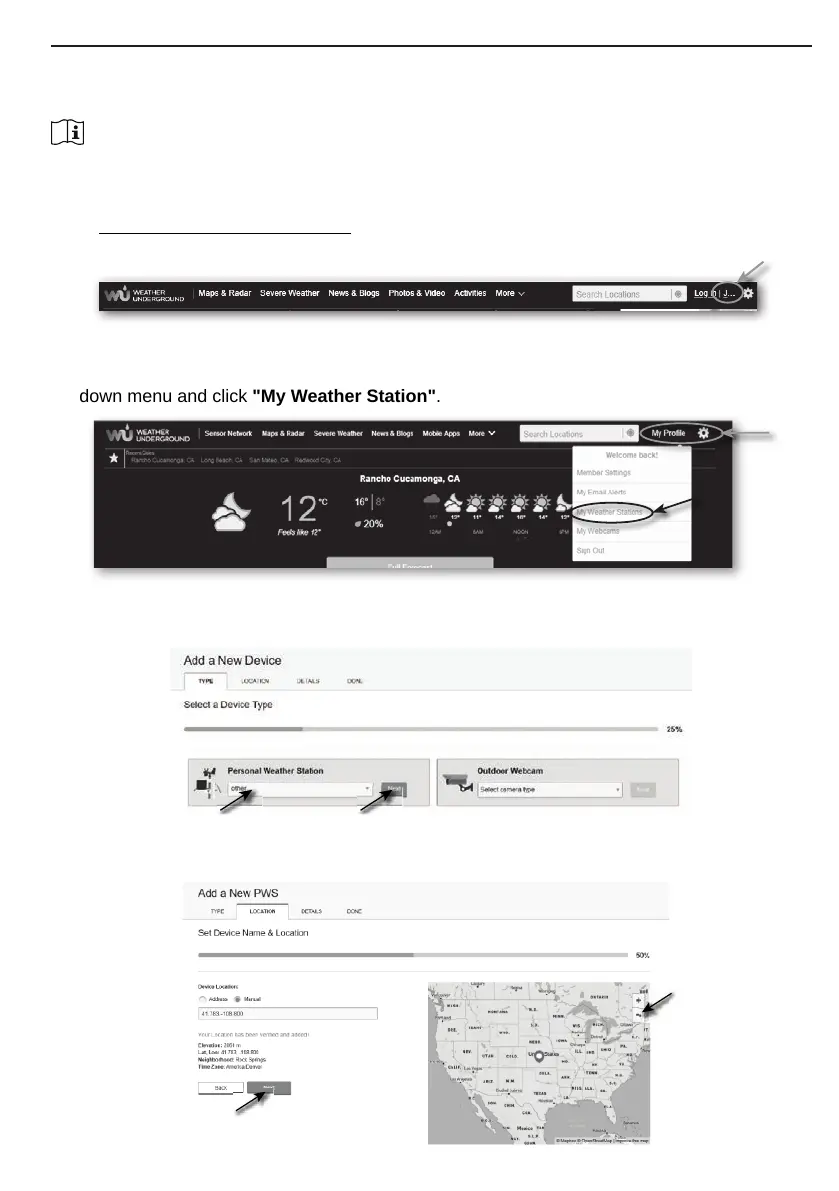
1. In https://www.wunderground.com click the "Join" on the top right corner to open the
registration page. Follow the instructions to create your account.
2. Once you have created your account and completed the Email validation, please go back to
the WUndergound web page to login. Then, click “My Prole” on the top to open the drop-
down menu and click "My Weather Station".
3. In "My Weather Station" page bottom, click the "Add New Device" to add your device.
4. In step “Select a Device Type”, choose “Other” in the list, then press “Next”.
5. In step “Set Device Name & Location”, select your location on the map, then press "Next".



 To Next Page