28
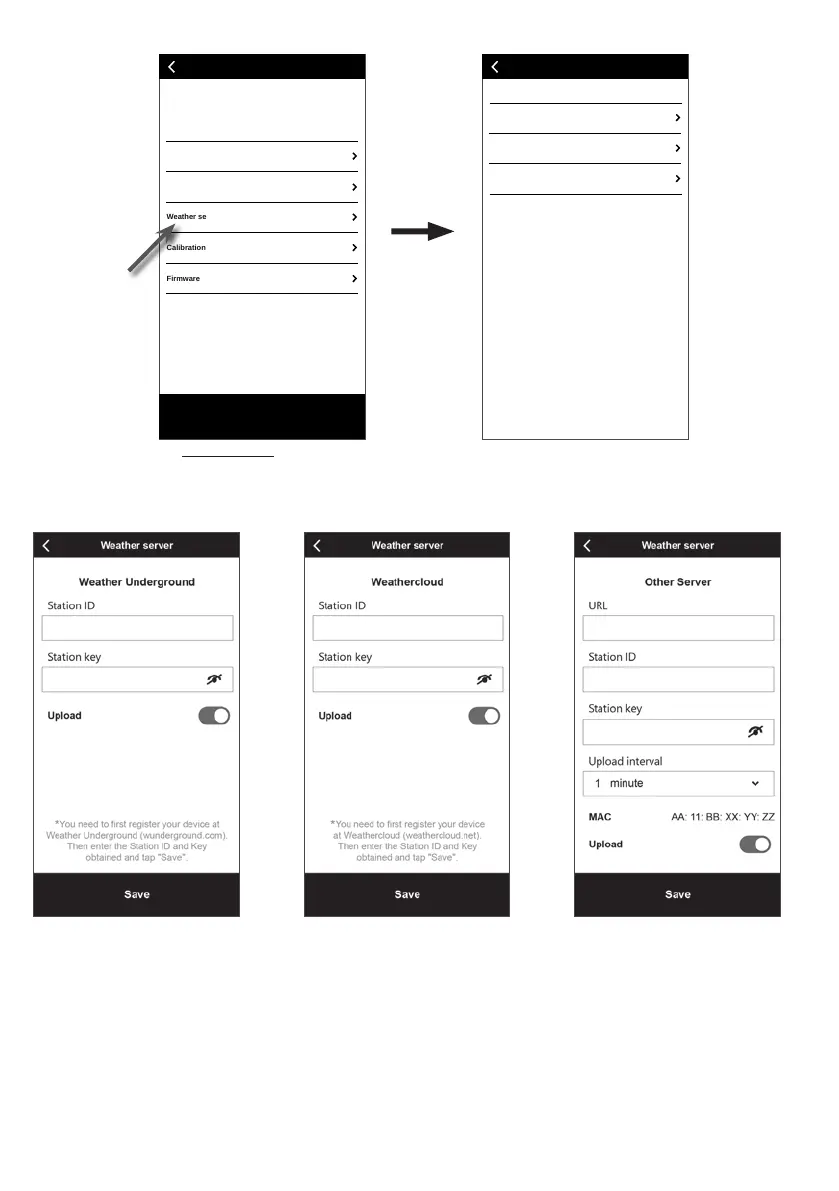
5.5 Weather server setting
Wi-Fi
Calibration
Weather server
Edit device
Firmware
Settings
Confirm & Exit
Weather server
Weather Underground
Weathercloud
Other server
(a) Settings page
At the settings page, tap
"Weather server".
(b) Select the Weather server
(c1) Upload your weather data to
Weather Underground
1. Register an account and weather
station at wunderground.com per
section 6.1
2. Enter the Station ID and
Station key obtained from
wunderground.com
3. Enable (or disable) the upload.
4. Tap "Save".
(c2) Upload your weather data to
Weathercloud
1. Register an account and weather
station at Weathercloud.net per
section 6.2
2. Enter the Station ID and Station
key obtained from Weathercloud.
net
3. Enable (or disable) the upload.
4. Tap "Save".
(c3) Upload to customized server
(optional)
1. Please consult with your retailer if
such service is available.
2. Enter the URL address, Station ID
and Station key of the customized
server.
3. Select upload interval
4. Enable (or disable) the upload.
5. Tap "Save".







 To Next Page