Driving and Operating 129
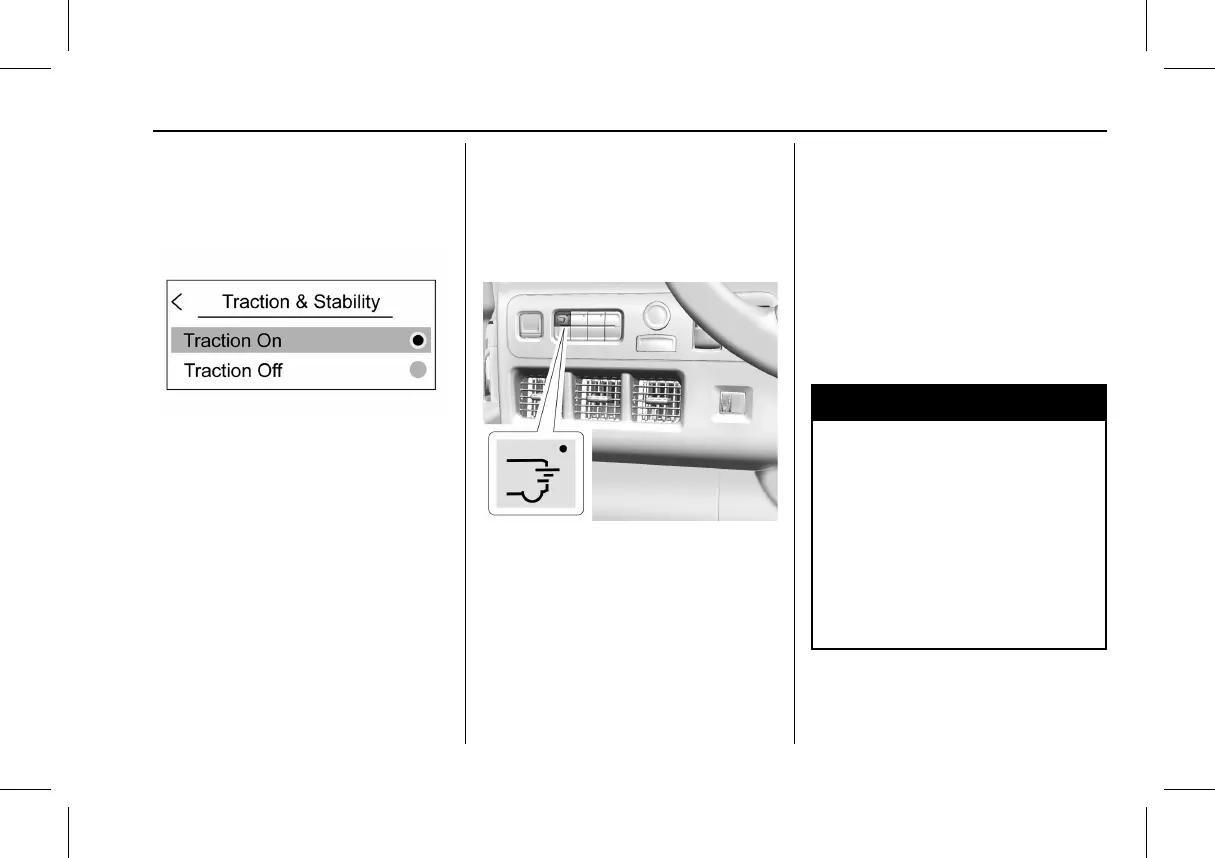
To turn Traction (TCS) off and on, on the
DIC, select Options > Traction and Stability.
See Driver Information Center (DIC) 0 69 for
instructions on navigating and selecting
items.
Traction and Stability Menu
To turn off TCS, select the Traction Off
button. The traction off light
i displays in
the instrument cluster. See Traction Off Light
0 60.
If TCS is limiting wheel spin when disabled,
the system will not turn off until the wheels
stop spinning.
To turn TCS back on, select the Traction On
button on the screen. The traction off light
i displayed in the instrument cluster will
turn off.
Adding accessories can affect the vehicle
performance. See Accessories and
Modifications 0 153.
Driver Mode Control
Delivery Mode
Press the following button to turn on
Delivery Mode.
After pressing the Delivery mode button and
shifting the vehicle into (P) Park, the vehicle
automatically turns on the cabin lights and
unlocks the rear bulkhead door for about
five seconds. See Sliding Door 0 15.
Once the vehicle shifts out of (P) Park, the
cabin lights turn off and the horn sounds an
alert to those nearby that the vehicle is
departing.
If after initially pressing the Delivery mode
button and the vehicle is not shifted
into (P) Park after a set period of time, the
cabin lights will automatically turn off to
preserve battery life.
Cruise Control
{
Warning
Cruise control can be dangerous where
you cannot drive safely at a steady
speed. Do not use cruise control on
winding roads or in heavy traffic.
Cruise control can be dangerous on
slippery roads. On such roads, fast
changes in tire traction can cause
excessive wheel slip, and you could lose
control. Do not use cruise control on
slippery roads.



 To Next Page