18
2.1 The Sonair
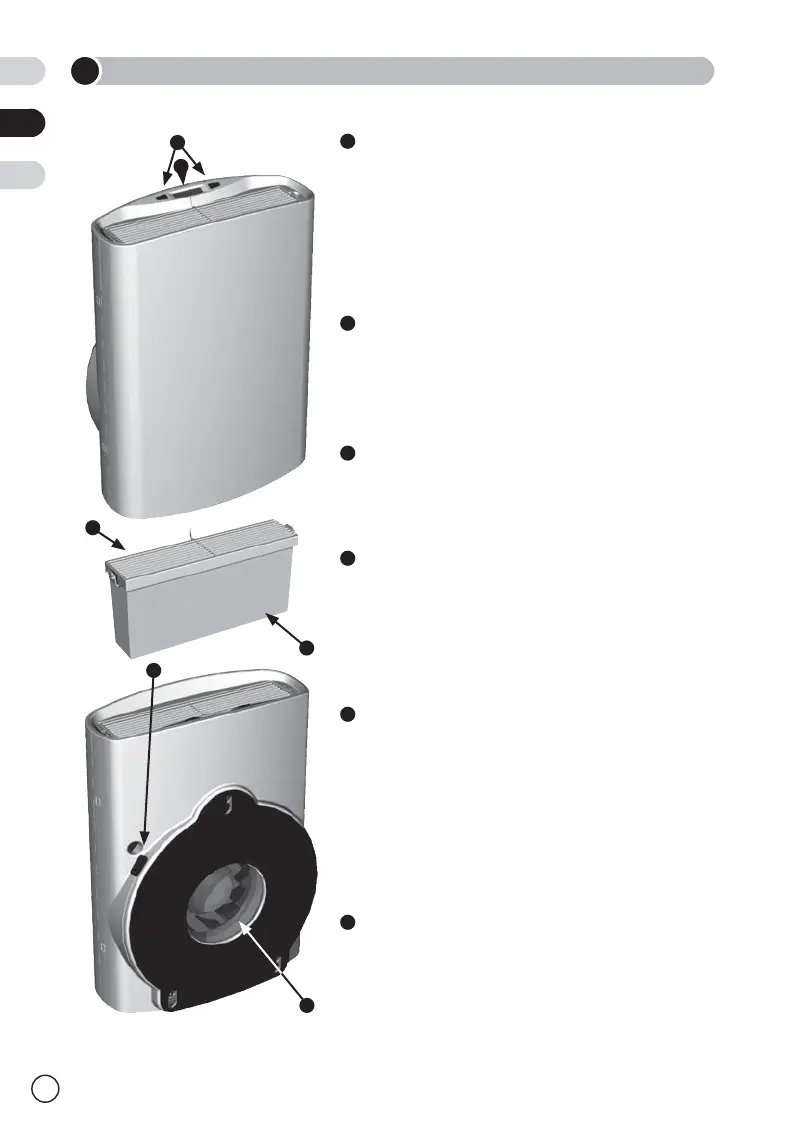
Operating buttons
The two operating buttons allow you to set
the ventilation rate manually. By pushing the
right button you can increase the fan speed.
By pushing the left button you can decrease
the fan speed and stop the motor.
Display
The display shows the ventilation rate and
any system errors. See page 19 for more
information about the display.
Outlet
The outlet holds the filter. The filtered air is
blown through the outlet into the room.
Filter
The outdoor and indoor air is cleaned by the
filter before it is blown into the room. See
page 23 for more information about filters and
how to replace the filter.
Open/close/recirculation knob
The knob allows you to adjust the ratio of
outdoor and indoor air being blown through
the filter and into the room or to close off
the air inlet completely. See page 22 for
more information about adjusting the ratio of
outdoor and indoor air.
Air inlet
The fan sucks outdoor air into the Sonair
through this opening.
2
PRODUCT OVERVIEW
1
3
4
5
6
2
1
2
5
6
4
3
NL
EN
DE


 To Next Page