ACS5000 Installation Manual Page 18
© 2017 Brivo Systems LLC. All rights reserved. Rev 1
Powering and Testing Procedures
WARNING: Power Precautions
BEFORE POWERING UP THE CONTROL PANEL, CHECK THE FOLLOWING
CONNECTIONS. MAKE SURE THAT:
• The transformer is NOT plugged into the 120 VAC outlet.
• All wiring to the back-up battery is DISCONNECTED.
Power up the control panel.
1. Plug the transformer into a 120 VAC outlet.
2. Check ALL power indicators:
a) Check the power supply board to confirm that the green LED is on and blinking,
indicating that AC power is being supplied to the board and that the board is
producing 12 VDC power.
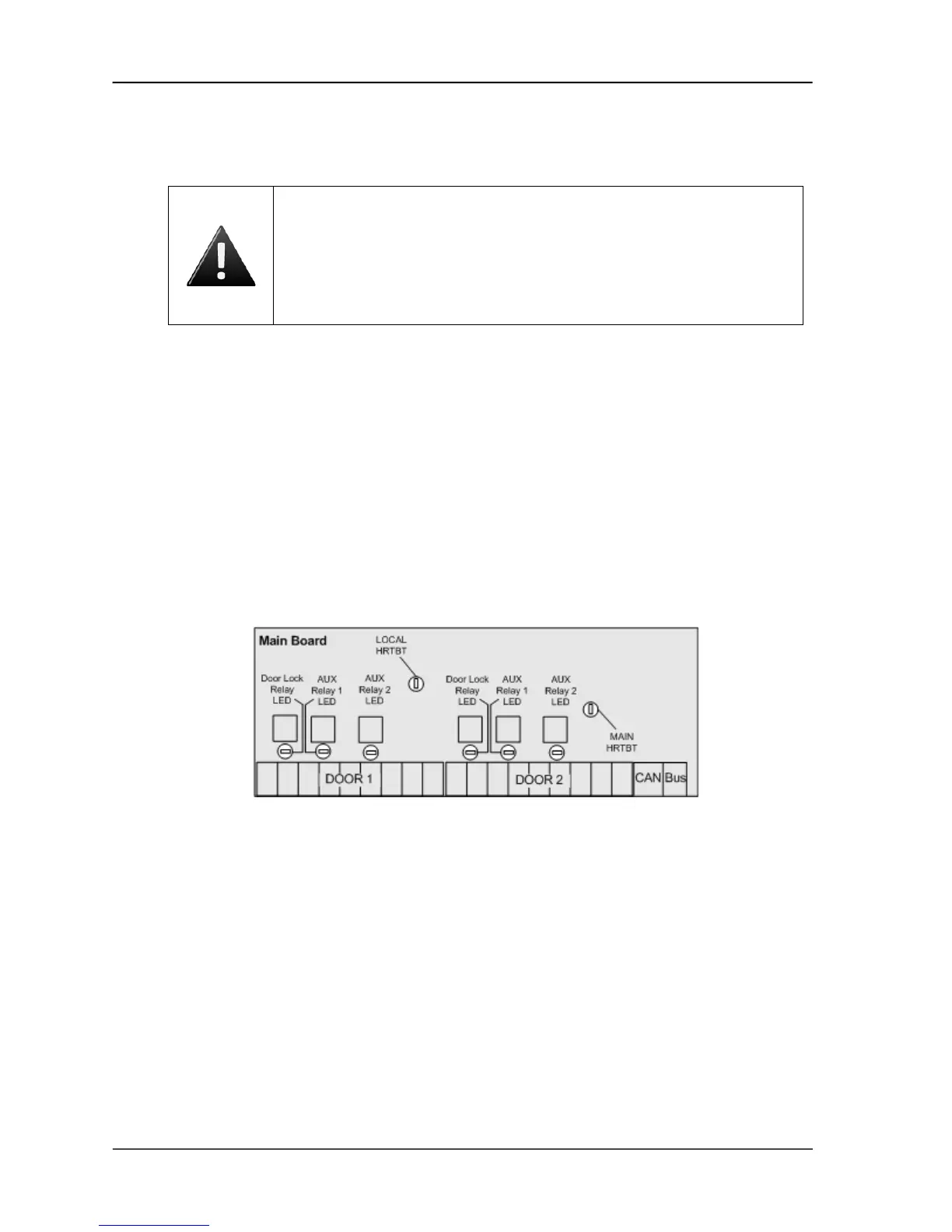
b) Check the MAIN BOARD to confirm that the LOCAL HRTBT (local heartbeat) and MAIN
HRTBT (main heartbeat) have come on and are blinking.
• The local heartbeat should begin blinking immediately.
• The main heartbeat can take 30-60 seconds to establish a steady beat.
Figure 7. MAIN BOARD Heartbeats
c)
For ACS5000-E control panels using a Brivo Cellular Network Router
, make sure the
Brivo Cellular Network Router is powered when connecting it to the MAIN BOARD.



 To Next Page