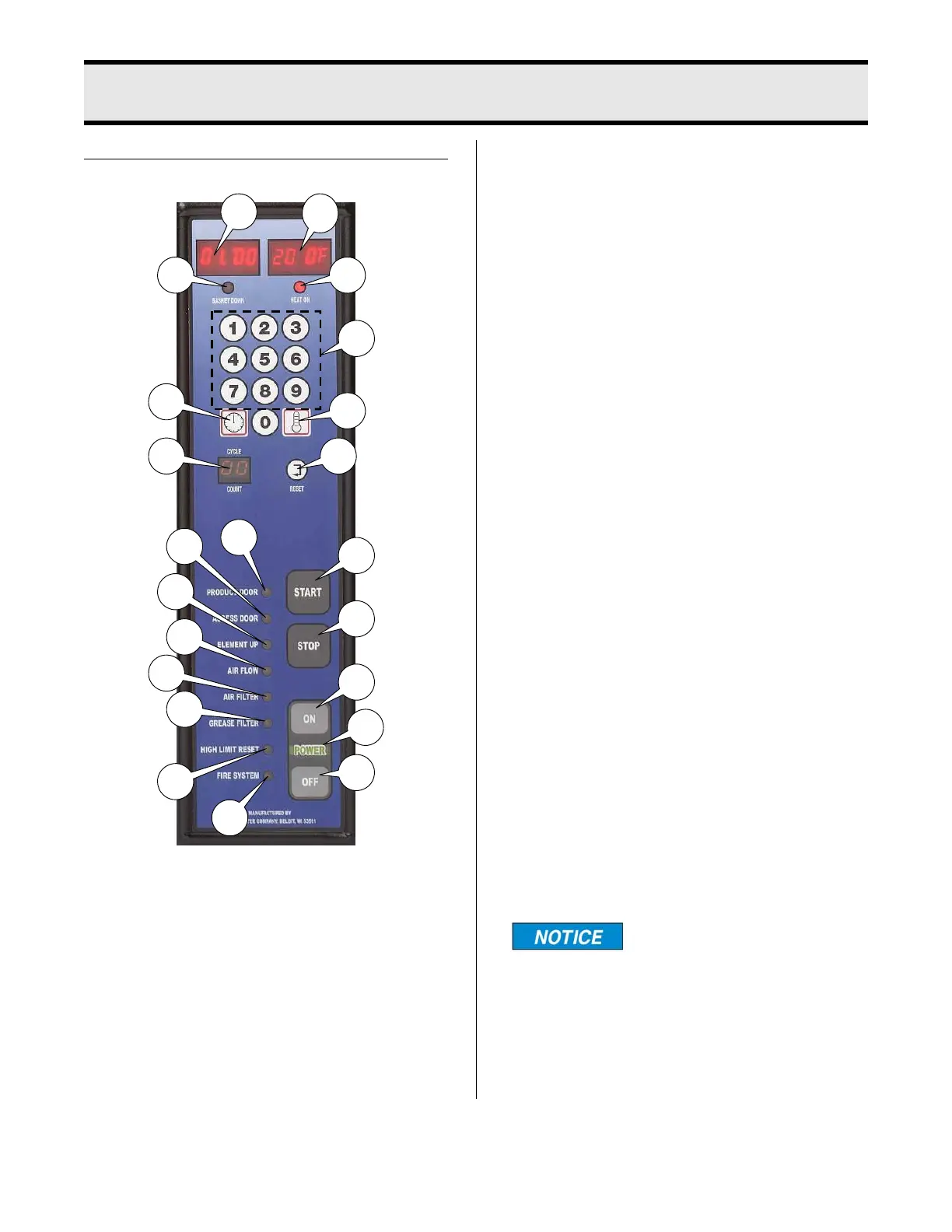
6 - CONTROL PANEL
6-1
boraster.com Manual #16421 5/06 Rev 4/14
DUAL DISPLAY FAMILIARIZATION
5. Basket Down Indicator Light: Illumi-
nates when Food Basket is in lowered
position.
6. Time Display: Shows time count-
down during a cook cycle, program
values during programming and pro-
grammed time during idle period.
7. Temp Display: Shows set tempera-
ture and actual temperature on
demand.
8. Cook Temperature Button: Initiates
temperature programming and dis-
play actual temperature.
9. Cook Time Button: Initiates time pro-
gramming.
10. Numerical Keypad: Enters and
adjusts set point values.
11. Cycle Count Display: Increases in
increments of one every time a cook-
ing cycle is completed.
12. Cycle Count Reset Button: Resets
the cycle count display to “zero”.
13. Start Button: Starts a cooking cycle
and lowers the platform.
14. Stop Button: At end of cooking cycle,
silences the audible alert.
Stop Button can be
pushed at any time dur-
ing a cooking cycle; however, cooking
time will revert to the initial setting.
1. ON: Turns power to unit on.
2. Power On indicator Light: The word
‘POWER’ illuminates green when
power is applied to unit.
3. OFF: Turns power to unit off.
4. Heat On Indicator Light: Illuminates
when oil is being heated. Light goes
off when oil reaches set temperature.
6
7
5
4
10
8
9
11
12
13
14
1
2
3
15
16
17
18
19
20
22
21



 To Next Page