11
6
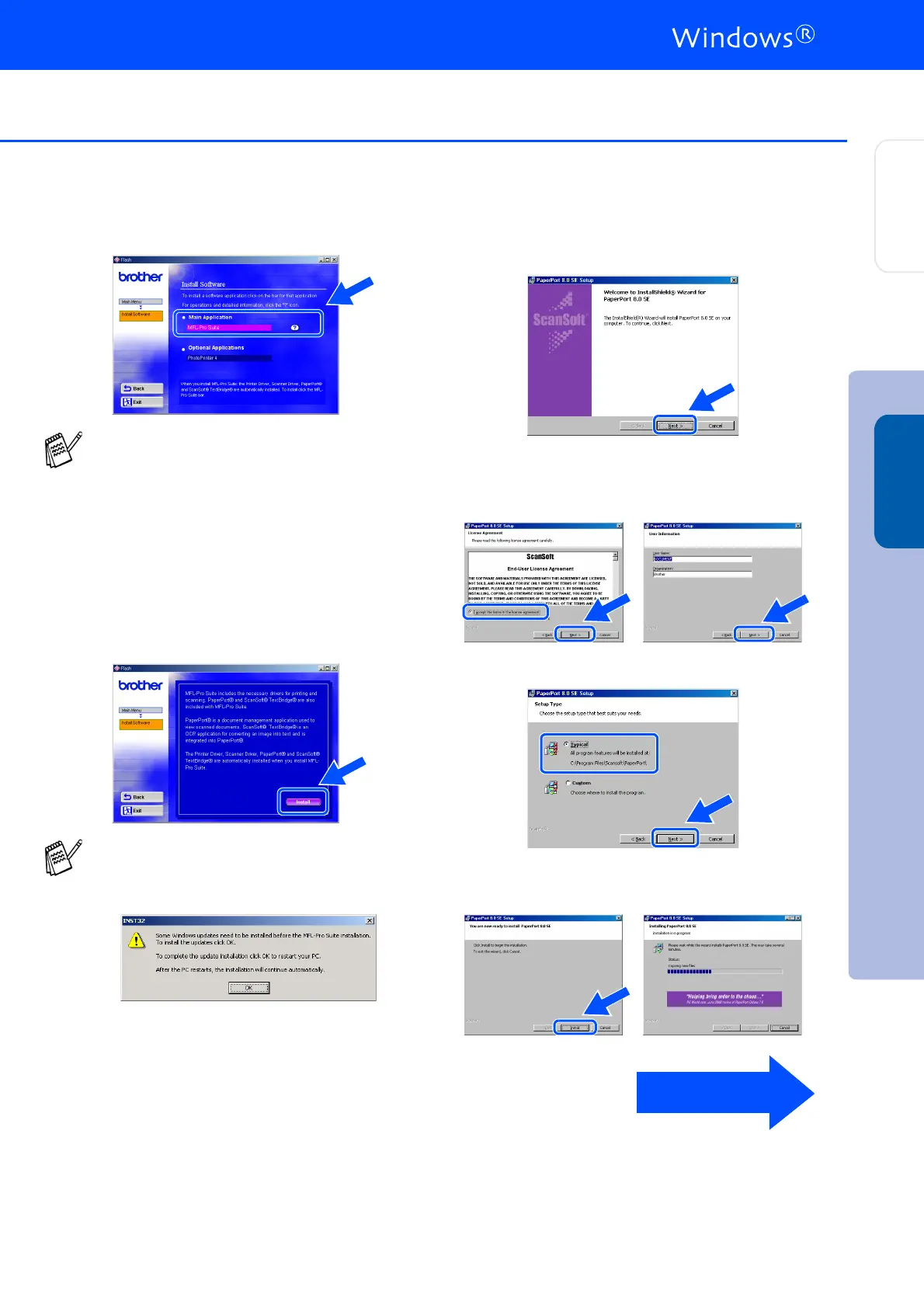
Click MFL-Pro Suite in Main Application.
7
Click Install.
8
When the PaperPort
®
8.0 SE Setup window
is displayed, click Next.
9
After reading and accepting the License
Agreement click Next, then enter your user
information.
0
Select Typical and click Next.
A
Click Install and PaperPort
®
will start
installing on your computer.
MFL-Pro Suite includes Printer Driver,
Scanner Driver, ScanSoft
®
PaperPort
®
,
ScanSoft
®
Text Bridge
®
and True Type
fonts. PaperPort
®
is a document
management application for viewing
scanned documents. ScanSoft
®
TextBridge
®
, which is integrated into
PaperPort
®
, is an OCR application that
converts an image into text and inserts it into
your default word processor.
If you see the following screen, click OK to
install the Windows
®
updates. After the
updates are installed your PC will restart and
automatically continue the installation.
If the installation does not continue
automatically, please open the installer
menu again by double-clicking the
setup.exe program on the Brother
CD-ROM, and continue from Step
4
.
To be continued
Step 2
Installing the Driver & Software
Setting Up
the DCP
Windows
®



 To Next Page