6. ELECTRIC COMPONENTS AND SOFTWARE
HE-800A
144
6-7. Input check list
Use the following procedure when checking for switch and sensor breakdown, cord breakage, and adjusting the
sensor positions.
The CPU can be checked as to whether it has correctly interpreted signals from switches and sensors.
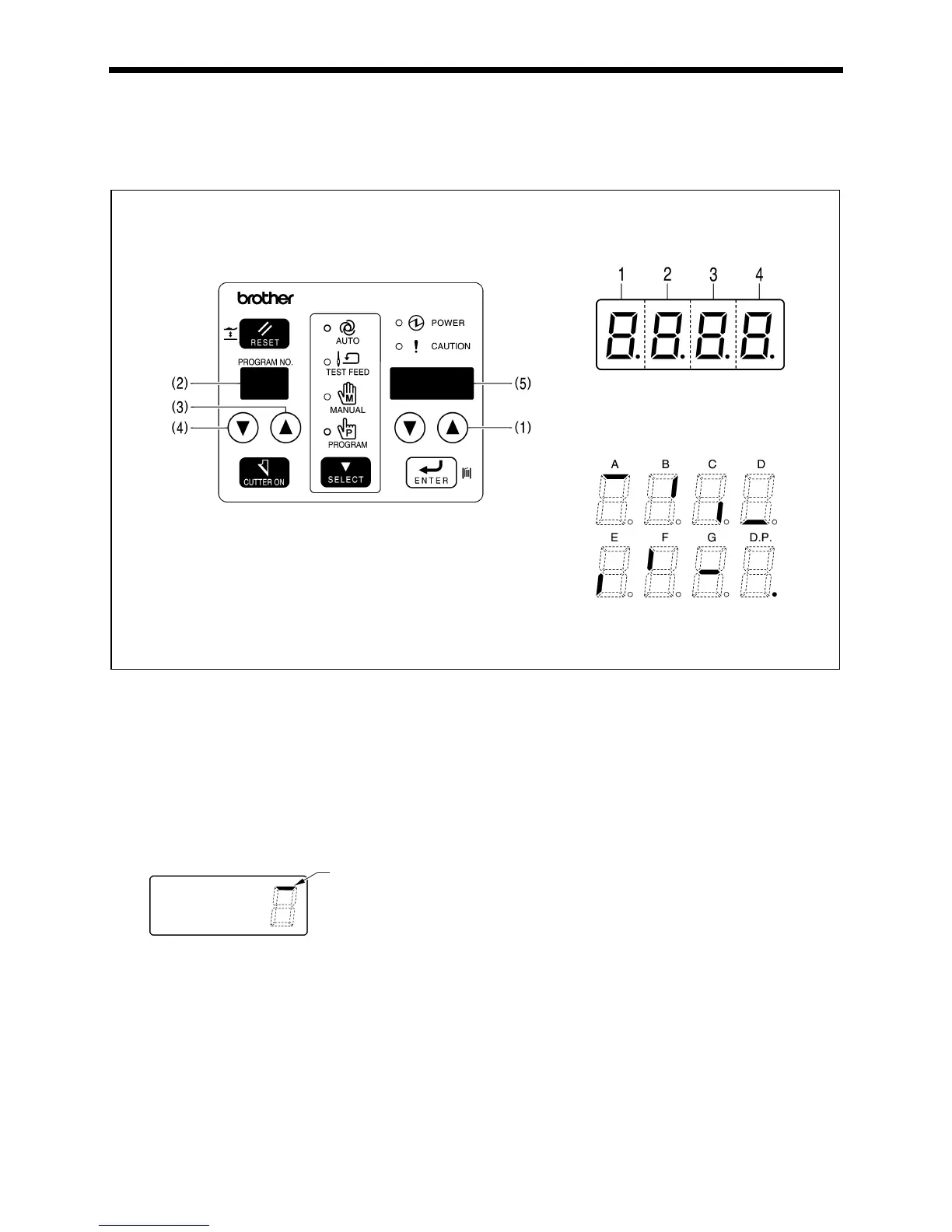
1. Turn on the power while pressing the parameter UP key (1).
* Input check mode will be activated and the check mode value will be displayed in the program No. LED (2).
2. Press the program No. keys (3) and (4) to select a desired check mode (F1 - F3).
3. When the switch or sensor is turned on, the corresponding segment on the parameter display LED (5) or
indicators on the operation panel will react.
* Turn the switch on and off to check it, and move the object by hand to check the sensor.
4. When returning to normal operation, turn power off and then on again.
<Example> When checking the cloth presser switch (Segment 4-A)
Segment
Segment meanings
Check whether a response occurs here
3559Q
4376Q
3558Q
3557Q



 To Next Page
 Loading...










