2. FUNCTION SETTINGS
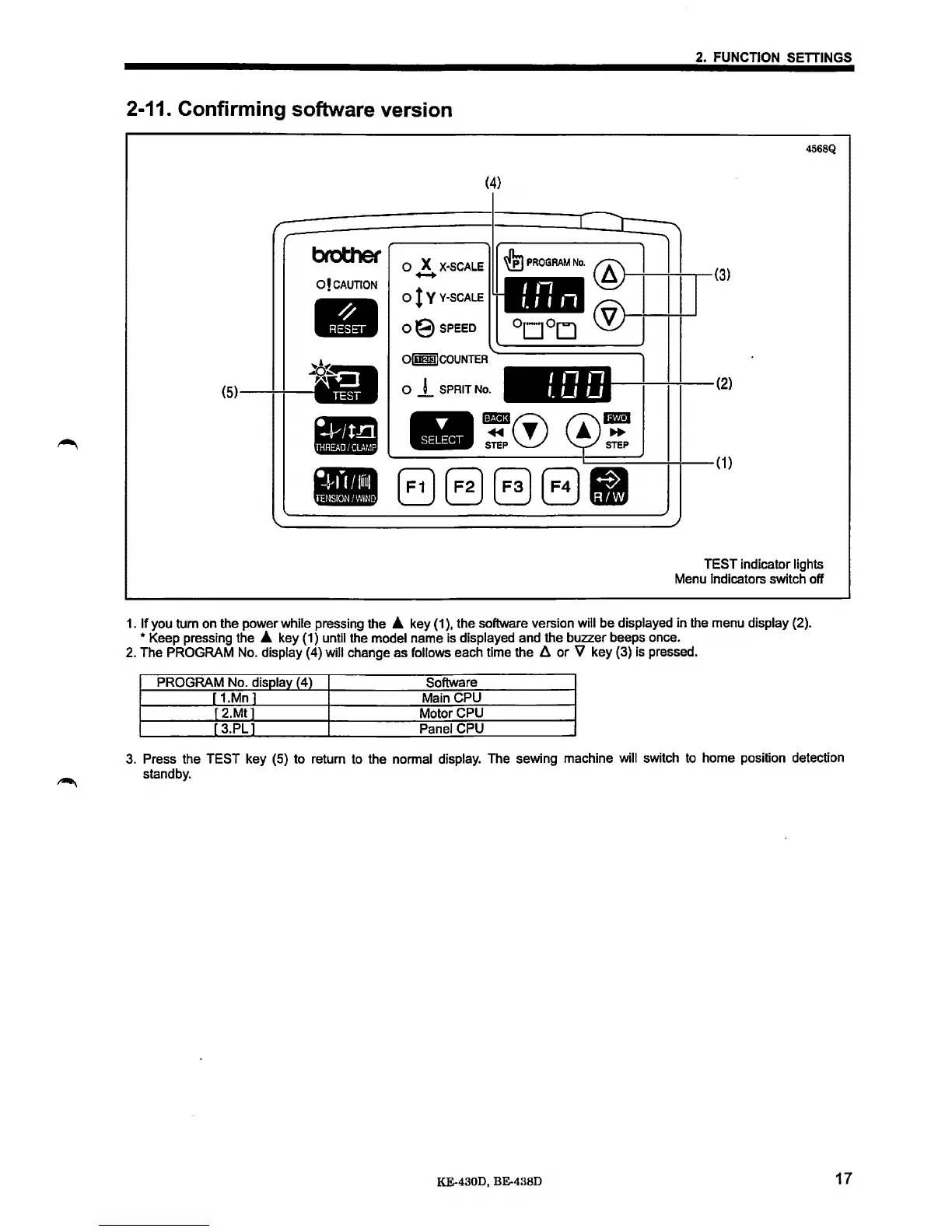
2-11. Confirming software version
(4)
brother
0 X
X·SCALE
O!CAUTION
.._
0
tV
V·SCALE
oE)SPEED
Olmm)COUNTER
(5
0
j_
SPRIT No.
-~(!)
STEP
88888
4568Q
(3)
(2)
(1)
TEST indicator lights
Menu indicators switch off
1.
If you tum on the power while pressing the • key
(1
),
the software version will be displayed in the menu display (2).
*Keep
pressing the • key {1) until the model name is displayed and the buzzer beeps once.
2.
The PROGRAM No. display (4) will change as follows each time the
li
or
V key {3) is pressed.
PROGRAM No. display (4)
Software
[
1.Mn]
Main CPU
r
2.Mtl
Motor CPU
r 3.PL 1 Panel CPU
3.
Press the TEST key (5) to return to the normal display. The sewing machine will switch to home position detection
standby.
KE-4300, BE-438D
17



 To Next Page
 Loading...





