5. USING THE OPERATION PANEL
17
KE-436C
5. USING THE OPERATION PANEL
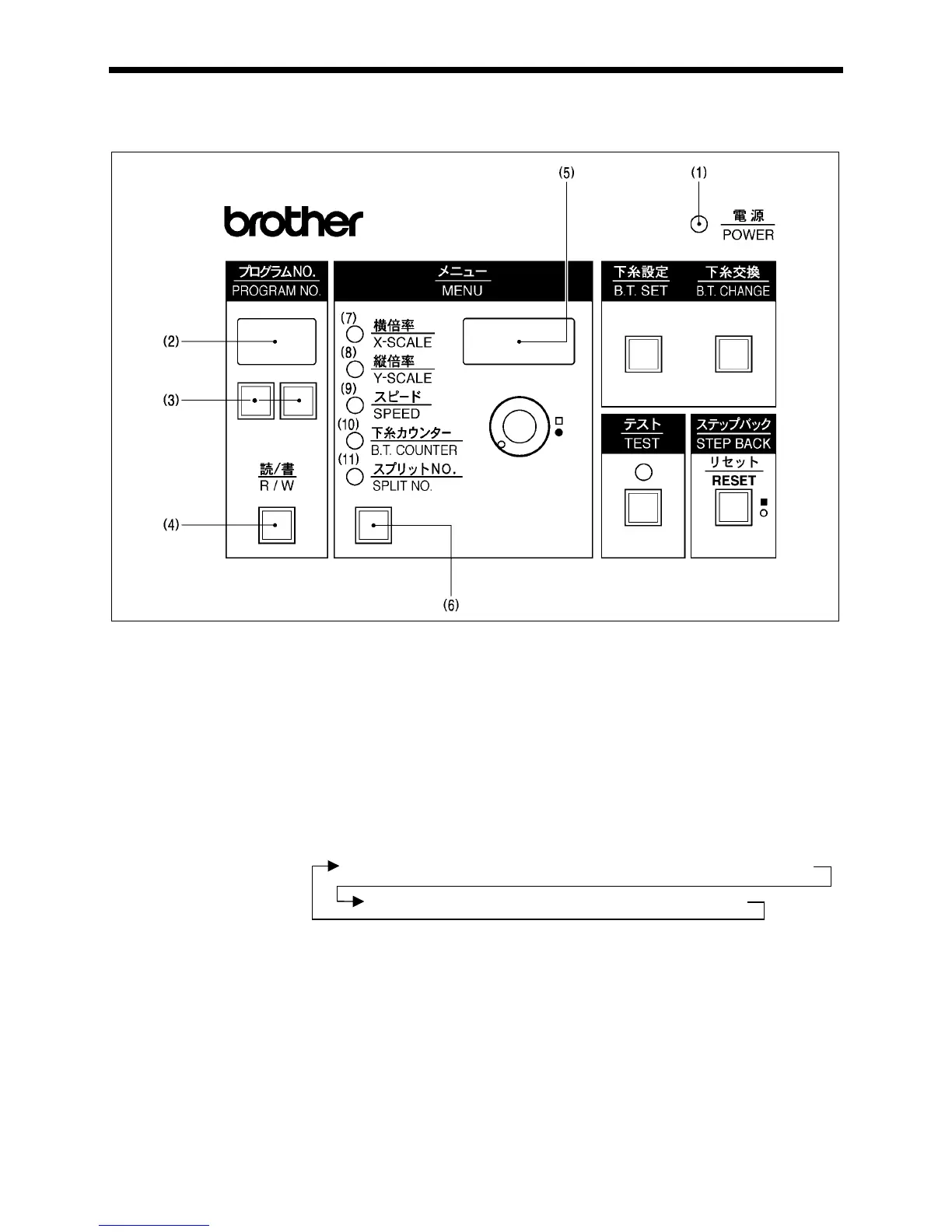
5-1. Explanation of panel
(1) POWER indicator................... When the power is turned on, the indicator lights to show that the power is on.
(2) PROGRAM No. display..........Displays the program number 00 - 99.
(3) Program select switch............Used to select the program number when reading a program from or writing a program to
disk.
(4) Program Read/Write switch ...Used to read a program from floppy disk, or to write a newly programmed stitch pattern to
floppy disk.
Up to ten patterns (00 - 99) can be stored on each disk.
(5) Display screen.......................Used to display data such as menus, errors and memory switch settings.
(6) Menu switch...........................Used to select the desired menu ( scale, speed, bobbin thread counter, split No.). One of
the indicators (7) - (11) illuminates to indicate the menu selected, and the setting for that
menu then appears on the display screen (5).
The illuminated indicator changes in the following order each time the switch is pressed.
X-SCALE indicator
(7) X-SCALE indicator.................Illuminates when X-scale mode has been selected using the menu switch (6).
(8) Y-SCALE indicator.................Illuminates when Y-scale mode has been selected using the menu switch (6).
(9) SPEED indicator....................Illuminates when speed mode has been selected using the menu switch (6).
2687Q



 To Next Page
 Loading...




